My blog categories page rebuilds itself once a day. An n8n workflow asks WordPress for my categories and newest posts, builds a card for each category with a short blurb, a live post count, a picture and links to the three newest posts, then writes the whole thing into one page. It does this for all four of my blogs, 22 categories in total, and I never open the page to update it.

The page I wasn’t making at all
I’d love to tell you I used to update a categories page by hand every week and finally got sick of it. I wasn’t doing them at all. None of my blogs had one.
I wanted one, though. As a reader, I like when a website or blog is organized so I can find things easily. I land on a post, I like it, and I want to see what else is filed next to it. So I wanted my own readers to be able to find what they’re looking for. I also just like when things are organized, and this is a way to do it.
A categories page is only useful if it’s current. Every new post changes it: the count goes up, and the newest post should be sitting at the top of its card. So the page had to keep itself up, or it wasn’t going to exist. Now every time a new post goes out, I don’t go back and link it anywhere. It’s hands off and I don’t even have to think about it.
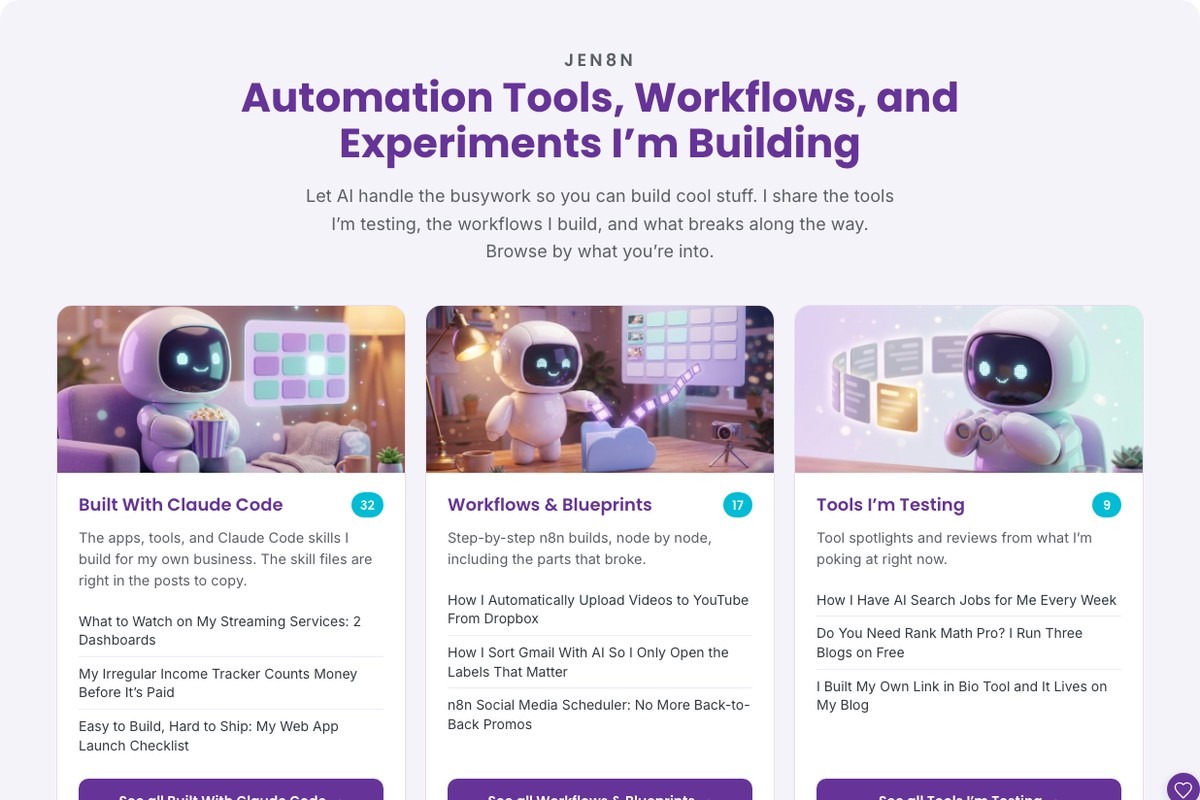
You can see the result on the Jen8n explore page. As I write this, Built With Claude Code shows 32 posts, Workflows & Blueprints 17, Tools I’m Testing 9, Ideas & Experiments 4 and Lessons & Fails 3. I didn’t type any of those numbers.
What does a self-updating blog categories page do?
It keeps one page on your blog current without you editing it. Once a day, mine does this for each blog:
- Asks WordPress for the categories I’ve picked, with each one’s link and post count.
- Asks WordPress for the newest posts in those categories, up to 100.
- Builds a card per category: name, my one-line blurb, the count, a picture from the newest post, links to the three newest posts and a “see all” button.
- Sorts the cards so the biggest category comes first.
- Writes the finished HTML into the page.
There’s no AI in the loop. It’s two questions to WordPress, one step of code and one save. A run costs nothing beyond the n8n server I already have.
Who is a self-updating blog categories page for?
It’s for you if you post often, you have more than a handful of categories, and you want a browse page with more on it than a list of names. Mine is useful because the cards show what’s new in each category at a glance.
Skip it if any of these sounds like you:
- A plain list is enough. WordPress has a Categories List block built in. It shows your categories, can show post counts, and it updates on its own. If you don’t need blurbs, pictures or newest posts, use the block and you’re done.
- You post a few times a year. A page you edit by hand twice a year isn’t a chore worth automating.
- You like editing that page by hand. Anything typed into the page gets replaced on the next run. More on that below.
- Your blog isn’t on WordPress. Mine reads and writes through the WordPress REST API. The idea carries to other platforms, the steps don’t.
The three options side by side:
| Categories List block | Page I’d build by hand | Self-updating page | |
|---|---|---|---|
| Updates when I publish | Yes | No | Yes, once a day |
| Post count per category | Yes | Only if I retype it | Yes |
| Blurb and picture per category | No | Yes | Yes |
| Newest posts per category | No | Only if I relink them | Yes, newest three |
| Setup | Add one block | Build the page | Build one workflow |
| Upkeep | None | Every new post | None |
What do you need to build a self-updating blog categories page?
- A WordPress blog. The REST API is already on. That’s what the workflow talks to.
- One empty page on that blog. Publish it once and note its ID. The workflow fills it from then on.
- A WordPress application password. WordPress makes these under your user profile. Reading categories and posts is public and needs no login. Saving the page does.
- Somewhere to run it on a schedule. Mine is n8n, self-hosted on a Hostinger VPS. Anything able to run a small script once a day works.
- A list of your categories with one line about each. This is the only writing involved, and you do it once.
How does a self-updating blog categories page work?
The whole workflow is 18 nodes: one schedule, one note to myself, and the same four steps repeated for each of my four blogs.
Get the categories. One request to /wp-json/wp/v2/categories with the IDs of the categories I want on the page. WordPress answers with each name, link and count. The count is where the number on each card comes from, so it’s always the real total.
Get the posts. One request to /wp-json/wp/v2/posts, newest first, limited to those same categories, with the featured image attached.
Build the HTML. A Code node holds a small settings block at the top: the page heading, the intro line, the colors and my list of categories with a blurb for each. Below it, the code matches posts to categories, takes the newest three per category, finds a picture, sorts the cards by count and writes the HTML. If one post sits in two categories, WordPress can hand it back twice, so the code drops repeats first.
Save the page. One request to the page’s own address, sending only the new content. The title, the URL and the published status are never touched, because they’re never sent.
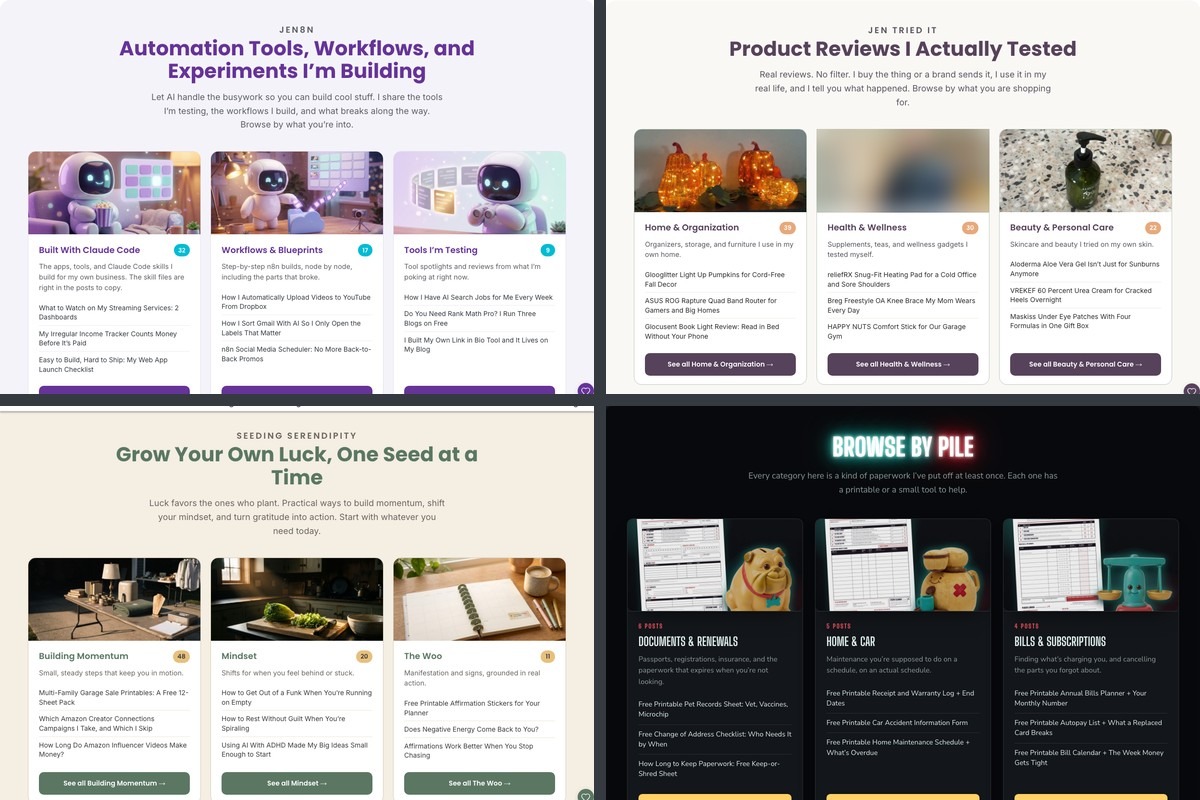
All four blogs run the same code with a different settings block. Same cards, four different looks:
Two things broke along the way, and both were silent.
The first was the pictures. I asked WordPress to attach each post’s featured image, and I also gave it a list of the fields I wanted back so the response stayed small. WordPress drops the attached image unless _links is in that list, and it doesn’t tell you. The cards used the first image inside each post instead, with no error anywhere, until _links got added.
The second was my newest blog. It sits behind Cloudflare, and Cloudflare refused the workflow’s requests with a 403. Sending a normal browser User-Agent header fixed it. The other three blogs never needed it.
I didn’t notice either one from a failed run, because neither made the run fail. When a run does fail outright, my n8n error workflow emails me, and a separate check covers schedules that never fire at all.
Get the generator
My workflow is full of my categories, my page IDs and my colors, so a copy of it would mostly be things you’d delete. The generator asks about your blog instead: its name and address, the heading for your page, your categories with a line about each, how many newest posts to show, your two colors, how often it should rebuild and where it’s going to run.
You’ll see a preview of your page take shape while you type. Then it writes you a skill for Claude Code, a prompt you can paste into any chat, or both. The fixes from the section above are already in there, so your AI builds it with _links in the field list from the start.
The skill file goes in a .claude/skills folder. The prompt gets pasted into Claude, ChatGPT or whichever chat you use, and it walks you through the build one step at a time.
What it doesn’t do
It doesn’t keep anything typed into the page. Every run replaces the page’s whole content. If I fixed a typo in the WordPress editor, it would be gone the next day. Changes go in the workflow.
The blurbs live in code. Each category’s one-liner sits in the settings block of a Code node. Rewording one means opening n8n.
Adding a category takes three edits: its ID goes into both requests, and its name and blurb go into the settings block. Miss one and the card shows up half empty or not at all.
It only looks at each blog’s 100 newest posts. The count on a card comes straight from WordPress, so it’s always right. The three links come from those 100 posts. A category with nothing new in a long while would show its count and no links. All 22 of my cards have links today.
It runs once a day, so a post I publish at noon isn’t on the page until the next run. And the next run isn’t when I thought it was. The trigger says 6am. My n8n server keeps a different clock than I do, so it lands at 11pm my time. Once a day is all this needs.
A new blog means copying the four steps by hand and giving the copy its own settings.
Frequently asked questions
What is a blog categories page?
A blog categories page is one page that lists every category on your blog so readers can browse by topic. Mine shows a card per category with a short description, the number of posts, a picture and links to the three newest posts.
Does WordPress have a categories page built in?
WordPress gives every category its own archive page automatically, and it has a Categories List block you can add to any page. The block shows category names and can show post counts. It doesn’t show descriptions, pictures or newest posts, which is why I built my own.
How often should a blog categories page update?
Once a day has been enough for me across four blogs. A new post shows up on the page by the next day. If you publish less than weekly, a weekly rebuild does the same job.
Do I need n8n to build this?
No. You need something to run a small script on a schedule, and n8n is what I already had. The generator on this page writes the build for n8n or for a setup without it.
Will an automatic update wipe out my page?
It replaces the page’s content on every run and leaves the title, URL and status alone. Anything you typed into the page body by hand is replaced, so use a page made only for this.
Does the workflow use AI?
No. It makes two requests to WordPress, runs one step of code and saves the page. There’s no AI call in the workflow and no per-run AI cost.
Try it yourself
A self-updating blog categories page is two WordPress requests, one step of code and one save, run once a day. Start with one empty page and three categories. Fill in the generator above, hand the result to your AI, run it once by hand and open the page. If the cards look right, turn on the schedule.
A book I made
Sell It or Shed It
A declutter workbook for making money from what you don’t use. One closet or drawer at a time: dump what’s in it, mark each thing sell or shed, list five, and set a thirty-day check date.
Clear your first zone →I run an affiliate program on the tools I build. Approved affiliates earn 20% on what their referrals pay, for up to a year. US only for now. See the program →
Related reading
- How I Add Internal Links to Every Blog Post With Claude Code
- How I Update Old Blog Posts Without Remembering To
- n8n Schedule Trigger Not Working? Mine Never Ran for 7 Weeks
- How I Stopped Rebuilding Things I’d Already Built
Subscribe if you haven’t already, and go make one page on your blog you never have to touch again.