A reading tracker is a small database of books plus a page that reads it back to you. Mine lives in Airtable across six tables, n8n counts my reading challenges every time I finish something, and a single-file dashboard on a Cloudflare Worker turns it all into stats, streaks and a map of where the stories are set. I built it for fun. I still type a lot of it in myself.

This post contains affiliate links. If you sign up through one, I earn a commission at no extra cost to you. I only point to tools I actually use or would recommend.
I have kept a spreadsheet for every hobby I’ve ever had
Reselling, print on demand, sweepstakes, workouts, books. If I do it more than twice, there’s a sheet. I love spreadsheets and databases more than is reasonable, so having Claude Code turn one into an actual dashboard was icing on the cake for me.
The books one exists for a dumber reason than you’d think. I read a lot, and I forget what I read. Not the plot, the whole book. Someone will bring up a title and I’ll have zero recall until three sentences in, when it comes back all at once.
So there’s a card on my dashboard called On This Day. It only shows up when I finished a book on today’s date in some earlier year, and when it does it hands me the cover and the rating and the date. I open the page most days, and that card is a fun reminder. It makes me think about that book and remember it. The entire purpose of this tracker is looking at fun data, and I’m not going to pretend it’s a productivity system.
What does a reading tracker do?
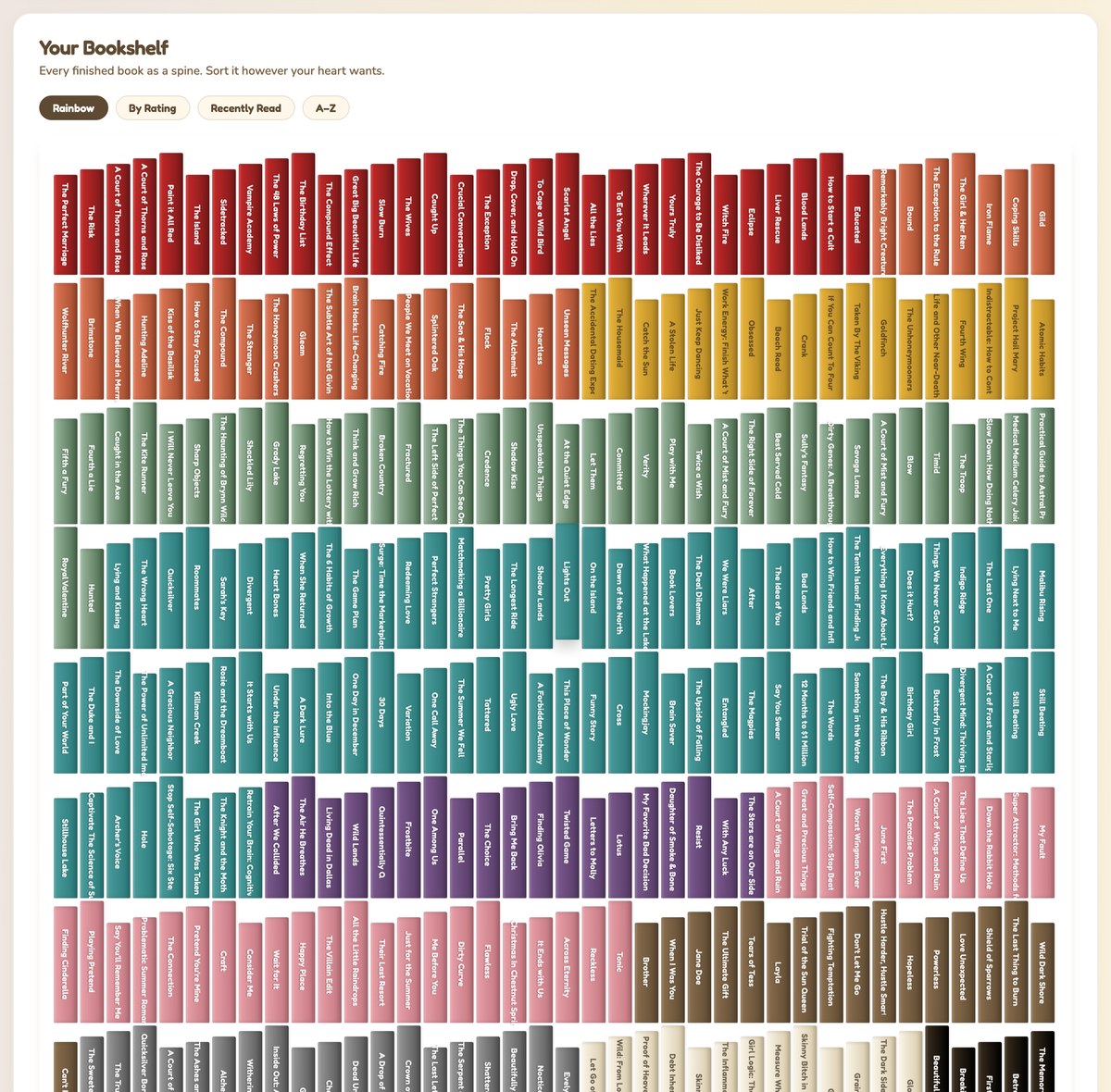
A reading tracker stores what you read and answers questions about it later. Mine holds books, authors, series, challenges, reading sessions and a daily log, and the dashboard turns those into about two dozen cards.
The ones I look at:
- Currently reading and coming up next, so I know where I am
- Books by month and a reading streak built from session dates
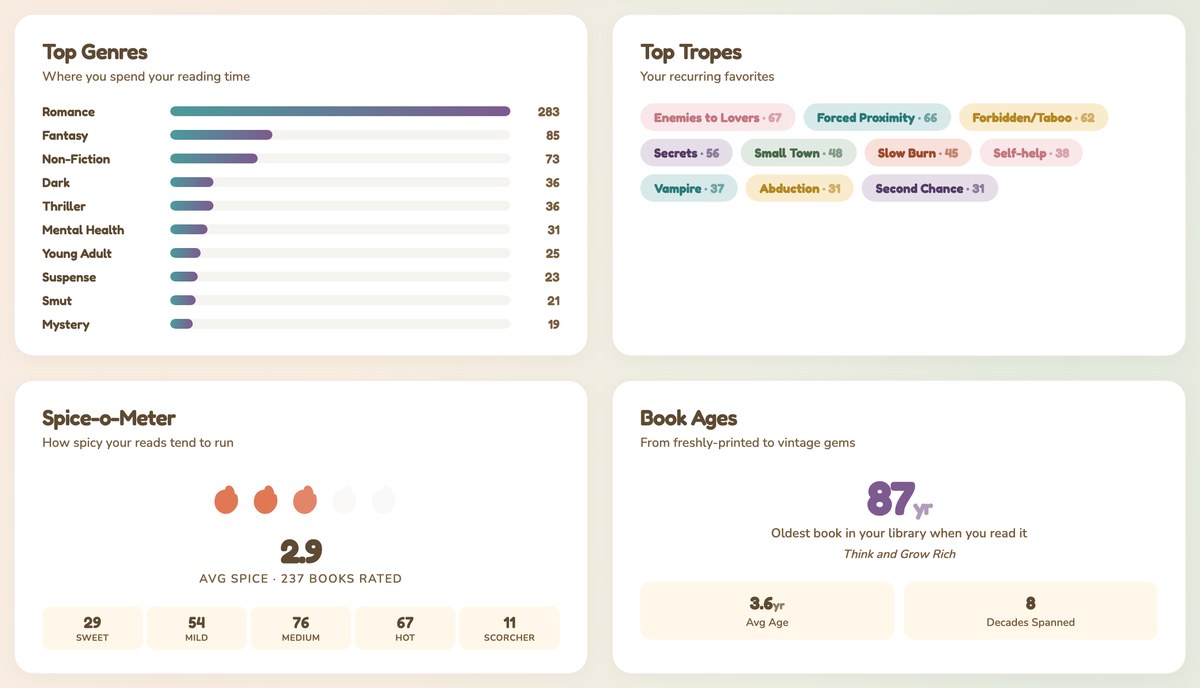
- Top genres, top tropes, and a spice meter, because I read romance and those are the things I sort by
- Series progress, which tells me I’m three books into something I forgot I started
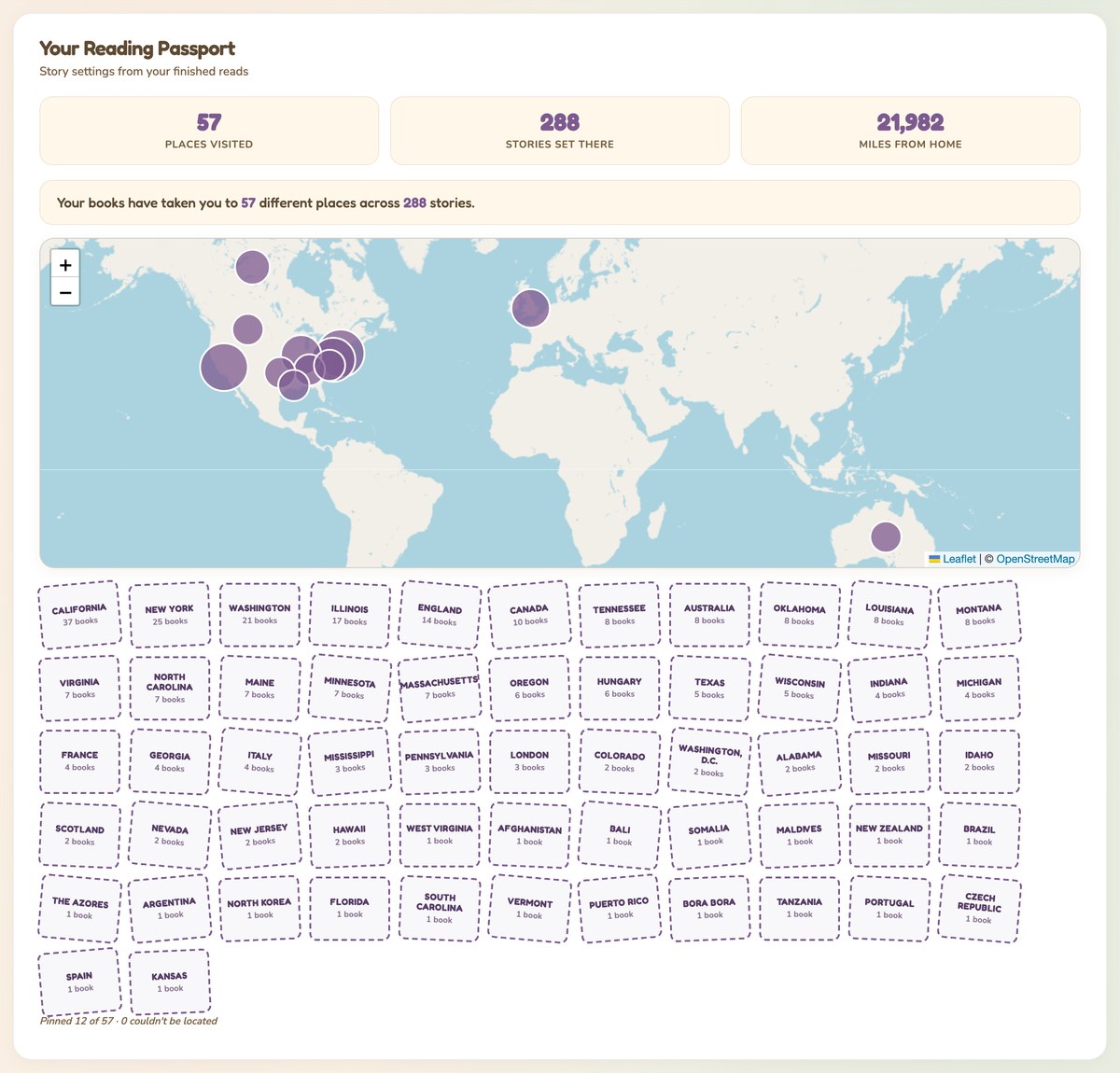
- A story locations map, geocoded and cached, which says my books have taken me to 57 places across 288 stories, and 21,982 miles from my house
- Challenges, like read a book with a blue cover or read twelve books set in twelve different places
- On This Day, the card that helps my brain
- A reading dragon named Pat, who levels up on reading XP
The dragon is the gamified layer. XP is pages plus audio hours times forty, and there are six stages from Egg to Elder Wyrm. Tap him and he talks trash. None of that changed how much I read, and I’m not going to claim it did, but it’s fun and I built it for me.
A list of cards only gets you so far, so I walked through the whole thing on video:
Who is a reading tracker for?
Build one if you already keep notes about a hobby somewhere and you’d enjoy seeing them arranged. That’s the real test. The people who get value here are the ones who like the data as much as the activity.
Build it if:
- You’ve already got a spreadsheet, a notes file or a shelf photo you keep meaning to organize
- You want to sort by things no app offers, like tropes, spice level, cover color or where the story is set
- You like opening a page and seeing your own numbers
- You’re fine doing the data entry yourself
Skip it if:
- You want your reading logged automatically. Nothing here detects what you’re reading. You type it in.
- You want a social feed, a friends list or a public profile. Mine is password gated and single user.
- You want your Goodreads or StoryGraph history imported. There’s no sync. My back catalog got in there by hand.
- Tracking a hobby makes it feel like homework. Some people get that, and this build makes it worse, not better.
What do you need to build a reading tracker?
Four pieces, and two of them have free tiers you’ll stay inside for a long time.
| Piece | What it’s for | Cost |
|---|---|---|
| Airtable | The database. Six tables: Books, Authors, Series, Challenges, Sessions, Daily. | Free tier works for a personal shelf |
| Cloudflare Workers | Serves the dashboard page and hides the API key behind it | Free tier |
| n8n | Counts the challenges and rolls them over each year | Free if you self host |
| A place to run n8n | I use a small VPS from Hostinger | Paid, monthly |
| Claude Code | How the base, the workflows and the dashboard got built | Paid |
The dashboard is one HTML file. Every Airtable call goes through my own Worker at /api/airtable, so the key never reaches the browser, which matters the second you put anything on the open internet.
If you want the n8n part but you’re not sure where to run it, I wrote up the self hosting decision already. You can also build the whole tracker without n8n and count your challenges by hand. It works, it’s just the part I got tired of.
Books get read in a lot of formats, and mine come from Kindle, Kindle Unlimited, audio and paperback. The Format field is what makes the audio math work later, so pick your options before you start entering books.
How does a reading tracker work?
The book goes in by hand, and everything downstream counts itself. This table is the real split, because “it runs itself” is a claim I see on builds like this and it isn’t true of mine.
| I do this | The system does this |
|---|---|
| Add the book: title, author, pages, genre, tropes, cover color, upload image | Work out which challenges it qualifies for and link it |
| Mark it Finished | Recalculate every challenge’s progress and completion percent |
| Log reading sessions | Build the streak, the calendar and the monthly counts |
| Rate it and write the review | Rank the year, pick the author of the year, build the 5-star DNA |
| Nothing, on January 1 | Clone every recurring challenge into the new year |
Three n8n workflows do the right-hand column. One links finished books to challenges, one creates the monthly goal on the first of the month, and one handles the New Year rollover.
The first version of the linker ran on an hourly schedule, which meant it woke up twenty four times a day to find nothing new and blew through my Airtable API limits doing it. I turned the schedule off and put an automation on the Books table instead: when a book’s status flips to Finished, Airtable calls the n8n webhook right then. Same result, near instant, and it runs when something actually happened instead of on a timer.
Two details worth stealing:
1. Pin the timezone in two places. Both create-workflows are set to America/Chicago and their code works out the year and month with Intl.DateTimeFormat, not getUTC anything. Otherwise “which month is this” goes wrong for a few hours every night and your monthly goal lands in the wrong bucket. 2. Wrap every card render in a try. The dashboard calls each card inside a safe() helper, so one card throwing an error shows a small message in its own box and the rest still load. Before I did that, one bad date in one record blanked the whole page.
Variety challenges needed one more trick. “Read twelve books in twelve different places” isn’t a count of books, it’s a count of distinct locations, so that one reads an Airtable rollup of unique values instead of counting links. It’s the difference between “12 of 12 places visited” and a number that says twenty when you’ve been to four.
Get the generator
The tracker in this post is shaped around romance novels and my brain. Yours shouldn’t be. So instead of handing you my files, here’s a generator: answer a few questions about what you’d track, and it writes you the whole thing.
It gives you two outputs from one set of answers:
The tracker spec. Your tables, your fields, your dashboard cards, and the mascot you picked. Take it to Claude Code and it builds the base and the page.
The auto-logging layer. The Airtable automation, the webhook and the matching rules, so the counting part keeps itself current the way mine does.
Pick your output format at the end. SKILL.md if you use Claude Code and want this as a skill you can call later, and if you’ve never installed one, here’s what a Claude Code skill actually is. Or a paste-in prompt if you’re working in Claude.ai or ChatGPT, which needs no install at all.
The one thing to change after it generates: the field options. It’ll guess at your genres or categories, and getting those right before you enter fifty records saves you a cleanup pass later.
What it doesn’t do
Adding a book is still a chore, and it’s the thing I’d fix first. Every new row wants title, author, page count, publication date, genre, up to three tropes, format, cover color and the series link. When I backfilled the metadata on my existing library, it ran to about 195 books and took several days of batch work. The counting is automatic. The typing is not.
The rest of the list:
- No sync with anything. Not Goodreads, not StoryGraph, not Amazon. Whatever’s in there, I put there.
- It’s read only. I’m looking at the dashboard, and to mark a book finished I have to leave and open Airtable. The one place I want a button is the one place there isn’t one. (This can be changed, I just haven’t)
- Nobody else can see it. Single user behind a password. There’s no share link, and building one means real auth work.
- It won’t recommend a book it doesn’t already know. The 5-star DNA and the spinner pull from my own to-be-read list. It never goes shopping.
- Challenge matching is text. The qualifying values are a comma separated field, and a blank one means “any value counts.” Get a value slightly wrong and a book silently doesn’t count toward the challenge.
Frequently asked questions
What is a reading tracker?
A reading tracker is a personal database of what you’ve read plus a view that answers questions about it. At minimum it’s books, dates and ratings. Mine adds authors, series, challenges, reading sessions and a daily log, which is what makes stats like top tropes or author of the year possible.
Do I need n8n to build a reading tracker?
No. Airtable plus a dashboard page is a complete tracker on its own. n8n handles the counting I got bored of doing, mainly linking finished books to challenges and rolling those challenges into the new year. Start without it and add it when a manual step annoys you.
How long does it take to build one?
The first working version took an evening with Claude Code, and I’ve added to it in bursts since. The dashboard is one HTML file, so changes are quick. Entering your back catalog takes longer than building the thing, which is the part gave me a few hives.
Can Airtable handle a whole library?
For a personal shelf, yes. My base holds six tables and hundreds of books with full metadata, but I am on a paid plan. If you’re tracking thousands of records with attachments on each one, check the current limits before you commit.
Does tracking your reading make you read more?
Not really. I was already reading a ton and recording it on Goodreads. I may shift what I read to complete one of my challenges, but I’m never rushing through a book just to hit a goal.
Try it yourself
Build the smallest version first: one table of books with a title, a finished date and a rating, and one page that counts them. That’s a working reading tracker in an evening, and everything in this post is something I bolted on later, one card at a time, in the order ideas popped into my head.
Then pick the one stat you’d want to see and add only the field it needs. Mine was tropes. Yours might be cover color, or narrator, or which of your friends recommended it.
A tool I built
Emergency Fund Aquarium
Log what you save at your own bank and watch your tank fill with creatures. Your money never moves through the app.
Start your tank →I run an affiliate program on the tools I build. Approved affiliates earn 20% on what their referrals pay, for up to a year. US only for now. See the program →
Related reading
- What is a Claude Code skill?
- Should you self host n8n?
- The tool that reads my screenshots and files them
Subscribe if you haven’t already. I’m working through the pile of private tools I’ve built for myself, and the next one is a dashboard I didn’t expect to still be opening months later.