

A free webhook tester gives you a public URL, catches whatever gets sent to it, and shows you the full request. Paste the URL wherever a service asks for a webhook destination, trigger it, and read the method, headers, query string, and body. No signup here, hits stay for 48 hours, and it exists so you can see what a service is sending before you start changing nodes in n8n.
You set up an n8n webhook trigger. Something somewhere is supposed to POST to it. You hit “test workflow” in n8n. Nothing happens. Or worse, the workflow fires but the data looks nothing like what you expected.
This is the moment you need to see what’s coming through, byte for byte.
The free Webhook Tester gives you a unique URL, catches every request hitting it, and shows you the full payload in real time. No signup, no email gate, no $9 a month tier hiding the feature you need. You open the page, copy the URL, and you’re done.
How webhook testing usually goes (and where it gets stuck)
You have a few options for inspecting webhook traffic. None of them are great for a quick one-off check:
| Option | Pros | Cons |
|---|---|---|
| webhook.site | Free tier, popular | Free tier caps around 100-200 requests, paywalls the good stuff |
| ngrok | Tunnels your local app to the internet | Requires install, setup, and a running local server |
| RequestBin | Simple and fast | Limited free tier, mostly paid now |
| Browser dev tools | Free, no setup | Only shows requests YOUR browser made, not webhooks from external services |
| jen8n.com/webhook-tester/ | Free, no signup, 48-hour retention, 1000 hits per IP per hour | New, focused on debugging only (no permanent storage) |
For most n8n debugging, the bottleneck isn’t tooling sophistication. It’s getting one fast look at one specific request without filling out a form first.
Three steps to test a webhook
- Open jen8n.com/webhook-tester/. A unique URL generates instantly.
- Copy the URL with the copy button at the top of the page.
- Paste it anywhere you need a webhook destination, your service’s webhook config, an n8n HTTP Request node aimed at it for testing, a curl command, Postman, anything.
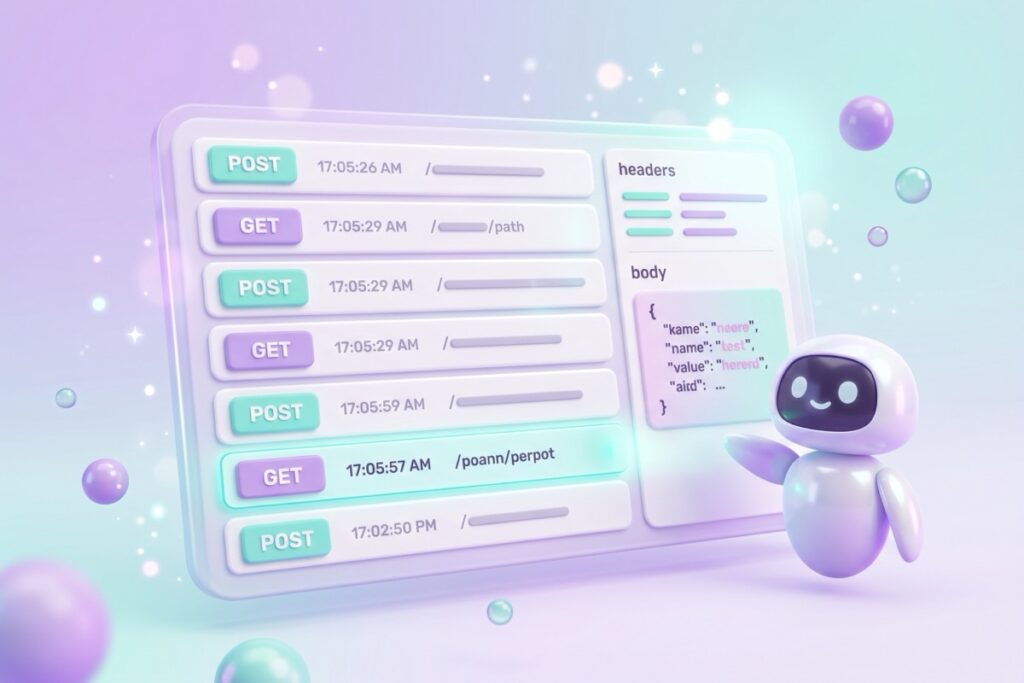
The page shows every request hitting your URL in real time. Method (GET, POST, PUT, and the rest), headers, query string, request body. All of it.
Why your n8n webhook still isn’t firing
Nine times out of ten it’s the wrong URL. The n8n Webhook node gives you two, and they behave differently.
| URL | When it listens | Use it for |
|---|---|---|
| Test URL | Registered while you have Listen for Test Event running, or when you execute the workflow by hand, and only if the workflow is not active | Building. Incoming data shows up right in the editor |
| Production URL | Registered when the workflow is active (newer n8n calls this published) | The real integration. Data lands in the Executions tab, not the editor |
So the classic failure is pointing a live service at the Test URL, walking away, and wondering why nothing landed. The other version is activating the workflow but still sending to the test path. There is a third one worth knowing: a production webhook fires correctly and you still see nothing in the editor, because production runs only show up under Executions. Copy the URL out of the node each time instead of from memory, and check which one you grabbed.
If you are not sure which URL your sender hit, aim it at the Webhook Tester first. The tester shows you the full request, so you can confirm the service is sending anything at all before you go hunting inside n8n.
What do you see when a request lands?
Every webhook hit captures:
- Method (GET, POST, PUT, DELETE, PATCH)
- Full headers (including auth tokens, content-type, user-agent)
- Query string parameters parsed out
- Request body in its raw form
- Timestamp down to the second
- Source IP (so you can spot if your test traffic is mixing with real traffic)
Hits stick around for 48 hours, then get deleted automatically. The point is to debug, not archive.
Once you can see the payload, the next question is how to reach each field inside n8n. Paste it into the explorer below and it writes the expression for you.
Why does this webhook tester exist?
I was building an n8n workflow with a Stripe webhook and needed to see what Stripe was sending in real time so I’d know how to write the filter logic. webhook.site worked great until I hit its free-tier cap two hours in. The next tier was $9 a month for what is fundamentally a request logger.
This tool is the version with no pricing page. It runs on Cloudflare Workers with a D1 database, costs me about $0.30 a month, and there’s no business model for charging you to see your own HTTP requests.
Common n8n use cases
The tester pairs with a few common n8n problems:
- Verifying webhook trigger payloads. Point your incoming service (Stripe, Calendly, Tally, Airtable) at the tester URL first to see the JSON structure, then point it at your n8n webhook once you know what to expect.
- Building HTTP Request nodes. Use the tester as a fake destination while you tune the HTTP Request node’s body and headers.
- Debugging “the workflow ran but the data is wrong.” Re-send to the tester URL with your real service, then compare it to what n8n received in execution history.
- Testing custom integrations. When a partner tool says “we’ll POST to your webhook URL” but the docs are vague, point them at the tester to see exactly what comes through.

Frequently asked questions
How do I test a webhook?
Get a public URL set up to catch requests, point your sender (the service or n8n node) at it, send a request, and inspect what came through. The Webhook Tester at jen8n.com/webhook-tester/ does this in three clicks: open the page, copy the URL, paste it where you need.
Is this webhook tester free?
Yes. No signup, no email gate, no tier. The rate limit is 1000 hits per IP per hour, plenty for debugging. There’s no paid version because there’s nothing to charge for.
How long are webhook hits stored?
48 hours. After the window, hits are deleted automatically by a scheduled cleanup job. This is a testing tool, not a permanent log store.
Can I test n8n webhooks with this?
Yes, and it’s the main use case. Use the Webhook Tester URL as a fake destination while building your workflow, then swap it for your real n8n webhook URL once you know the request format you’re working with.
How is this different from webhook.site?
Three differences: no rate-limit cap on the free version (just per-IP throttling), no signup, and the focus is on real-time debugging rather than long-term storage. If you need permanent webhook logs, webhook.site is the better fit. If you need to see one request right now, this is faster.
Is it safe to send real data to a webhook tester?
Treat any webhook tester as semi-public. The unique URL is hard to guess, but it’s not encrypted at rest and the tester captures everything sent to it. Don’t send real customer data, real auth tokens, or anything you wouldn’t want a stranger to see. For sensitive-data debugging, use a self-hosted tool or your own server.
Try it on your next stuck webhook
Next time an n8n webhook isn’t behaving, open the Webhook Tester, grab a URL, and aim your sender at it. Two minutes of inspection beats an hour of guessing what’s wrong.
The decision rule is simple: if a webhook isn’t doing what you think it should, see what it’s sending before you change any nodes. The tester makes step one take 30 seconds instead of half an afternoon.
If you’re also building workflows and not sure whether they’re worth the build time, the Automation ROI Calculator is the companion tool for catching skip-it workflows early.
New to the terms flying around a webhook payload? The n8n Vocabulary Guide breaks down headers, query strings, and the rest in plain English.
And if the workflow you’re debugging runs on a schedule instead of a webhook, the visual Cron Builder writes the cron expression for you.
Subscribe if you haven’t yet, and in the meantime, go test the one webhook on your list right now.
A tool I built
Subscription Graveyard
Bury the subscriptions you’ve cancelled, give each one a tombstone, and watch what you’re saving pile up.
Bury your first one →I run an affiliate program on the tools I build. Approved affiliates earn 20% on what their referrals pay, for up to a year. US only for now. See the program →