A reselling profit dashboard reads your sales data and shows what you actually cleared, after the platform fee, the shipping, the ad spend and what the item cost you in the first place. Mine sits on two Airtable tables and one HTML page, it counts a refunded sale correctly, and it tells me which sources and platforms are pulling their weight.

I built the nicest dashboard for the hustle I care least about
Reselling is the dying arm of my operation. It doesn’t light me up, and I go months barely touching it, then get pulled back in for a spurt of listing and shipping. That’s the context for everything below.
I built it anyway, for the same reason I built the book one: I like data, and I already had the Airtable base sitting there. Building a page on top of a base I already keep is my idea of a good time.
The spurts turned out to matter for the design. A dashboard you open every day can assume you remember things. Mine has to make sense when I come back after ten weeks away and can’t remember what I paid for a jacket or which platform I listed it on.
What does a reselling profit dashboard do?
It answers questions your marketplace can’t, because your marketplace only knows about itself. Two Airtable tables feed it, Items and Expenses, and the page turns 169 items and 66 sales into about seventeen cards.
The ones I look at:
- This month’s goal, with the tools I pay for already deducted
- Pipeline and ready to list, so I know what’s sitting in a bin unlisted
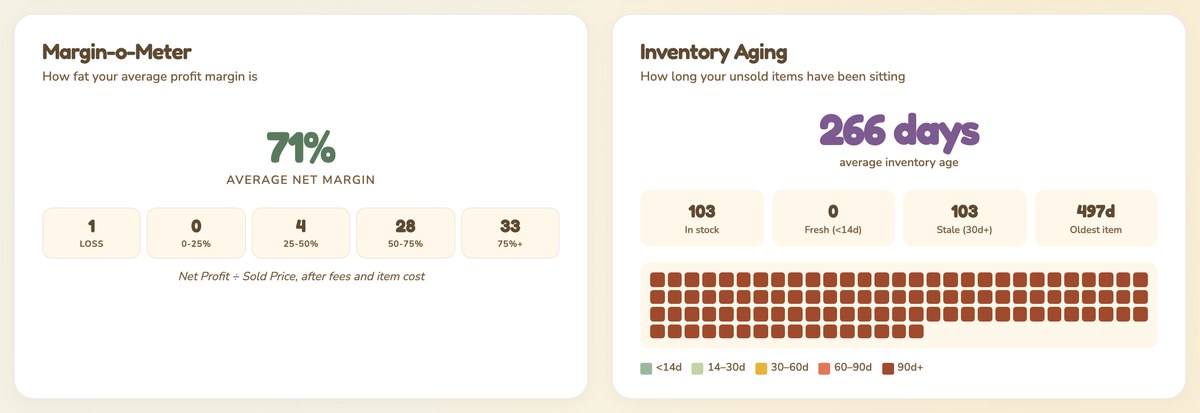
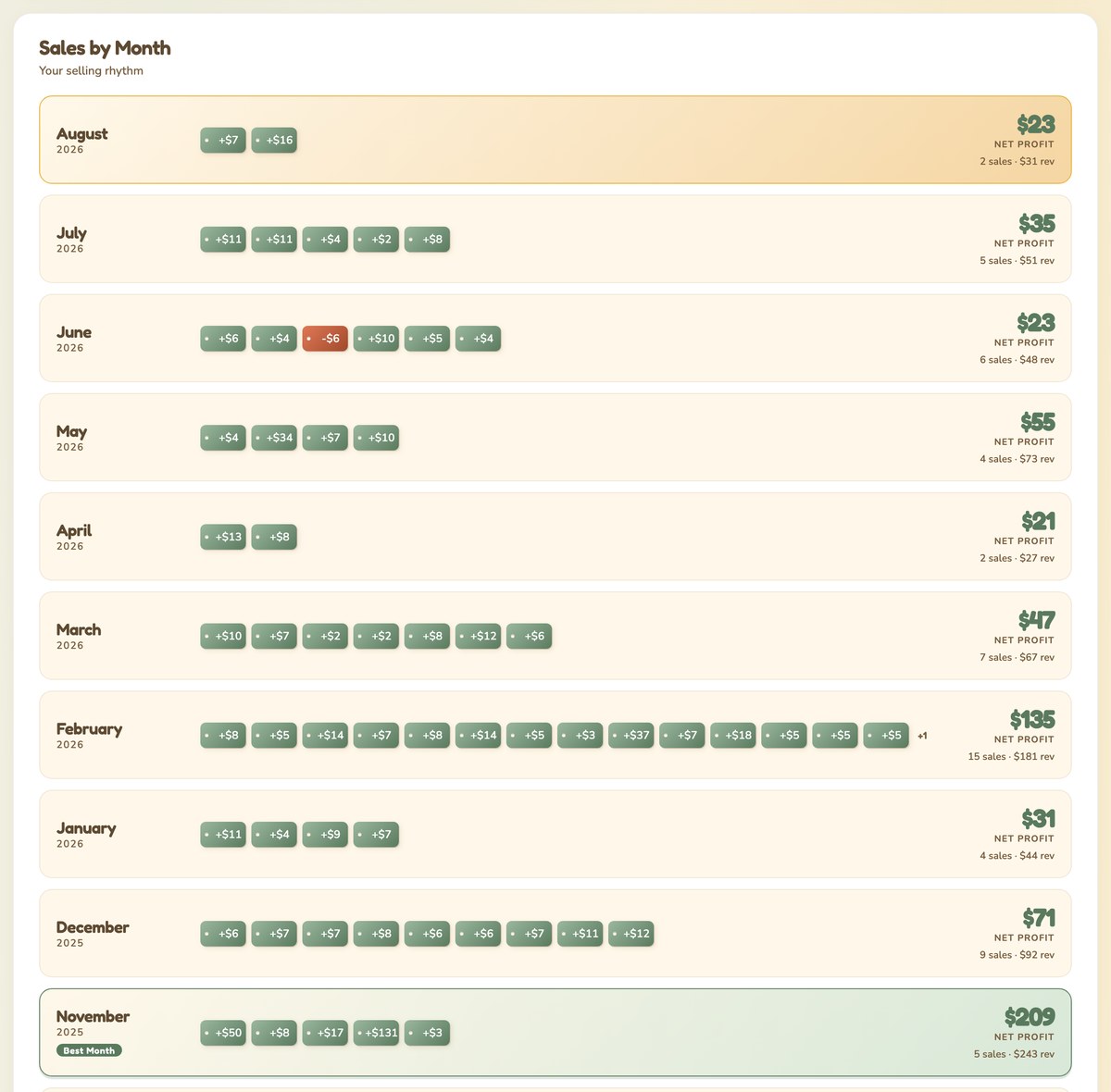
- Sales by month and a sales calendar, which is where the spurts show up as clumps. February had 15 sales, August has 2
- Profit by source, meaning what I made from estate sales versus thrift versus my own closet
- Platform profitability, side by side
- Condition breakdown and a margin meter, currently 71 percent average net margin across everything sold
- Inventory aging, a heatmap of how long things have been sitting. Mine says 266 days on average and 497 for the oldest, which is exactly as bad as it sounds
- Recently sold, hall of fame, and the full inventory table with search and CSV export
A raccoon in a thrifting outfit runs the place, with a vintage suitcase for company. There are no photos of items anywhere in it, and there never will be, so the cards use price tags and luggage tags instead of pictures.
Who is a reselling profit dashboard for?
Build one if you sell across more than one platform and you’ve never seen the numbers added up in one place. That’s the gap. Poshmark knows what Poshmark did. It has no idea what you paid at the estate sale, and no opinion about eBay.
Build it if:
- You buy inventory, so your real profit depends on cost of goods that no marketplace tracks
- You run in spurts and need a page that makes sense after months away
- You want to know which sourcing spots are worth the drive
- You already keep your sales in a spreadsheet or a base and just want to see it
Skip it if:
- You want your sales pulled in automatically. Nothing here syncs with Poshmark, eBay or Mercari, and you enter the sale yourself.
- You want to run your business from the page. It’s read-only. Every edit happens in Airtable.
- You want tax software. It shows true profit and expenses, and it files nothing.
- You sell occasionally and don’t buy inventory. Your profit is the sale price, and a dashboard is overkill.
What do you need to build a reselling profit dashboard?
Three pieces, and the data you’re probably already keeping somewhere.
| Piece | What it’s for | Cost |
|---|---|---|
| Airtable | Two tables: Items and Expenses. Items holds the sale, the costs and the platform. Expenses holds subscriptions and supplies. | Paid, I’m on a paid plan |
| Cloudflare Workers | Serves the page and holds the API key, so nothing sensitive sits in the browser | Free tier covers it |
| Claude Code | How the base and the page got built | Paid |
The fields that matter on the Items table are the ones your marketplace never asks about: what you paid for the item, what you spent promoting it, which platform sold it, and where you sourced it. Everything interesting on the page comes from those four.
The dashboard is a single HTML file. It calls my own Worker route rather than Airtable directly, so the key never reaches the browser, which is the part to copy no matter what you build.
How does a reselling profit dashboard work?
The page reads both tables on load and works the numbers out from the raw fields, so a card is never one stale formula away from being wrong.
Profit means everything is deducted. Not revenue, not revenue minus the platform’s cut. Every sale is:
true profit = total paid - refund - (platform deductions - fees refunded)
              - what the item cost me - ad spend
The costs a marketplace never sees are the two that matter most in reselling: what you paid for the thing, and what you spent promoting it. A jacket bought for $12 and sold for $30 is not a $30 sale, and if your profit column doesn’t know about the $12, it will tell you a lovely number that isn’t your money. Mine also subtracts refunds and adds back the fees a platform hands you on a return, because eBay tends to refund the final value fee and the others often don’t.
Expenses needed their own rule. The first version summed every row of a recurring charge, so a monthly subscription got counted once per row instead of once per month. Now monthly charges count once for the month they land in, and a yearly charge is spread across twelve.
The goal moves. There’s a floor of $300, but the actual target is whichever is higher, that floor or my prior three-month average rounded up to the nearest $25, with the monthly cost of my tools already taken out. A goal you set once and never revisit stops meaning anything by March.
| Question | Where the answer comes from |
|---|---|
| What did I actually clear on that sale? | Total paid, minus fees, refunds, item cost and ads |
| Which sourcing spot is worth the drive? | Profit by source, grouped from the source field |
| Which platform pays best? | Platform profitability, same math per platform |
| What’s rotting in a bin? | Inventory aging, days since listed |
| Am I ahead this month? | Goal card, floor or three-month average, tools deducted |
Get the generator
My fields are shaped around thrift and resale. If you sell prints, or cakes, or crochet, the shape is the same and the payouts are not. So instead of my file, here’s a generator: tell it what you sell and what comes out of each sale, and it writes you the build plan.
It asks what one sale looks like, what gets deducted from it, and where your inventory comes from, then writes the base and the dashboard spec with the true-profit math already in it, so your profit column subtracts everything from day one instead of after you notice.
Pick your format at the end. A SKILL.md if you use Claude Code, and if you’ve never installed one, here’s what a Claude Code skill is. Or a paste-in prompt for Claude.ai or ChatGPT, which needs no install.
The thing to change before you build: your own deduction list. Every platform takes its cut differently, and the whole point is that yours are all in there.
What it doesn’t do
Entering a sale is still tedious, and it’s the part I’d fix first. Every sale means typing the item cost, the fees, the shipping, the ad spend and the platform by hand, and if I skip a field the profit math goes wrong without telling me. A dashboard built on hand entry is only as good as the last row you typed.
The rest of the list:
- No marketplace sync. Poshmark, eBay and Mercari know nothing about this page, and it knows nothing about them until I type it in.
- Read-only. I look at the dashboard and edit in Airtable. There’s no button on the page that writes.
- No item photos. There are none in the base by design, so the cards use tags rather than pictures.
- Not tax software. True profit and an expenses card, but nothing filed and no mileage.
Frequently asked questions
What is a reselling profit dashboard?
A reselling profit dashboard is one page that reads your sales data and shows what you cleared after every cost, including what you paid for the inventory. Marketplaces show you revenue minus their own fees, which is a different and friendlier number.
What counts as profit on a resale?
What landed in your account, minus the platform’s cut, minus shipping, minus what you paid for the item, minus any ad spend, and minus a refund if the sale came back. Check what your own profit column subtracts before you trust it, because plenty of them stop at the platform fee.
Do I need to know how to code?
You need to be able to describe what you want. I built this with Claude Code, and the generator in this post writes the spec for you. The one thing worth understanding is your own numbers, because no tool can guess which costs apply to you.
How many sales before it’s useful?
Give it a few months of data. Profit by source and platform profitability need enough sales to stop swinging on one lucky item, and the aging heatmap needs listings old enough to be embarrassing.
Can it track expenses as well as sales?
Yes, on a second table. Mine holds subscriptions and supplies, counts monthly charges once per month, and spreads yearly ones across twelve, then deducts that from the monthly goal so the target reflects what the tools cost.
Try it yourself
Start with one table and one number. Log ten sales with what you paid, what you got, and what the platform took, then put a page in front of it that shows the total. That total is usually the surprise, and everything else in this post is a card I added later because I wanted to know one more thing.
Then add the field for the question that nags you most. Mine was where I sourced it, because I wanted to know whether the drive paid for itself.
A book I made
Haul to Sold
A take-along sourcing log for resellers. Write down what you paid at the garage sale or thrift store, then fill in what it sold for, the fees and the profit later.
Log your next haul →A book I made
Sell It or Shed It
A declutter workbook for making money from what you don’t use. One closet or drawer at a time: dump what’s in it, mark each thing sell or shed, list five, and set a thirty-day check date.
Clear your first zone →I run an affiliate program on the tools I build. Approved affiliates earn 20% on what their referrals pay, for up to a year. US only for now. See the program →
Related reading
- What is a Claude Code skill?
- Build your own reading tracker with Airtable and n8n
- How to start reselling your closet
Subscribe if you haven’t already. I’m working through the private tools I built for myself, and the next one counts money coming in rather than going out.