I built a Chrome extension to replace Toby, the paid tab organizer. It takes over the new tab page with a grid of collections, saves an open tab when I drag it onto one and closes it in the same motion, launches any saved link when I start typing, and dims links I haven’t clicked in 90 days so I can sweep them out. It syncs my two computers through a Cloudflare Worker I own, for nothing a month.

Just another build I wanted to do
I loved Toby. I want to say that first, because this isn’t a post about a tool letting me down. Toby was $54 a year, it did exactly what it said, and the reason it’s gone is the same reason most of my subscriptions are gone lately: I wanted to build my own version and tweak it until it was just what I like. I’m still learning, and I’m having a lot of fun doing it. Toby isn’t the first tool I’ve done this to. I stopped paying for a bio link tool for the same reason, and built that one too.
The new tab page is the page I open most and the one I’d never owned. Toby took it over, and I liked that. So the build started from that page and worked backward: what do I do on it, what did I wish it did, and what did I never use. The write-up of the cancellation is in the subscriptions I canceled, including the part where this build took less than an afternoon. This post is how it works.
What does a new tab page extension do?
Mine replaces the blank new tab with a page I control: a grid of collections holding links, a panel of the tabs I have open right now, a search box that already has the cursor in it, and a row of the links I click most. Every job the page does starts from one of those four things.
The everyday half is the part I use forty times a day and the part Toby taught me:
- Collections. A flat list of named cards, each holding links with their favicons. No spaces, no tags, no notes. I never used them in Toby, so I didn’t build them.
- Drag a tab in, and it closes. The open-tabs panel lists every tab in the window. Drag one onto a collection and it’s saved, and the tab is gone. Saved means closed. That single rule is why the tab bar stays short.
- Paste a link. Each collection has an add-link line for the curated stuff I keep for months.
- Open all. One click opens every link in a collection as background tabs, which is how a project comes back on Monday.
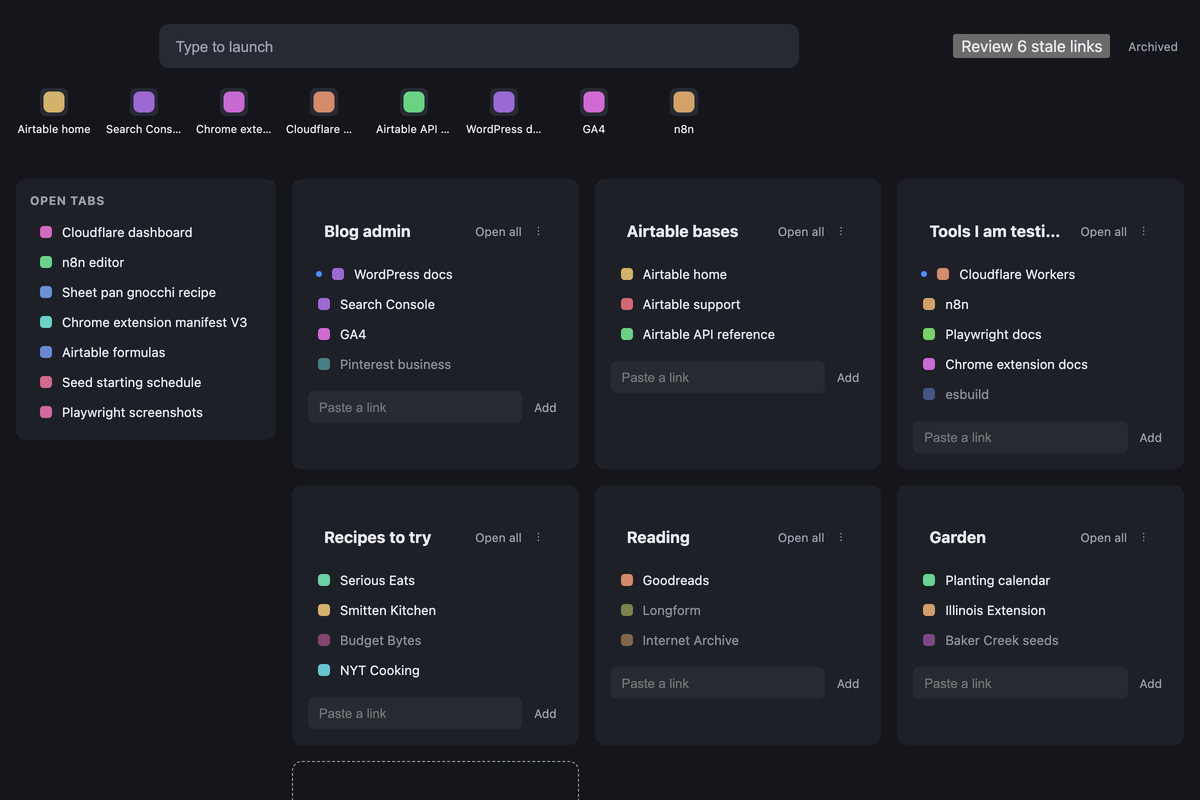
That’s the page with demo data in it. Mine has 24 collections and 161 links in it today, which is exactly why the next three features exist.
Who is a new tab page extension for?
It’s for someone on Chrome, on a desktop, who hoards tabs and wants the new tab page to be the place they go to stop hoarding. If you keep forty tabs open “for later” and you’d rather they lived in a named bucket you can find by typing, this is the shape. It’s a personal tool. I wasn’t trying to copy Toby to sell it, and it’s not planned to be a product.
It isn’t for four kinds of people, and I’d rather say so here than at the end:
- Anyone on a phone or a second browser. It’s Chrome on desktop only. No mobile, no Firefox, no Safari.
- Anyone who wants tags, notes and nested folders. It’s flat on purpose. If you organize deeply, Toby-style spaces and tags aren’t here.
- Anyone who won’t paste a token once per machine. The sync has no login screen and no account. You paste one secret into the extension’s settings on each computer, once.
- Anyone who wants session save and restore. It saves links, not windows. There’s no “reopen everything from Tuesday.”
What do you need to build a new tab page extension?
You need a browser that allows extensions, a place for the sync to live if you use more than one computer, and a way to build it without writing every line yourself. This is the list from mine and what each piece does.
| Tool | What it does here | Free or paid |
|---|---|---|
| Chrome, developer mode | Runs the extension as a load-unpacked install from a folder | Free |
| Cloudflare Workers | The sync API, one file, bearer token | Free tier |
| Cloudflare D1 | The database behind the sync, two tables | Free tier |
| Claude Code | How I built it. I decided what it does, it wrote the code and the tests | Paid, my existing plan |
That’s the whole bill. The extension itself is about 1,200 lines of plain JavaScript with no bundler, so I can open any file and read it. The Worker is 117 lines. There’s no framework anywhere, which is the reason it’s still readable to me two months later.
How does a new tab page extension work?
The page paints instantly from a copy of everything stored inside the browser, then syncs in the background, and every save, click and delete is a small operation that gets queued and sent to the Worker when it can. Nothing on the page ever waits on the network. That one decision shaped everything else.
The same thing, split into what happens on its own and what I do:
| Runs on its own | I do by hand |
|---|---|
| The new tab opens from local cache, then pulls the Worker’s copy in the background. | Drag a tab onto a collection, or paste a link into one. |
| Every save, delete and click goes into a queue and flushes to the Worker. Two machines merge by last write wins, and clicks are counted up, never overwritten. | Type a few letters and press Enter. Arrow keys move, Ctrl or Cmd plus Enter opens in the background. |
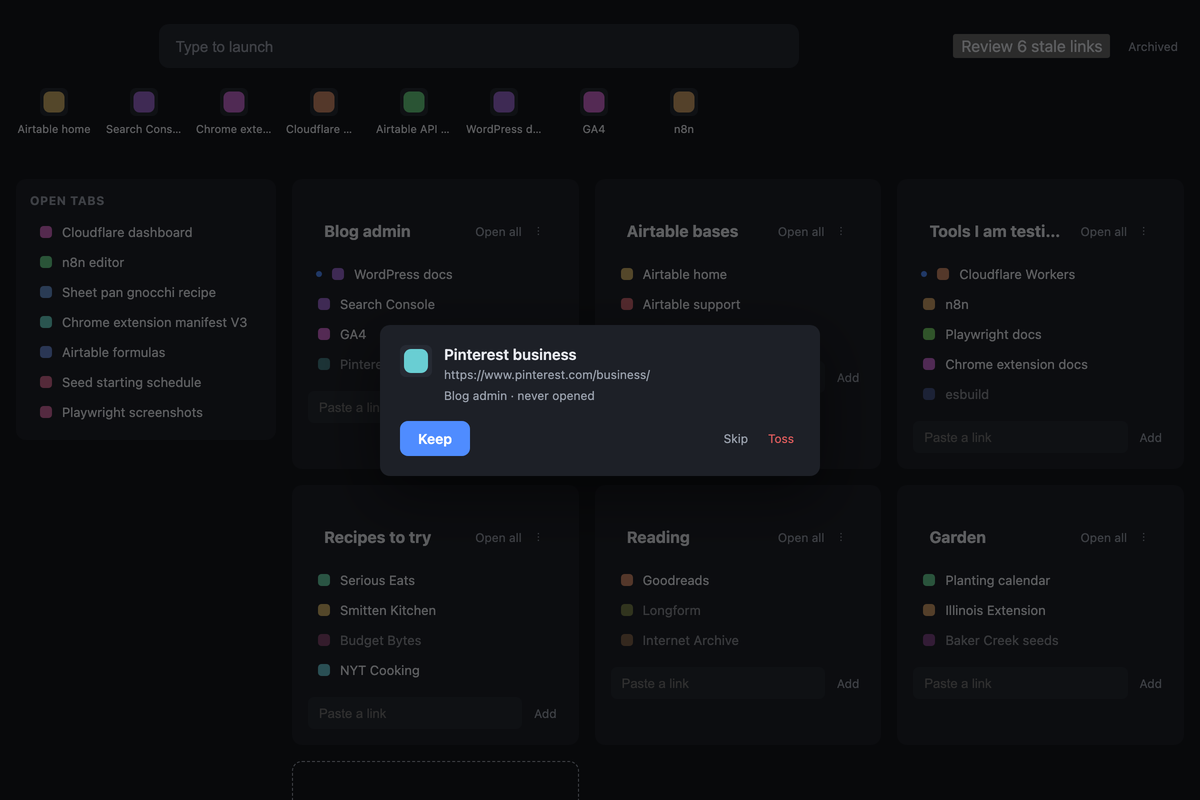
| Links unclicked for 90 days dim, unless starred. A “Review stale links” button appears in the header with the count. | Run the sweep: one link at a time, Keep, Toss or Skip, with K, T and S on the keyboard. |
| The Frequent row rebuilds itself from click counts, the 8 most-used links across every unarchived collection. | Star a link to keep it forever. Archive a collection when the project’s over. |
The three upgrades over Toby all came from the same list I wrote before building, the things I wished it did:
- Type to launch. Any keypress on the page goes into the search box. It fuzzy-matches titles and URLs, ranks exact starts first, and caps at 12 results. Most days I never touch the grid.
- The stale sweep. A link I haven’t clicked in 90 days dims out. When enough of them pile up, the header shows a button, and the sweep walks me through them one at a time. Toss is a small text button, not a big red one.
- The Frequent row. The 8 links I click most float to a shelf above the grid on their own. I never pin anything by hand, because I’d forget to unpin it.
Sync is the part I’d tell a friend to copy exactly. The extension keeps the full state in local storage plus a queue of unsent operations. Flush the queue, then pull the server’s copy, and never pull while the queue still has something in it, or you overwrite your own unsent work. The Worker stores only a hash of the token, and a wrong token gets a 401 and leaves the queue alone. There are 18 tests on the Worker and 32 on the extension, and most of them are about that ordering.
Get the skill
Mine is built around Chrome, two computers, and the way I hoard. Yours is a different browser and a different pile, so the tool below asks about yours and writes the plan for it: which jobs the page does, what data it holds, which upgrades you want, and whether anything leaves the browser at all. Pick your browser, say how many computers, tell it how you hoard, and it hands you a build prompt for Claude Code, plus a sweep skill if you chose sync.
Count the tabs you have open right now before you run it. That number is the reason.
What it doesn’t do
Two things worth knowing before building one.
There’s no importer, on purpose. I never built a Toby import. I’d paid for the year, so Toby was still there, and I opened every link out of it, one by one, and either saved it into the new system or deleted it. It took a while, and it was the sweep before the sweep existed. Anyone with a big library faces the same afternoon, and I think it’s the right afternoon to have.
It’s not a product. I wasn’t trying to copy Toby to sell it. It’s for my personal use, which is why there’s no login, no onboarding, no mobile, and no plan to add them. The generator below gives you the plan for yours, not a copy of mine.
I haven’t opened Toby since July. The year I paid for is still running out, and I’m fine with that.
Frequently asked questions
Can you replace Toby with your own extension?
Yes, if you’re on Chrome and you use the basics: collections, drag-to-save, and open-all. Mine took less than an afternoon to build with Claude Code and has held 161 links across 24 collections since July. What you give up is tags, notes, spaces and session save.
How does a Chrome extension take over the new tab page?
Through one line in the manifest, chrome_url_overrides with a newtab entry pointing at your own HTML file. Chrome shows that page on every new tab. The tabs permission lets the page list and close your open tabs.
Do I need a server to build a new tab page extension?
Only if you want more than one computer. On one machine, everything can live in the extension’s local storage. For two, I run a tiny Cloudflare Worker with a D1 database on the free tier and a single token I paste into each install.
Is it safe to store links in a Worker?
Mine stores only http and https URLs, rejects anything else, and keeps a hash of the access token rather than the token itself. A wrong token gets a 401. The security audit found nothing high, and a regression test runs on every change.
What about the Chrome Web Store?
Mine never went there. It’s still a load-unpacked install from a folder, which means Chrome treats it as a developer extension. That’s fine for a personal tool on two machines. An unlisted store listing would auto-update both, and I will eventually do it.
How do I keep old links from piling up?
Make them dim. Mine marks any link unclicked for 90 days as stale, unless it’s starred, and offers a keep-or-toss sweep, one link at a time, on the keyboard. The sweep is the only reason the library still fits on one screen.
Try it yourself
Count the tabs you have open right now, then write down the three buckets they’d fall into. Those three names are your first collections, and that list is the entire data model. If you can name them, you can build the page.
A tool I built
Build a Bio
Build a branded link in bio page in about a minute, then embed it on your own blog so your clicks land on your site, not someone else’s.
Build your bio →I run an affiliate program on the tools I build. Approved affiliates earn 20% on what their referrals pay, for up to a year. US only for now. See the program →
Related reading
- Software Subscriptions I Canceled Because I Built My Own
- How I Do My Own Bookkeeping Without QuickBooks
- My Pilates Progress Tracker: 79 Classes, 24 Moves, One Base
- My Software Bill Is $583 a Month. The Blog Is $328.
Subscribe if you haven’t already, more of these builds are on the way, and in the meantime, go forth and automate the boring stuff.