I do my own bookkeeping in an Airtable base shaped like the Schedule C. Every expense row carries the IRS line it belongs on, Stripe sales log themselves through a webhook, bank spending pulls in daily, and a small Cloudflare Worker turns all of it into a P&L, a Schedule C draft and a quarterly tax estimate. My part is about five minutes a week. QuickBooks was $131.50 a month. This runs on a few dollars a month.

This post contains affiliate links. If you sign up through one, I earn a commission at no extra cost to you. I only link tools I pay for and use. Nothing here is financial, tax or legal advice. I have a bit of a bookkeeping background, and I still will run all of this past my accountant.
A tax form has about twenty lines
Part II of the Schedule C, the expenses half, has around twenty lines on it. Advertising. Office expense. Commissions and fees. Meals, at half. Other. That’s the whole list the IRS wants a one-person business to sort its spending into, and every bookkeeping app I’ve used sorted it into two hundred categories instead, then made me map those back onto the twenty at the end of the year.
So when I built my own, I started from the form. The base has one field on every expense called Schedule C Line, and the only values it accepts are the lines on the form. There’s no “Software & Apps” category to argue with. Cloudflare goes on Line 27a. The Stripe fee on a $9 sale goes on Line 10. At year end, the export is the draft return, because the base was never anything else.
I told the why in the subscriptions I cancelled, so I’ll keep it to one line here: QuickBooks was doing payroll for a corporation I no longer have. This post is the how.
What does my own bookkeeping system do?
It records every dollar in and out of one small business and keeps each one on the tax line it belongs to. Income arrives as gross plus a separate fee, expenses arrive with a Schedule C line and a deductible percentage, and the reports at the top read straight off those rows. That’s the entire job, and it’s less than an accounting app does on purpose.
Concretely, it has three layers:
- Airtable is the source of truth. Fourteen tables, and the ones that matter are Income, Expenses, Vendors, Accounts and Owner Equity. Every row is editable by hand. If everything else dies, the base still has the books.
- A Cloudflare Worker reads the base on every page load. It doesn’t keep its own copy of anything. It draws the dashboard, the P&L, the Schedule C preview, the tax estimate, the vendor roll-up and the reconcile page, and it runs one cron a day.
- A small AI model categorizes the unknowns. Known vendors match by name for free. A charge from somewhere new goes to Claude Haiku, which suggests a vendor and a line and flags the row for review. That costs a few dollars a month at my volume.
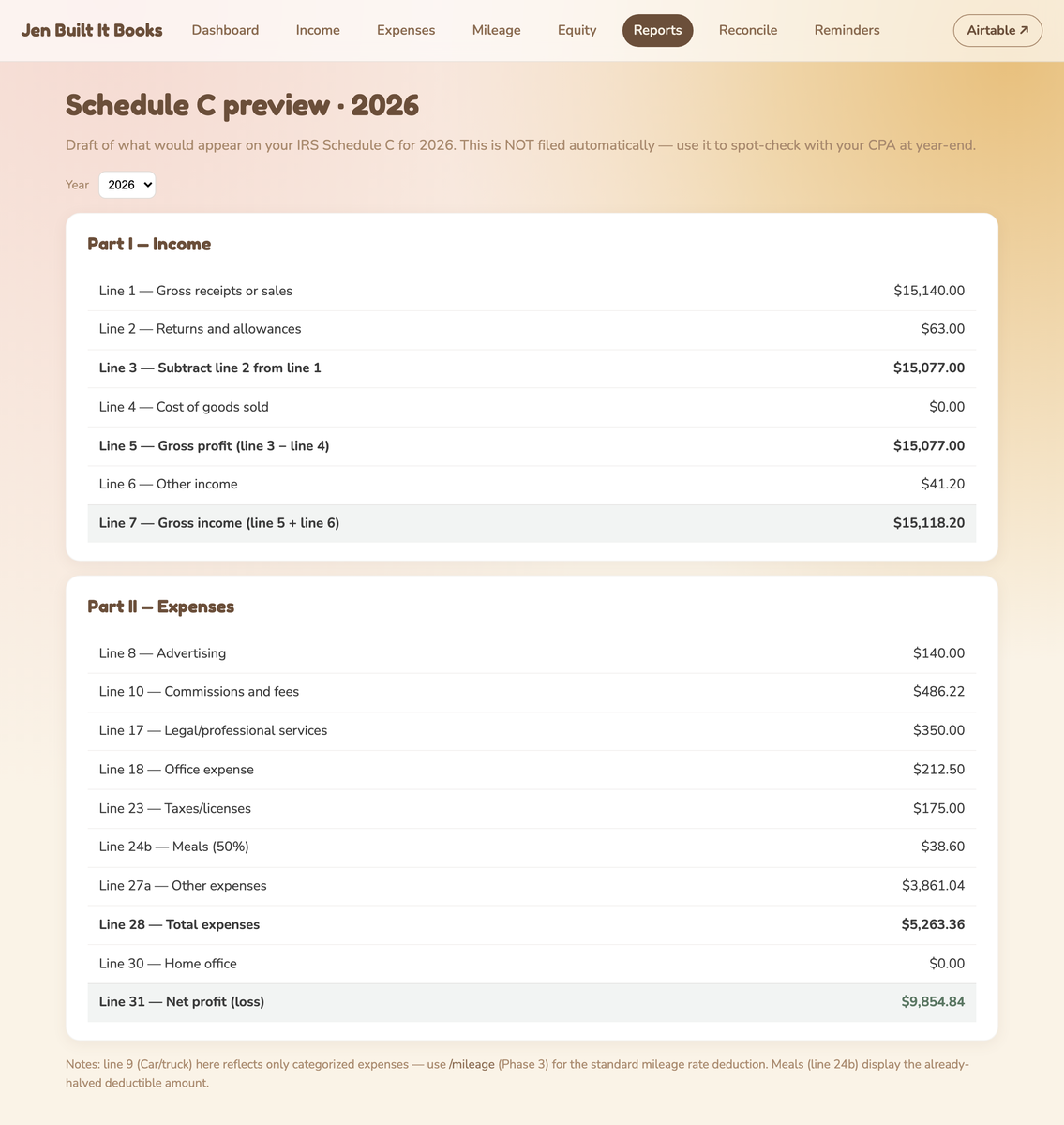
That screenshot is the Schedule C preview with demo numbers in it. Mine looks the same, with different money.
Who is a DIY bookkeeping system for?
It’s for one person running one business who wants to see their own numbers and hand an accountant a clean export at year end. In my case: a single-member LLC, cash basis, no employees, income from a handful of streams like app subscriptions, print on demand, affiliate payouts and reselling. If that’s roughly you, the shape transfers. It also helps to know what you’re looking at. I do have a bit of a bookkeeping background, and that’s part of why I trust myself with this.
It isn’t for everyone, and three groups should keep paying for software:
- Anyone with employees or payroll. Payroll is the job QuickBooks does well, and it’s the job I stopped needing. This system has no payroll at all.
- Anyone who wants an accountant-facing app. There’s no accountant login and no double entry. My accountant gets a CSV bundle at year end. I can build them a login. I haven’t.
- Inventory-heavy businesses. This is cash basis with a single cost-of-goods line. If you carry real inventory, you need real inventory tracking, and this isn’t it.
What do you need to build your own bookkeeping system?
You need a place to hold the rows, a place to run the reports, and a way to get money in and out without typing it. Here’s what each piece does in mine and what it costs.
| Tool | What it does here | Free or paid |
|---|---|---|
| Airtable | Holds every table. The source of truth. | Paid, I’m on a plan I already had for other things |
| Cloudflare Workers | Runs the dashboard, the reports and the daily cron | Free tier |
| Stripe | Where my app sales happen. Its webhook writes the Income rows | Free, they take the fee |
| Mercury | The business bank. Its API feeds the expense side daily | Free |
| Claude Haiku via the API | Categorizes charges from vendors the base hasn’t seen | A few dollars a month |
| Resend | Sends the deadline reminder emails | Free tier |
| Claude Code | How I built all of it. I decided what it does, it wrote the code | Paid, my existing plan |
The bank matters more than it looks. Mercury has an API, so checking-account spending shows up on its own. The Mercury card doesn’t have one, which is the first rough edge below.
If you don’t have a business account yet, that’s its own decision before any of this. I wrote about whether a side hustle actually needs one over on my other site.
How does my bookkeeping system work?
Money comes in through a webhook, spending comes in through a daily bank pull, both land as rows that already carry their tax line, and a weekly five minutes clears whatever the automation wasn’t sure about. Here’s the same thing split into what runs on its own and what I do.
| Runs on its own | I do by hand |
|---|---|
| A Stripe sale fires a webhook. The Worker writes an Income row with gross and fee split, and the payout it belongs to. | Once a week, about 5 minutes: clear the Needs Review pile. Confirm the vendor and the line, or mark it personal. |
| Once a day at 8am Eastern, the cron pulls 14 days of bank transactions, matches vendors, asks Haiku about the rest, and writes Expense rows. | Per trip: log mileage. Per transfer between me and the business: an owner equity row. |
| The same cron reconciles Stripe payouts against Income rows and flips them to Cleared. | Once a quarter, about 10 minutes: pay the IRS and Illinois, then mark the quarter paid. |
| Deadline emails go out ahead of quarterly payments, the state annual report and year-end prep. | Once a year, about 30 minutes: export everything for my accountant, file the annual report, close the year. |
A few rules under all of that never bend, and they’re the part I’d copy before any of the code:
- Gross, not net. The customer paid $9, so the income row says $9 and the 56 cent fee is its own expense on Line 10. Netting them looks tidier and stops matching the 1099-K.
- Refunds reduce gross receipts. They go on Line 2. They’re not an expense.
- Owner draws are not expenses. Money I take out goes to the Owner Equity table and never touches profit. Same for money I put in.
- Every imported row has a source id. The Stripe charge id, the bank transaction id, an identity built from the CSV line. Re-importing a file changes nothing. I learned that one by re-uploading a card export and getting nine duplicate charges.
- A charge nobody can categorize gets a flag, not a guess. Nothing is filed from a guess.
Then there’s the reconcile page, which is the one I trust the whole thing from. It lays the bank’s last 60 days of transactions next to the row each one matched. Green banner if everything matches, red banner at the top if anything’s missing. When it’s green, the books are right, and I don’t have to take the dashboard’s word for it.
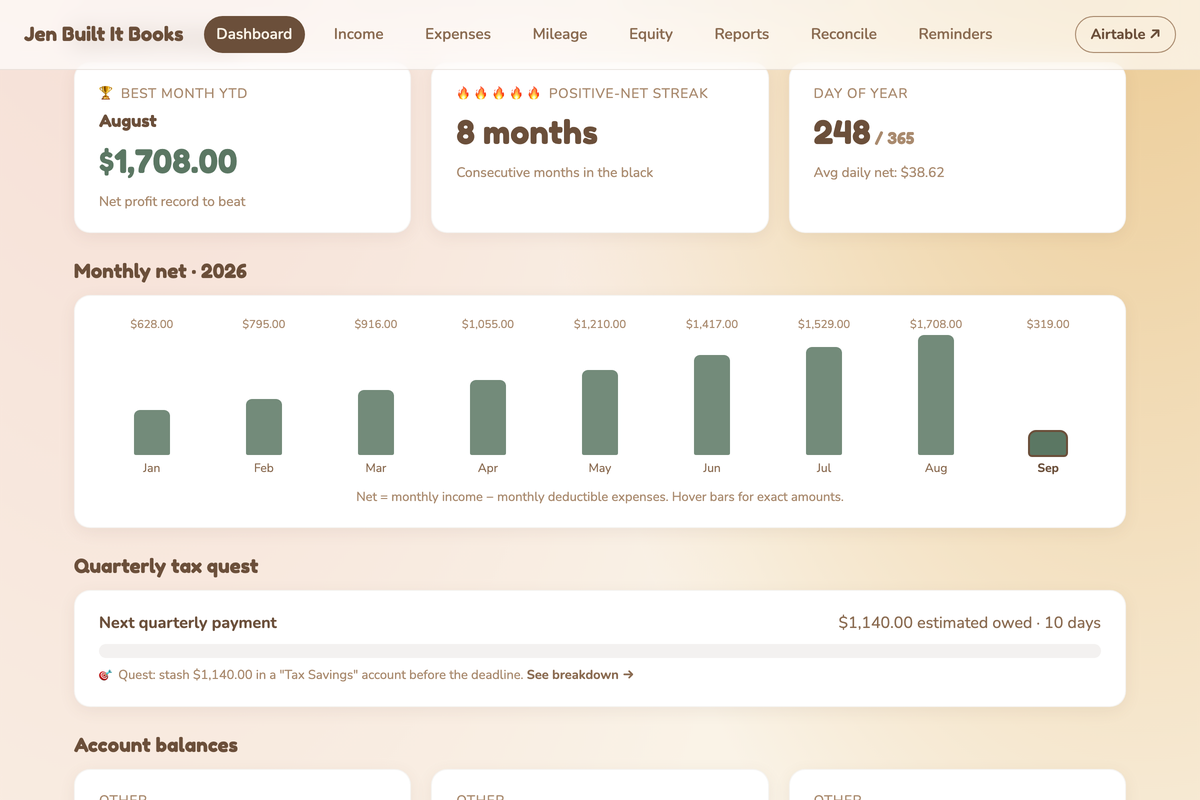
And yes, the dashboard has a little game in it. Best month, months in a row in the black, and a progress bar for the quarterly tax I’m supposed to be setting aside. I made owing the IRS a quest because otherwise I’d never open the page. Demo numbers in the screenshot. My real streak is nobody’s business.
Get the skill
Mine is shaped around a single-member LLC that gets paid through Stripe. Yours is a different business with different streams and a different bank, so the tool below asks about yours and writes the plan for it: which tables, which rules, what runs on its own, and what stays by hand. Pick your entity, tick how money reaches you, name your bank, and it hands you a build prompt for Claude Code and, if you want it, a monthly close skill that runs the books once they exist.
Def talk to your accountant first. That’s the one step I won’t let the tool skip, and it’s the first question the prompt makes Claude ask.
What it doesn’t do
Two things I’d want to know before building this, both still true today.
Card purchases only come in by CSV. Mercury’s checking account has an API, so that side syncs itself. The Mercury card doesn’t, so once a month I download the card transactions and upload them. The dedupe rule above exists because I did that wrong once. The bank side is automatic. The card side is a habit.
Receipt scanning never got built. The plan was a receipts@ address that forwards to the Worker, runs the image through OCR, and matches it to the expense row. It’s still on the list. For now receipts live wherever they live, and the Schedule C line is the thing I actually keep clean.
Always keep an eye on it. I’ve had to tweak a lot along the way, and a system that holds your money data is never finished the way a single-job tool is. With all that said, I’m glad I don’t have the QuickBooks monthly bill anymore.
Frequently asked questions
Can I do my own bookkeeping without QuickBooks?
Yes, if you’re a one-person business without payroll. You need a place for the rows, a way to import sales and bank activity, and categories that match your tax form. Mine is Airtable plus a small web app, and my accountant gets a CSV bundle at year end.
Is Airtable good for bookkeeping?
For a single-member business on cash basis, yes. It holds the rows, links vendors to expenses, and exports cleanly. It isn’t an accounting system, so the rules, like gross versus fees and owner draws, have to live in how you build it, not in the software.
Do I need double-entry bookkeeping for a Schedule C?
No. A Schedule C filer on cash basis can keep single-entry books: money in, money out, each on its tax line. Double entry is what an accountant-facing app does. Mine doesn’t, and the reconcile page against the bank is the check that replaces it.
How much does a DIY bookkeeping system cost to run?
Mine is a few dollars a month, almost all of it the AI model that categorizes new vendors. Cloudflare Workers, Resend and the Mercury API are on free tiers. Airtable is the plan I already paid for. QuickBooks was $131.50 a month for me.
What happens when a webhook fails?
The daily reconciliation catches it. The cron lists Stripe’s recent payouts and matches every charge back to an Income row, so a sale the webhook dropped shows up as unmatched and gets written then. The reconcile page against the bank is the second net.
Can my accountant use it?
Not directly, today. There’s no accountant login. They get the year-end export: income, expenses by Schedule C line, mileage, owner equity and a summary. Building them a read-only view is possible. Ask yours what they’d want before you build it.
Try it yourself
Print a Schedule C and take last month’s bank statement. Write an IRS line number next to every business charge. If that takes you twenty minutes and you find yourself wanting the list to fill itself in next month, build the base. The form already told you what the categories are.
Once the rows exist they answer a bigger question than the tax one. Income minus expenses per month is the whole of whether a side hustle is actually profitable, and the base has been building that answer the whole time.
A tool I built
Side Hustle Garden
Log every side hustle payment and watch it knock out your monthly bills, smallest first.
Plant your first dollar →I run an affiliate program on the tools I build. Approved affiliates earn 20% on what their referrals pay, for up to a year. US only for now. See the program →
Related reading
- Software Subscriptions I Cancelled Because I Built My Own
- My Software Bill Is $583 a Month. The Blog Is $328.
- My Pilates Progress Tracker: 79 Classes, 24 Moves, One Base
Subscribe if you haven’t already, there are more of these builds on the way, and in the meantime, go forth and automate the boring stuff.