An irregular income tracker shows what you’re on pace to make when your money comes from lots of places on lots of schedules. Mine logs the day I earn something, not the day it pays, because affiliate commissions, creator payouts and ad money can land 30 to 90 days later. From that log it works out my daily pace, a typical day and what’s on its way. It’s a projection, not my books. A generator below builds yours.

The work is done. The money shows up in two months.
Most of what I earn is work I’ve already done that won’t be paid for 30 to 90 days. Amazon, for one, pays Associates commissions about 60 days after the end of the month they were earned. By the time any of it lands in my bank account, I’ve lost track of which day of work it came from.
So if I only counted money once it landed, a great week would look like nothing for two months, and then a random Tuesday would look amazing for no reason at all. Neither one tells me whether what I’m doing right now is working.
The Money Tree fixes that for me. It’s a private dashboard I built with Claude Code, reading an Airtable base where I log what I earned each day, by source, whether it’s paid yet or not. When something lands that I never logged, a cash back bonus or a gift or a surprise payout, I add that too. It’s not my super accurate database. I have real bookkeeping for real income. This one’s just a projection, and it’s nice to see the stuff that lands that I didn’t have in there.
Money that’s actually landed lives in my bookkeeping and in Side Hustle Garden, an app I made for exactly that. The Money Tree is the other half: the work I’ve done, before anyone pays me for it.
Why build a whole dashboard for this? I love building things, and anything with data in it ends up with a dashboard. This one has 1,308 entries from 30 sources, logged every single day since June 23, 2025. That’s 465 days in a row, which says less about my discipline and more about how much I like watching a number move.
What does an irregular income tracker do?
An irregular income tracker turns a messy pile of small, late, uneven payments into one number you can trust: your pace. Mine does four jobs.
- Logs by the day earned. Every row is a date, a source and an amount, entered the day after I earn it.
- Projects my pace. It averages the last 7, 30 or 90 days and stretches that out to a week, a month and a year.
- Shows a typical day. It puts the median next to the average so one huge day can’t fake the pace.
- Spots changes early. It flags sources picking up or going quiet weeks before the money would tell me.
The point is to see whether this month’s work is adding up while I can still do something about it, not 60 days later.
Who is an irregular income tracker for?
It’s for anyone whose money comes from several places on different payout schedules, and who wants to know their pace before the payments arrive.
- Creators with affiliate, ad and creator-program money that pays a month or two after the work.
- Resellers selling on a few apps, each with its own wait after delivery. (If you want profit per item instead, I built a reselling profit dashboard for that.)
- Side hustlers with a pile of small income sources and no idea what they add up to.
- Data nerds like me, who want a chart for everything.
It’s not for budgeting. It won’t tell you what you can spend this month, because the money isn’t in your account yet. It’s not for taxes either, and it doesn’t replace real bookkeeping. And if you get one steady paycheck, you already know your pace, so skip it.
Here’s why the gap exists in the first place. These are the payout terms from each program’s own pages, checked October 1, 2026:
| Where the money comes from | When it pays | Minimum before it pays |
|---|---|---|
| Amazon Associates | About 60 days after the end of the month you earned it | $10 for direct deposit, $100 for a check |
| Facebook content monetization | About 30 days after the end of the month | $25 in the US |
| Mediavine ads | Net 65, paid on the first business day of the month | $100 by ACH |
| TikTok Shop affiliate | Usually 15 days after delivery, up to 31 | None listed |
| Depop (US) | 2 business days after delivery, or 10 after the sale | None listed |
| eBay | Usually 1 to 2 days to show as available | None listed |
Reselling money moves in days. Affiliate and ad money takes one to three months. Mix them together and your bank account tells you almost nothing about this week.
What do you need to build an irregular income tracker?
You need a place to log, a way to build the dashboard and a few minutes a day. Here’s what I use and what each piece does.
- Airtable. Holds the log. One table for sources (name, type, roughly how long it takes to pay) and one for daily entries. Google Sheets or Notion work too, and the generator below writes the layout for any of the three.
- Claude Code. Built the dashboard from my description. I pay for my Claude plan and for Airtable.
- A private place to run it. Mine lives in a password-protected hub of my own tools on Cloudflare Workers. Running it on your own computer works just as well. This is money data, so keep it private.
- A daily habit. I log each day’s numbers the next day. Always a day late, never the same day. The dashboard knows it, which comes up again in the streak part.
That’s it. No bank connection, no app store, nothing reading your accounts. You type the numbers, which is a feature when the whole point is knowing them.
How does an irregular income tracker work?
It counts each dollar on the day you earned it, then does the math on that log. Here’s what mine shows, top to bottom.
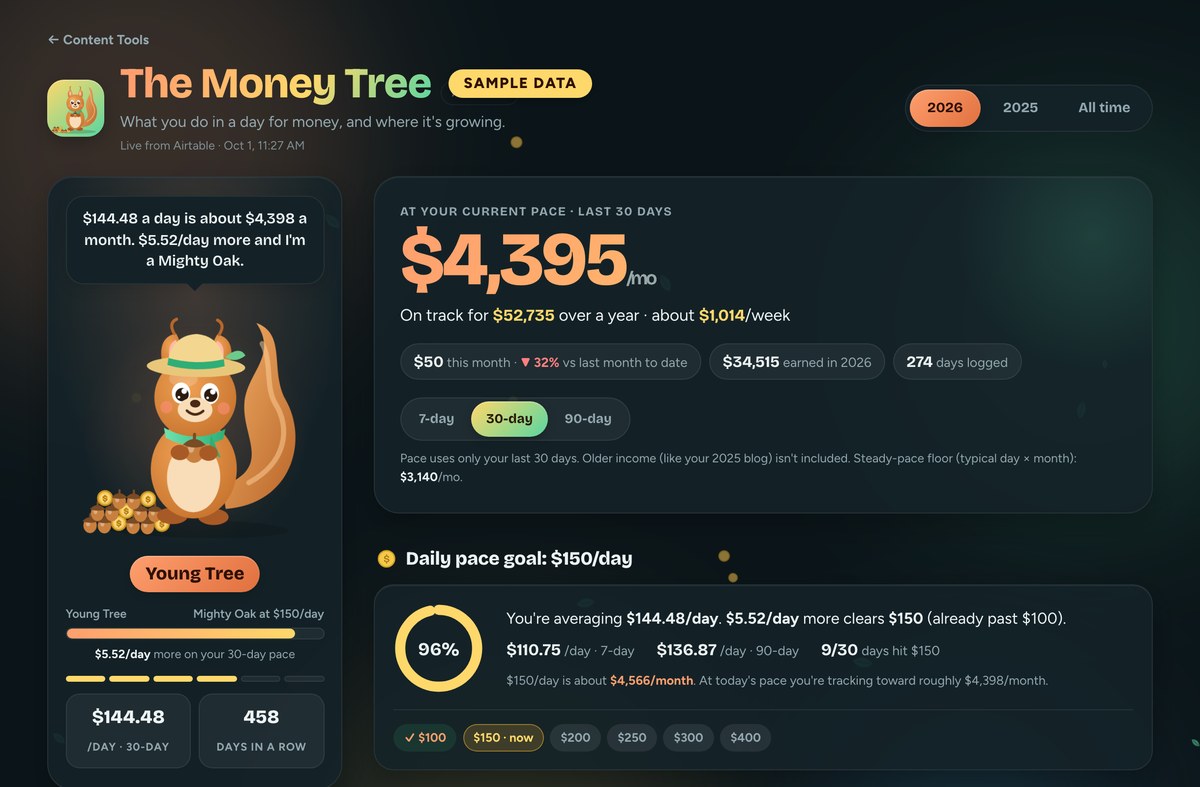
The pace. The top of the page says what I’m on pace for, per week, per month and per year. It’s built from my last 30 days by default, and I can flip it to 7 or 90. Seven reacts fast and jumps around. Ninety is smooth and slow to notice anything. Right under it, this month so far is compared to last month on the same day, so a month that’s half over doesn’t look like a crash. A forecast chart shows the last 90 days with the pace extended 30 days forward as a dashed line.
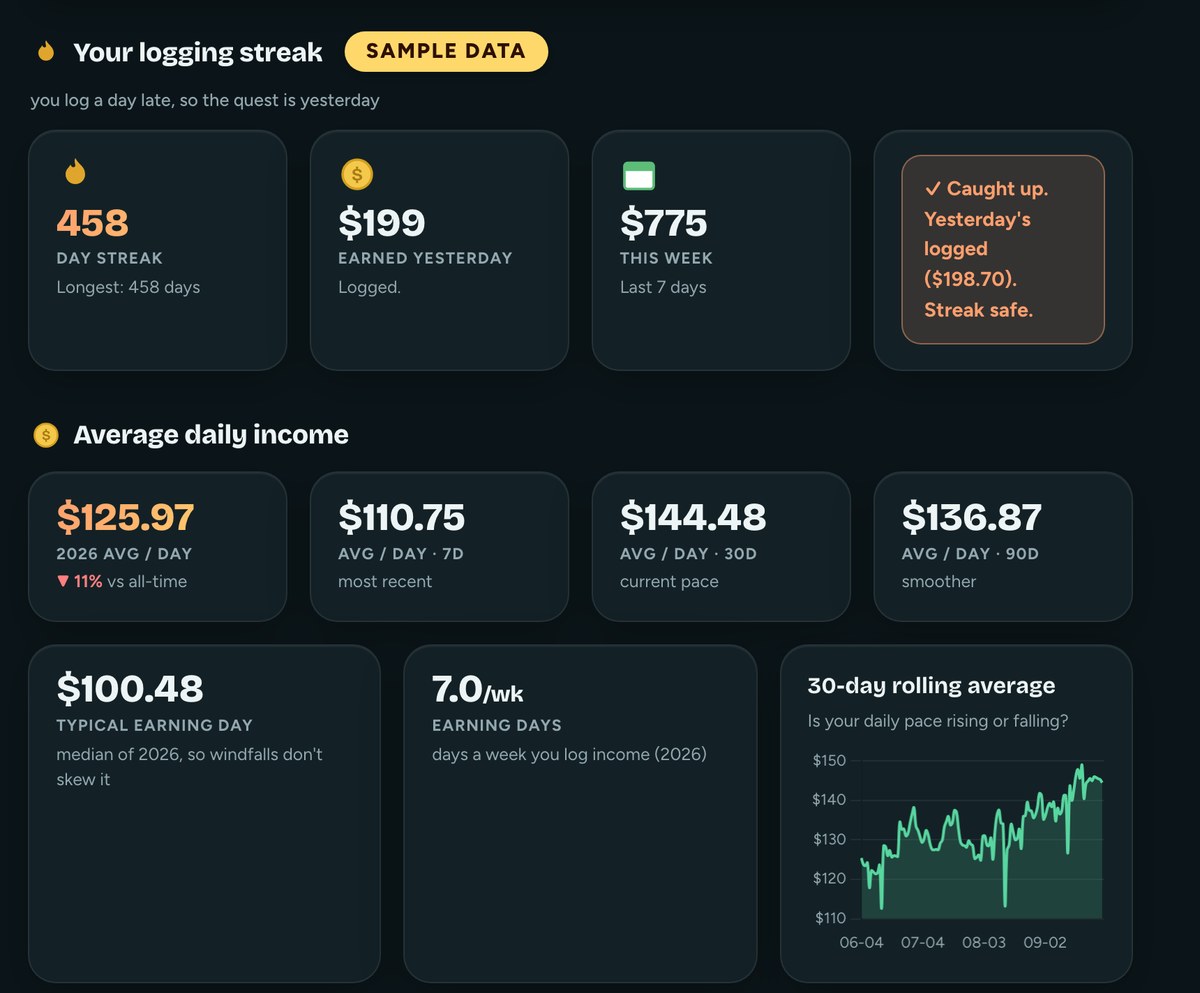
The typical day. Right next to the average sits the median, which is the middle day if you lined them all up. This one exists because of 2025, when I sold my old blog. That one payment was bigger than months of normal days put together, and every average that included it said I was rich. The median ignored it, the way it should. I also split the dashboard by year, so 2025’s blog money stays out of this year’s projections entirely.
What’s moving. Each source’s last 30 days gets compared to the 30 days before, and anything that changed by more than a small floor gets called out as picking up or gone quiet. It also tags a source the first time it earns anything, or when it comes back after a break. I see a slowdown here weeks before the smaller payout would show it.
How spread out it is. One bar shows how much of the last 90 days came from my biggest source, and one line answers the scary question: if that source stopped tomorrow, what would my pace be?
Sprout and the streak. Sprout is a squirrel who tends the tree. Until this week, his rank was based on lifetime income, which meant he hit the top rank early and then sat there forever. Now he ranks by my 30-day pace, so he grows when the month is good and naps when it isn’t. The streak counts days logged, and because I always log a day late, it counts yesterday. If it waited for today, I’d break it every single morning.
Get the generator
The generator below asks where your money comes from and roughly when each source pays. Pip, a carrier pigeon with a mail bag, shows you when today’s work would land for each source. Then it writes two things you can copy.
The first is a tracker layout for Airtable, Google Sheets or Notion: a sources table and a daily log, set up so you record the day you earned money, not the day it paid. The second is a prompt for Claude that builds the dashboard from that log. It covers your pace, a typical day and whatever extras you pick, like what’s on its way, what’s picking up or a logging streak.
Use your best guess for payout timing, then check your programs’ payout pages for the real numbers. And give the log a week or two before you build the dashboard, so the math has enough days to work with.
What it doesn’t do
It doesn’t know what landed. Payout dates move around, programs hold money until you hit a minimum, and returns take commissions back. The tracker shows what I earned, and my bookkeeping shows what I got. Both matter, and they’re never the same number.
It’s only as good as my logging. If I skip a day, the pace drops, and that’s not the dashboard’s fault. And the generator only writes a layout and a prompt. It doesn’t connect to any account or see a single number of yours. Claude does the building in your own tool, with your own data.
My version has rough edges too. My sources table has an “active” checkbox I never keep up with, so the dashboard ignores it and shows any source with money in the period instead. And there’s a whole goals section built and waiting, which stays hidden because I haven’t set a single goal yet.
Frequently asked questions
How do I track irregular income?
Log each amount on the day you earned it, by source, in one place. Then average the last 30 days to get your pace, and look at the median day next to it so one big payment doesn’t skew the picture. A spreadsheet works fine for the log.
When do Amazon affiliates get paid?
Amazon pays Associates commissions about 60 days after the end of the month they were earned, per Amazon’s own help page. There’s a $10 minimum for direct deposit, and anything under it rolls into the next month. So January’s commissions land around the end of March.
Can I track irregular income in Google Sheets?
Yes. Make one tab for your sources and one for a daily log with the date earned, the source and the amount. The generator above writes the layout for Sheets, plus a Claude prompt to build the dashboard on top of it.
Should I use the average or the median for irregular income?
Use both. The average tells you your pace. The median tells you what a normal day looks like. When the average is way above the median, one big payment is pulling the average up.
Is an irregular income tracker the same as a budget?
No. A budget plans spending from money you already have. An irregular income tracker shows what you’ve earned before it’s paid, so you can see your pace. Use it to decide what to work on, and budget from what’s actually in your account.
Try it yourself
An irregular income tracker counts money on the day you earn it, not the day it lands, so you can see your real pace while payouts take 30 to 90 days. Start by logging what you earned yesterday, by source. That one habit is most of it.
Then use the generator above to set up your layout and build the dashboard. If you want the other half too, the money that’s already landed, here’s how I do my own bookkeeping.
A tool I built
Side Hustle Garden
Log every side hustle payment and watch it knock out your monthly bills, smallest first.
Plant your first dollar →I run an affiliate program on the tools I build. Approved affiliates earn 20% on what their referrals pay, for up to a year. US only for now. See the program →
Related reading
- How I Do My Own Bookkeeping Without QuickBooks
- Build a Reselling Profit Dashboard With Airtable
- Build a Print on Demand Sales Tracker With Airtable
- How I Track What I Actually Got Done Without Logging It
Subscribe if you haven’t already. I’ll keep writing up the dashboards I build for every pile of data I find, broken parts included. In the meantime, go forth and automate the boring stuff.