

If you’ve been online long enough to remember buying PLR in bulk because it felt like such a deal, this post is for you. Those of us who came up in the early blogging days accumulated a lot. PLR bundles, half-finished ebooks, course outlines sketched on flights, lead magnets abandoned mid-build when something shinier came along. I couldn’t bring myself to delete any of it, so it just… sits. Hard drives, Dropbox folders, Google Drive. A whole digital hoard of “someday.”
The problem isn’t that the stuff is worthless. Some of it probably isn’t. The problem is that sorting through it requires a kind of decision-making energy I genuinely don’t have. I get decision fatigue fast, and staring down a folder of 47 PLR packages asking myself “is this still relevant?” is exactly the kind of task I will put off indefinitely.
Here’s the short version: the Abandoned Asset Reviver is an n8n workflow that scores your old PLR, drafts, and half-built projects with AI, then hands back a ranked list of what’s actually worth reviving. You add assets to Airtable, flip the status to Score Me, and it does the deciding for you for about a penny each.
So I built a workflow to do the deciding for me.
This post contains affiliate links. If you sign up through one, I earn a commission at no extra cost to you. I only point to tools I actually use or would recommend.
What the Abandoned Asset Reviver Does
The short version: you add your old assets to an Airtable table, flip the status to “Score Me,” and let AI tell you what’s actually worth bringing back to life.
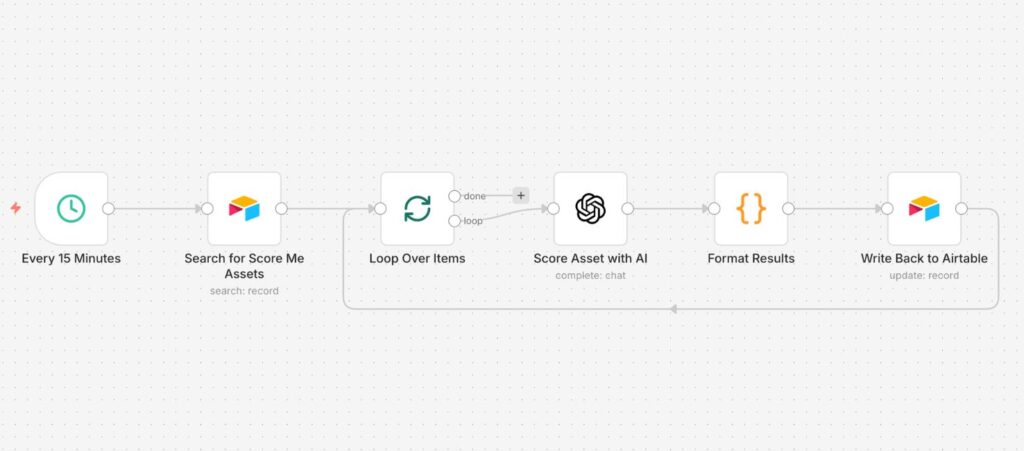
The longer version: the workflow picks up everything marked “Score Me,” sends it to GPT-4o-mini with a detailed prompt, and comes back with three things for each asset.
- Scores on three dimensions, 1-10 each: monetization potential, ease of revival, and alignment with what you’re currently working on
- Three resurrection plans with specific steps, a timeline, and expected outcomes
- Three spin ideas for connecting the asset to what you’re building right now
All of it writes straight back to Airtable. No copy-pasting, no tab-switching, no trying to remember what the AI said about the bundle you fed it yesterday.
How Does the Scoring Work?
Each asset gets rated on three dimensions and the scores don’t pull punches. I’ve run things through this that I thought were goldmines and gotten back 3s and 4s. Which is actually the point.
Monetization (1-10)
Is there a real market for this? Is there a clear path to revenue? How hard would it be to find buyers or an audience for it today, not when you bought it?
Ease of Revival (1-10)
How close is this to being usable? Does it match your current skills? How much actual work stands between you and a finished product?
Alignment (1-10)
This is the one that matters most for digital hoarders like me. Your personal development PLR from 2019 might be solid content, but if it has nothing to do with what you’re building now, it’s going to sit there for another five years. This score tells you how naturally the asset connects to your current direction.
The three scores add up to a Total Score out of 30 and you can sort your whole Airtable by it. Suddenly you’ve got a ranked list instead of a pile. That’s the thing that actually helps me let go of stuff without guilt, because now I have data instead of just a feeling.
If it’s not old assets but a head full of new ideas that’s got you stuck, I sort those the same way over on my other blog, by turning the pile into seeds you can actually plant.

The Spin Ideas Are Where It Gets Interesting
The scores are useful. The resurrection plans are helpful. But the spin ideas are the reason I keep coming back to this one.
Most of us don’t struggle with old assets because the content is bad. We struggle because we can’t see how it connects to what we’re doing now. The spin ideas reference your specific current projects and give you a concrete angle for repurposing, not vague suggestions like “turn it into a blog post” but actual specific next steps based on what you told it you’re working on.
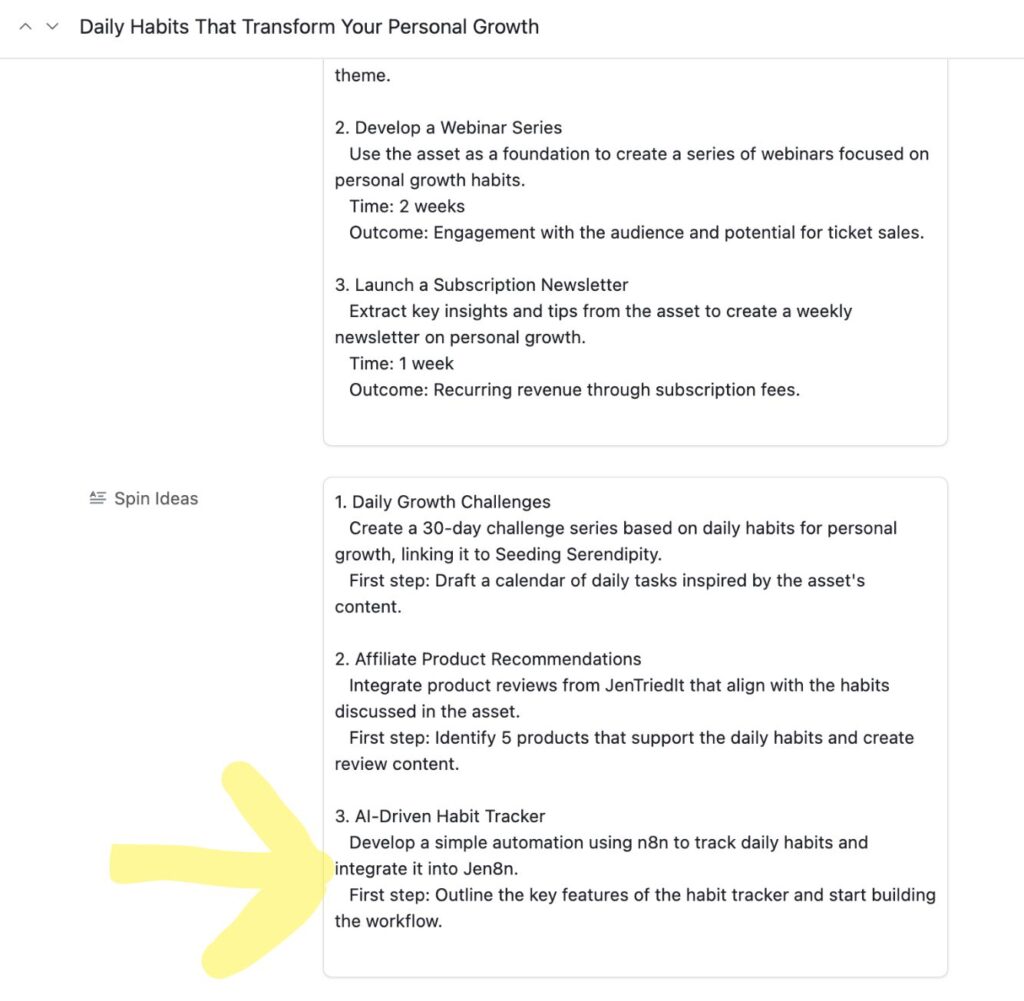
I ran some old Personal Growth PLR through this and one of the spin ideas pointed me toward habit tracker automations. That sparked an idea that eventually became The Dopamine Dealer. Not exactly what the AI suggested, but it lit the match. It genuinely made me get there in an instant.
What Does It Cost to Run?
GPT-4o-mini runs about $0.01 per asset. A penny. I ran my first batch of about 30 assets and the total API cost was under 50 cents. For each one I got scores, reasoning, three full revival plans, and three spin ideas. The math on this is almost silly.
What Do You Need to Run It?
The workflow connects n8n, Airtable, and OpenAI. You’ll need an n8n instance (self-hosted or cloud), an Airtable base set up with the right fields, and an OpenAI API key. It’s six nodes, no branching logic, no weird edge cases.
The scoring prompt and the Airtable fields are both walked through above, so you can build this in your own n8n without waiting on a file from me. The triage sheet below is yours to download now.

A Couple of Things to Know Before You Start
The “Current Focus” field in Airtable is where you tell the AI what you’re working on right now so it can make the spin ideas relevant. Right now I just drag it down to copy it into each row, which works fine, but if your focus doesn’t change much you could probably hard code it somewhere more permanent. That’s something I want to improve in a future version.
One thing to keep an eye on: the workflow generates a lot of ideas. Which is great, but for a fellow digital hoarder, there is a small risk of just creating another organized pile to ignore instead of actually acting on anything. Start with five or ten assets, sort by total score, and pick one thing to actually do before you score fifty more.
Frequently Asked Questions About the Abandoned Asset Reviver
What kinds of assets can I run through this workflow?
Anything you can describe in text. PLR bundles, blog post drafts, course outlines, lead magnets, old ebooks, digital products you started and shelved. If you can write a description of it in Airtable, the workflow can score it.
Do I need to upload the actual files?
No. You describe the asset in Airtable, what it is, what it covers, and what your current focus is. The AI works from your description, not the original file.
How accurate are the scores?
Accurate enough to be genuinely useful as a ranking system. The quality of your description affects the quality of the output, so the more specific you are about the asset and your current focus, the better the scores get. I’ve found them consistent enough to actually trust as a decision-making tool.
Does this work with n8n cloud or only self-hosted?
Both. The workflow runs the same way on either version. You just connect your Airtable and OpenAI credentials inside n8n, which works identically on cloud or self-hosted.
Where do I get the workflow?
There’s no file to download. This post walks the scoring prompt and the Airtable setup, so you can rebuild it in your own n8n and adjust the scoring to what you sell.
Want to try this before the workflow drops? Score five to ten assets by hand on one page, three quick scores each, and circle the one thing actually worth reviving. No email needed.
Download the free PDFIf you’ve got a digital hoard that’s been stressing you out, start here. Five assets, one workflow, and you’ll know exactly what’s earning its keep. Subscribe below and you’ll get the next build as it lands.
A tool I built
Side Hustle Garden
Log every side hustle payment and watch it knock out your monthly bills, smallest first.
Plant your first dollar →I run an affiliate program on the tools I build. Approved affiliates earn 20% on what their referrals pay, for up to a year. US only for now. See the program →