My house hunting tracker is a small private app I built with Claude Code for me and my husband, Mike. Every morning it checks new listings against our list of wants, reads each description for a 3-car garage and a basement, looks up the FEMA flood zone, and emails us both. We each tap thumbs up or down, and each of us can see the other’s vote. It weeds the list down a lot before either of us looks.

Two people, two searches, and the occasional link
First, so nobody gets the wrong idea: we aren’t seriously looking yet. Buying a house is a future thing for us.
Before this, Mike and I would both search on our own and every now and again send a link to each other. Two people running the same search on two phones, with no idea what the other one had already seen and ruled out. A shared list cuts down on search time for both of us.
So in early September I built House Hunt with Claude Code, a few weeks before my Christmas gift tracker. It started as a list of houses and two thumbs. In October it got a redesign with a mascot named Jingle, a little gold key who ranks up as you vote, a tab for near misses, and price drops in the morning email.
The best part is that it goes to both of us. It takes all of our wants into account instead of only the filters a listing site gives you, so it weeds things down a lot more, then sends the short list to both of us and we decide which ones we like.
That’s the plan, anyway. In real life, it’s pretty much me thumbs-upping and Mike ignoring it. I think he voted once. He’s more of a verbal person, so we talk about the houses out loud instead.
What does a house hunting tracker do?
A house hunting tracker keeps one shared list of houses that fit your wants, with a place for each person to say yes or no. Mine does four things a saved search on a listing site doesn’t do for us:
- Reads the description. The garage field on a listing is often blank or wrong. So it also scans the description text for phrases like “3-car” or “three car,” and the card shows “3-car (from description)” when the number came from the text. It does the same for the word basement, unless the text says “no basement.”
- Checks flood risk. Every new house gets looked up on FEMA’s public flood map. High-risk zones get dropped. Moderate ones get a badge.
- Scores and ranks. Extra garage space, a basement, minimal flood risk, my own keywords and a recent price drop all add points, so the best fits sit at the top.
- Shares the votes. Thumbs up or down from either of us. The Shortlist tab groups houses into Both liked, Liked by me and Liked by Mike. Anything either of us thumbs down moves to Hidden, with an undo.
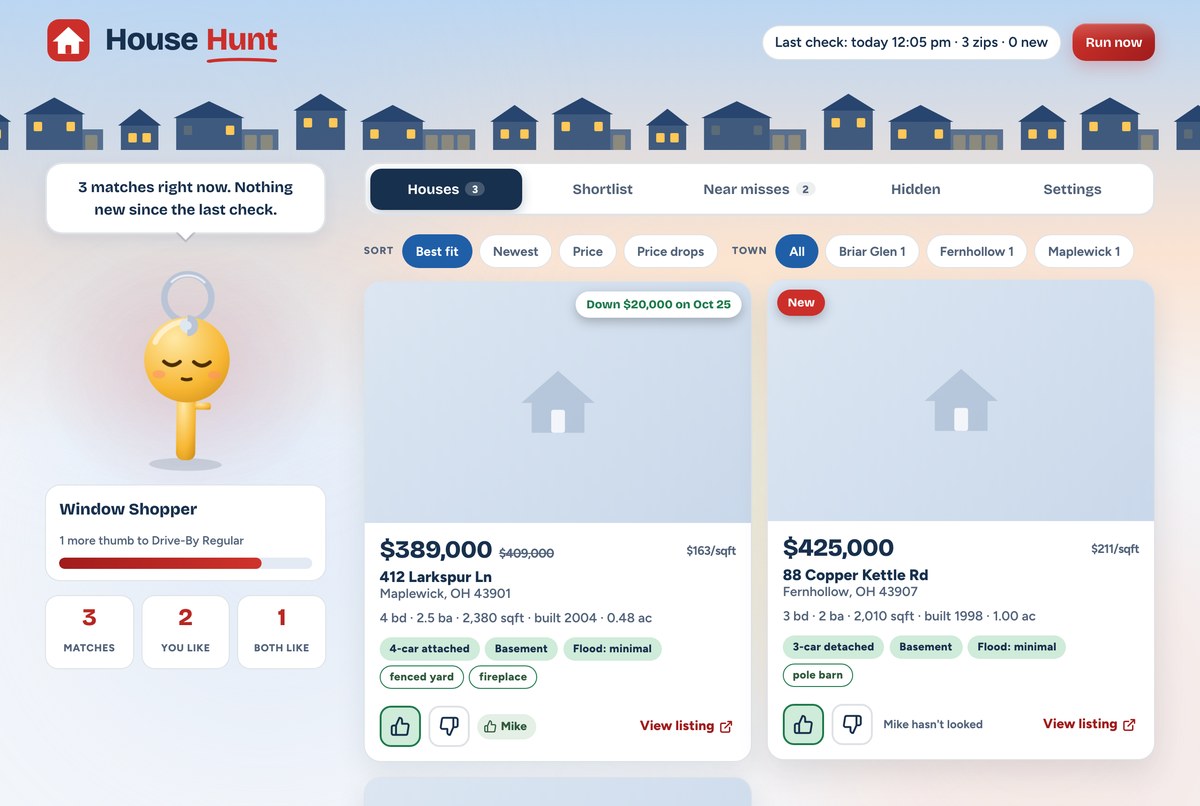
It’s sent us several houses we’d probably have scrolled right past. A house that makes it through every one of our filters gets an extra special look from both of us, even the one who won’t tap the thumb.
Who is a house hunting tracker for?
This is for you if you’re searching with a partner, a parent or a roommate, you each have a few must-haves the other one keeps forgetting, and you’re tired of texting each other links. It’s also for anyone whose list includes things a listing site’s filters don’t handle well for them, like a garage size that only shows up in the description.
Skip building one if any of these sounds like you:
- Your must-haves are price, beds and baths. The filters on Zillow and Redfin are pretty good. A saved search covers it.
- You’re house hunting alone. Half the point is the shared votes. A saved search and a notes app do the rest.
There are three ways to do this, depending on how much setup you want:
| Texting links | A shared sheet you fill in | Built from your alert emails | |
|---|---|---|---|
| What you set up | Nothing | One spreadsheet | A sheet plus an n8n workflow |
| New houses show up | When someone remembers | When someone types them in | On their own, from your saved-search emails |
| Both people’s votes in one place | No | Yes, a column each | Yes, a column each |
| Flood zone check | No | By hand | Automatic, FEMA lookup by address |
| Garage and basement check | No | By hand | Paste the description, it checks |
| Morning email to both of you | No | No | Yes |

What do you need to build a house hunting tracker?
- A saved search with email alerts. Zillow, Redfin or wherever you already look. I checked a real Zillow alert in my inbox, and it carries the price, beds, baths, square feet, address and a link. It doesn’t include the description.
- Google Sheets or Airtable. Either one works as the shared list. Both of you need access to it.
- n8n, for the automatic part. Mine runs on a Hostinger VPS I set up with the one-click template. It watches your inbox for alert emails.
- FEMA’s flood map and the Census geocoder. Both are free with no account or key. The Census one turns an address into map coordinates, and FEMA’s flood map tells you which zone those coordinates sit in.
- Claude Code or any AI chat. The generator below writes a skill or a prompt that walks you through building it.
There’s no AI inside the tracker itself. The garage and basement checks are plain text matching, and the score is simple math. AI only helps you build it.
How does a house hunting tracker work?
Your wants are the rules. Mine are editable on a Settings tab: price range, minimum beds and baths, minimum garage size, which property types count, whether a basement is required, preferred or ignored, how strict to be about flood zones, and up to 10 keywords. Every house gets checked against all of them.
The garage check reads two places. It takes the bigger number between the listing’s own garage field and whatever it finds in the description. “Oversized 2” doesn’t count as 3. A tandem only counts if the text says 3.
The flood check uses FEMA’s public map. The address becomes a point on a map, and FEMA’s National Flood Hazard Layer says what zone that point is in. Zones starting with A or V are high risk. An X zone marked 0.2 percent annual chance is moderate. Any other X is minimal. If the lookup fails, the house gets marked unknown and gets checked again on the next run.
The score is for ranking, not deciding. Every garage space above the minimum adds 10 points. A basement adds 20 when it’s preferred. Minimal flood risk adds 10. Each keyword hit adds 5. A price drop since we first saw it adds 10, and anything new in the last 3 days gets 5.
Near misses get their own tab. A house that fails exactly one rule, and only by a little, lands on Near misses instead of vanishing. That means one garage spot, one bedroom or one bath short, or no basement mentioned when I’ve said a basement is required.
The morning email goes to both of us. It lists new matches, houses that just became matches (a price dropped under our max, say) and price drops on houses we already know. When a house goes off the market, it disappears from every tab, but our votes stay saved in case it comes back.

It’s been checking every morning since early September. Between the first version and the redesign, it ran 36 mornings in a row without a miss.
Get the generator
My tracker is built around our towns and our wants, so a copy of mine would mostly be our stuff. The generator asks about your search instead: who’s searching with you, your must-haves and nice-to-haves, how strict to be about flood zones, where your alert emails come from, and whether you want Google Sheets or Airtable.
Then it writes you a skill for Claude Code, a prompt you can paste into any chat, or both. It builds the version from the table above: an n8n workflow that reads your saved-search alert emails with a Gmail trigger, like the one in my Gmail sorting workflow, adds each house to your shared sheet, looks up the flood zone and checks it against your rules. You paste in the description when a house looks good, and it checks for your garage, basement and keywords.
The skill file goes in a .claude/skills folder. The prompt gets pasted into Claude, ChatGPT or whichever chat you use, and it walks you through each step.
What it doesn’t do
It isn’t a necessity. I’ll say that plainly, since I built the thing. It’s not as useful as I thought it would be, because the filters on the listing sites are pretty good already. All mine really adds is curating them for the two of us. It was a fun thing to build for us, and that’s most of why it exists.
It doesn’t get Mike to vote.
It doesn’t look at schools. I left them out when I planned the first version. We don’t need to consider schools. If you do, just mention it to your AI builder.
The reader version can’t read descriptions on its own. Alert emails don’t include them, so you paste the description in for the houses you care about.
Frequently asked questions
Can I make a house hunting tracker in Google Sheets?
Yes. Make one row per house with columns for address, price, beds, baths, link, flood zone and one vote column for each person searching. The generator in this post writes Google Sheets setup steps if you pick Sheets.
How do I check if a house is in a flood zone?
Look the address up on FEMA’s flood map. FEMA’s National Flood Hazard Layer is free and public. Zones starting with A or V are high risk, and an X zone is moderate or minimal risk depending on its subtype.
How do couples keep track of houses they both like?
Use one shared list with a vote for each person instead of texting links back and forth. Mine sorts houses into Both liked, Liked by me and Liked by my husband, so the ones we agree on are easy to find.
Do Zillow alert emails include the listing description?
The Zillow alert I checked in my own inbox did not. It had the price, beds, baths, square feet, address and a link to the listing. That’s why the reader version asks you to paste in the description for houses you want checked.
Do I need n8n for a house hunting tracker?
No. n8n adds houses to your sheet automatically from your alert emails, but the tracker works without it. You can add houses by hand and still get the shared votes and the checks.
What should a house hunting tracker include?
At minimum: the address, price, beds, baths, a link and a vote from each person searching. Flood zone, garage size, basement and price history are the extras I use most.
Try it yourself
A house hunting tracker is one shared list of houses that fit your wants, checked against your must-haves, with a vote from each person searching. Start with the generator above, pick your must-haves, and point it at the alert emails you already get. Then see how long it takes your partner to actually tap a thumb.
Related reading
- My Christmas Gift Tracker So We’re Not a Last-Minute Mess
- How I Sort Gmail With AI So I Only Open the Labels That Matter
- What to Watch on My Streaming Services: 2 Dashboards
- Easy to Build, Hard to Ship: My Web App Launch Checklist
Subscribe if you haven’t yet, and go build something fun for your own household.