The fastest way to figure out what to watch on my streaming services is a list that only holds what’s on the services I already pay for, filtered to what I like. I built two of them with Claude Code: one for me and one for my husband, since our taste has almost nothing in common. A weekly refresh adds new releases and drops what’s leaving. A generator below writes the prompt to build yours.

Good show, wrong app
My most common streaming moment goes like this. Someone recommends a show, or I see a trailer, it sounds perfect, and then it’s on a platform we don’t pay for. So I go back to Netflix and fish around for half the night instead.
I wanted the opposite. A page that only shows me what I can watch right now, on Netflix, Hulu, Prime Video, HBO Max or Peacock, filtered enough to know what I like. And then shows it to me by platform, so I’m not hopping between five apps that all want me to watch their own stuff first.
So I built Tonight’s Watch, a private dashboard in my content tools hub. A day later I built my husband his own, The Keep. Two separate dashboards, because he likes gritty crime, epic fantasy and horror, and I like dating shows, romance and cozy mysteries. One shared list would bury both of us, and I didn’t want our lists mixed together anyway.
My favorite thing on his: I have access to his dashboard, so I can mark the things I think we should watch together. He sees a little badge on those that says, in so many words, don’t watch this without me. And we watch it together.
What does a what-to-watch dashboard do?
A what-to-watch dashboard shows only the shows and movies on the services you pay for, sorted by what fits your taste, so picking something takes a minute instead of an evening. Mine does five things.
- Limits everything to my services. If a title isn’t on one of my five, it’s not on the page.
- Filters by mood. Trashy fun, swoony, spicy, make me laugh, good cry, cozy, edge of my seat and escape.
- Knows the difference between background and full attention. Some nights I want something on while I work. Some nights I want to actually watch.
- Separates brand new from old. New seasons and new releases get their own tab, apart from older titles that just landed on one of my apps.
- Keeps a watch list. One tap saves something for later.
Every card says which service it’s on, why I’ll probably like it, and links to the page that confirmed where it streams. Book adaptations get a tag with the book’s title and author, because I always want to know.
Who is a what-to-watch dashboard for?
It’s for anyone paying for several streaming services who still can’t find anything to watch.
- Endless scrollers who spend more time browsing than watching.
- People with too many subscriptions who want to see what they’re actually getting for them.
- Couples with completely different taste who share a couch.
- Builders who like making small tools for their own house with Claude.
It’s not for finding a show on a service you don’t have. That’s the opposite of the point. And if you watch the same three comfort shows on repeat, you already know what’s on tonight.
Here’s how the two dashboards compare, as of today:
| Tonight’s Watch (mine) | The Keep (his) | |
|---|---|---|
| Services | Netflix, Hulu, Prime Video, HBO Max, Peacock | Same five, plus YouTube TV and Tubi |
| Titles tracked | 280 | 250 |
| What it leans toward | Dating shows, romance, book adaptations, cozy mysteries | Action, gritty crime, epic fantasy, horror, crude comedy movies |
| Hard nos | Horror, gore, subtitles, kids shows | Sitcoms, reality TV, romance, subtitles |
| Look | Warm and cozy | Dark and gritty, built for a desktop |
| Special button | Send an upcoming release to Asana | Pick for me |
| Shared feature | I can mark titles on his for us to watch together | He sees a Watch with Jen badge on those |
What do you need to build a what-to-watch dashboard?
You need a place to keep the list, Claude to research it and a few minutes to tell it your taste.
- Airtable. Holds the list. One row per title with the service, moods, release date and my own status. A Google Sheet or Notion works too.
- Claude Code. Built both pages and did the first round of research. I pay for my Claude plan and for Airtable.
- A weekly scheduled task in Claude Code. Runs every Sunday and keeps the list current. More on that below.
- JustWatch. The streaming guide that shows where a movie or show is streaming. Claude checks it, along with each service’s own site, before it adds anything.
No streaming account gets connected to anything. The dashboard never logs into Netflix. It just knows what’s there.
How does a what-to-watch dashboard work?
It starts with a list of titles Claude researched and confirmed, then a Sunday task keeps that list fresh.
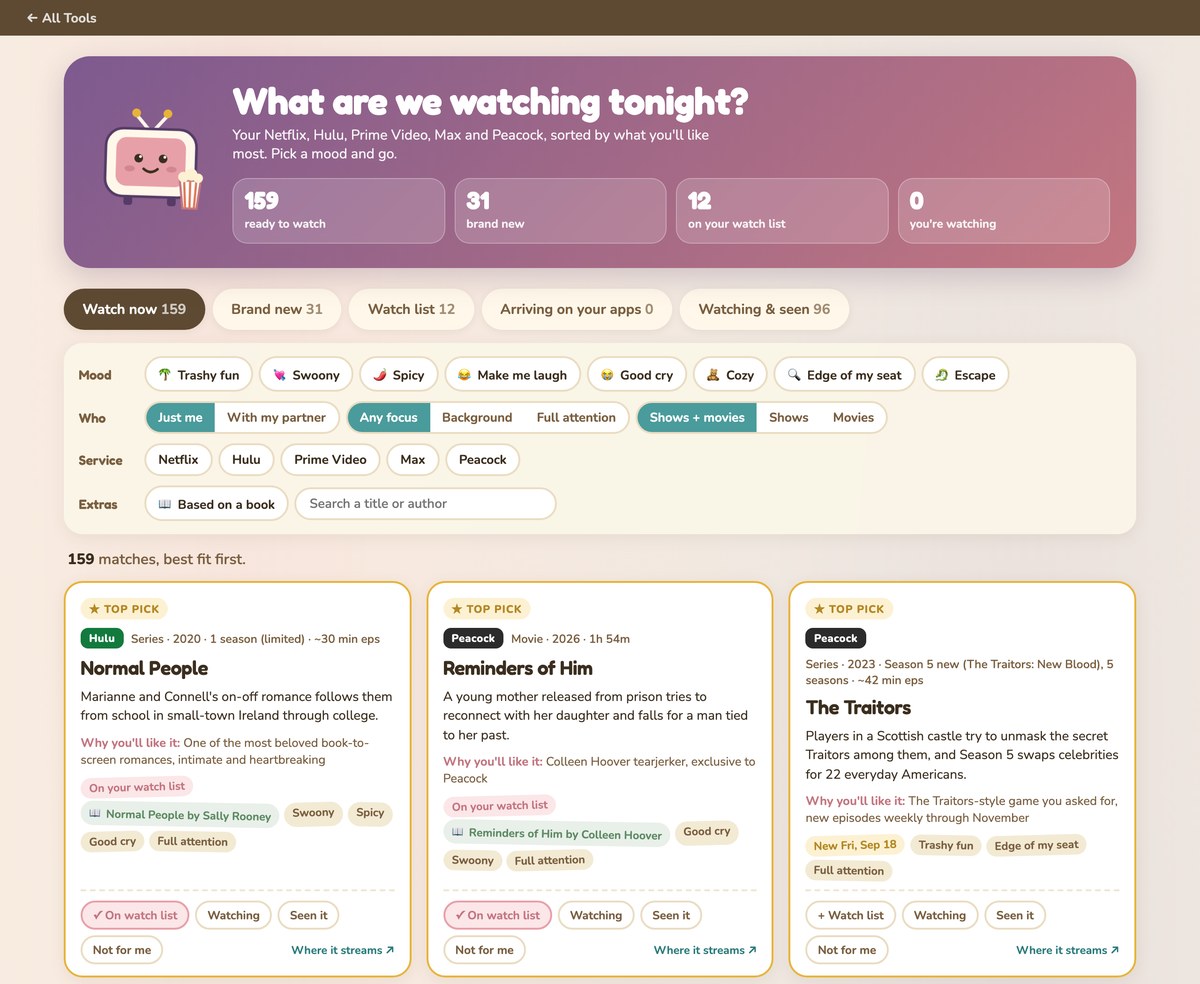
The first list. When I built Tonight’s Watch, Claude asked me what I watch and what I won’t. Love Is Blind and The Ultimatum style dating shows yes, island party shows yes, Bachelor style no. Romance of every kind. Anything from a book. Never horror, never subtitles. Then five Claude agents researched my five services and came back with 279 titles that fit, each confirmed on JustWatch or the service’s own site.
The Sunday refresh. Every Sunday morning, a scheduled task in Claude Code reads my whole list and then does four jobs. It moves anything that’s premiered from upcoming to streaming. It searches what’s new on my services and what’s announced for the next six months, and adds what fits. It catches new seasons of shows already on the list, so they don’t turn into duplicates. And it searches what’s leaving each service, then marks those titles as gone. It aims for 10 to 30 changes a week, and it has one hard rule: research everything, guess nothing.
My marks stay mine. The refresh never touches the buttons I tap. So far I’ve marked 66 titles as seen, 30 as not for me and 12 for my watch list, and none of that gets overwritten on Sunday.
His page. The Keep runs on the same setup with his own table and his own Sunday refresh, so his crime shows never leak into my romance shelf. It has a big Pick for me button for nights he doesn’t want to choose, and a rewatch shelf, because he will absolutely watch The Sopranos again. His feedback changed both dashboards, too. He told me the coming soon section was mostly old movies landing on a service, not actually new stuff. So now both pages split brand new from arriving on your apps.
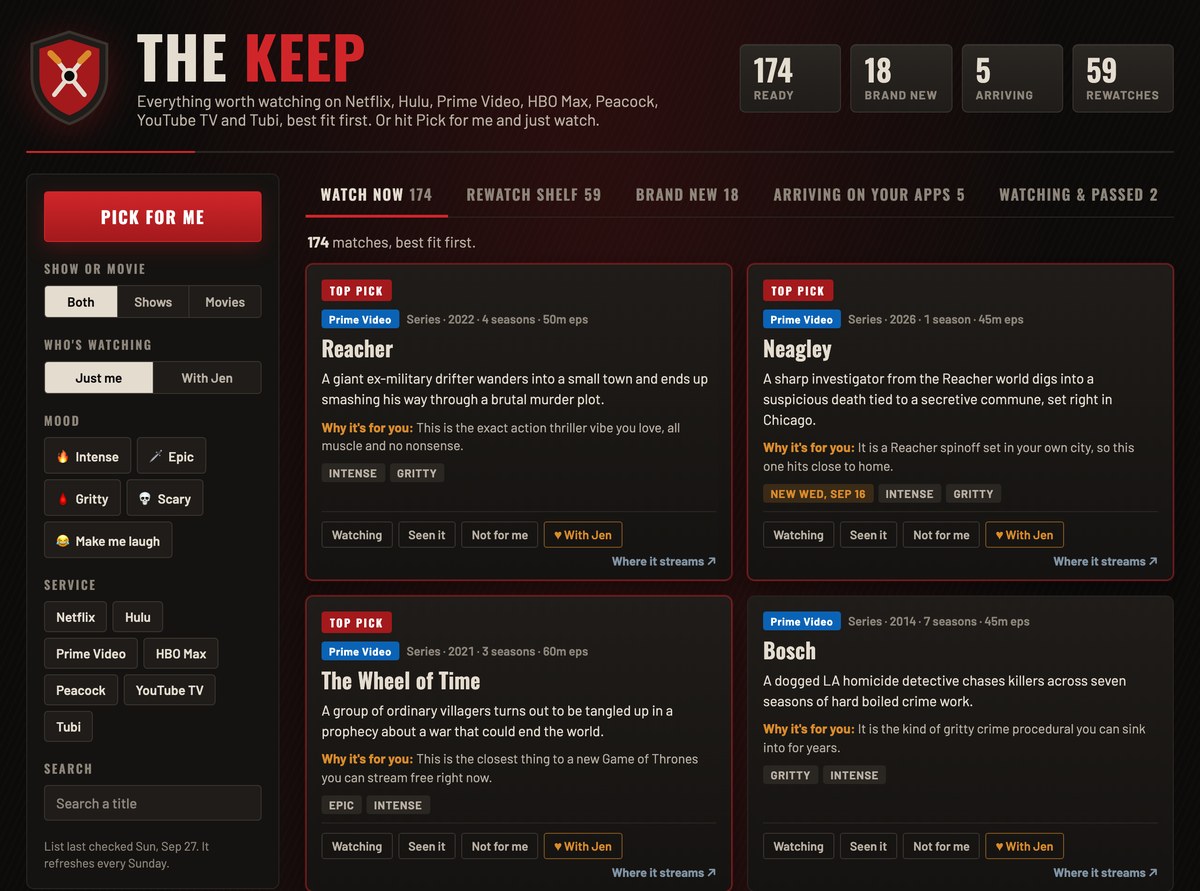
The badge. On his page, I see a With Jen button on every card. When I tap it, he sees a Watch with Jen badge on that title. Only I can set it, and right now there are six of them waiting for us.
Get the generator
The generator below asks which streaming services you pay for, what you love, what you’ll never watch and whether it’s just you or two of you. Kernel, a popcorn bucket, fills up as you add services.
Then it writes a prompt you paste into Claude, with web search on, to build your own what-to-watch list from only those services. If you pick the weekly option, you also get a refresh prompt you can schedule in Claude Code, so new seasons and new releases show up without you hunting for them. Pick two of you, and each person’s taste and hard nos get their own section, plus a watch together flag only you can set.
What it doesn’t do
It doesn’t know what’s streaming on its own. Everything comes from Claude checking JustWatch and the services’ sites, and streaming catalogs change all the time. A title can leave before Sunday catches it.
It doesn’t play anything or connect to your accounts. You still open the app and press play. And the generator only writes prompts. It doesn’t see your services or build anything until you paste the prompt into Claude.
Mine has rough edges too. The first version put old movies in the coming soon section, which my husband pointed out within a few days. And my arriving on your apps tab is empty right now, because most of what was arriving turned out to be new seasons, which live in brand new instead.
Frequently asked questions
How do I find what to watch on my streaming services?
Make a list from only the services you pay for, filtered to your taste. I keep mine in Airtable and let Claude research it, checking JustWatch and each service’s site before anything gets added. A weekly refresh keeps new releases coming in and marks what’s leaving.
Can Claude tell me what’s streaming on Netflix?
Yes, if web search is on. Ask it to check JustWatch or Netflix’s own site and to only list titles it confirmed. Tell it to leave out anything it can’t confirm, because catalogs change often.
How do I keep a watchlist across Netflix, Hulu and other apps?
Keep one list outside the apps, with a column for the service. A spreadsheet or an Airtable table works. Mine has a watch list tab plus seen and not for me buttons, so the whole picture lives in one place.
What’s the best way to pick a show when two people have different taste?
Give each person their own list, plus a way to flag what you’ll watch together. My husband and I have separate dashboards, and I can mark titles on his so he sees a Watch with Jen badge.
How do I know when a show is leaving my streaming service?
Have something check for you every week. My Sunday refresh searches what’s leaving each of my services this month and next, and marks those titles as gone. If a title moves to another service I pay for, it updates the service instead of dropping it.
Try it yourself
The easiest way to know what to watch on your streaming services is a list built from only the services you pay for, filtered to your taste and refreshed every week. Use the generator above to write your prompt, paste it into Claude with web search on, and you’ll have your own list tonight.
If you like small tools for your own house, I also built a meal planner that saves recipes from blogs and a reading tracker in Airtable.
A tool I built
Subscription Graveyard
Bury the subscriptions you’ve canceled, give each one a tombstone, and watch what you’re saving pile up.
Bury your first one →I run an affiliate program on the tools I build. Approved affiliates earn 20% on what their referrals pay, for up to a year. US only for now. See the program →
Related reading
- I Built a Meal Planner App to Save Recipes From Websites
- Build a Reading Tracker With Airtable and n8n
- How I Stopped Rebuilding Things I’d Already Built
- My Irregular Income Tracker Counts Money Before It’s Paid
Subscribe if you haven’t already. I’ll keep building little tools for our house and writing up how they work, broken parts included. In the meantime, go forth and automate the boring stuff.