My Christmas gift tracker keeps every gift, a budget I can shift between people, and the prizes and supplies for our family party games in one place. It runs on Airtable, a dashboard page I can tap on my phone, and an n8n email every Sunday morning with a countdown to the next party. Online gifts get an order-by date 10 days before the party, so nothing ships too late.

This post contains affiliate links. If you sign up through one, I earn a commission at no extra cost to you. I only point to tools I actually use or would recommend.
The year I stopped planning on sticky notes
We’re a last-minute mess most of the time. I want to change that this year.
My old system was a list. Who I’m buying for, about how much I want to spend, and some ideas. My sister and I also plan games for our family parties, and that comes with its own pile: game ideas, supplies to set them up, and a lot of little prizes. Last year we panicked about prizes we already had, which I wrote up over on the holiday gift planner post at Admin Arcade. This year I wanted all of it in one spot before December showed up.
So in late September I built Gift Desk with Claude Code. The first version was only an Airtable base and an email. The same day, I asked for a dashboard, because putting things into Airtable is annoying. I wanted to tap a button on my phone and mark something bought, not scroll a grid.
I’ve been using it for about three and a half weeks now, and we’re still in the messy before part. I don’t know for sure who’s hosting, where we’re going or who’s coming. But having the whole setup ready, I automatically feel a little more organized.
What does a Christmas gift tracker do?
A Christmas gift tracker keeps one list of everyone you’re buying for, what you’re getting them, what it costs and where each gift is in the process. Mine adds three things a plain list doesn’t: an order-by date for anything shipping, a budget I can move around, and a section for party games.
Every gift moves through five steps:
- Idea. I’ve thought of it.
- Bought. It’s paid for.
- Arrived. It’s in the house.
- Wrapped. I wanted this step instead of “shipped,” because wrapping is where I fall behind.
- Given. Done.
Each gift can also carry a link, a price, online or in store, a hiding spot and a receipt photo. People get a budget, sizes, likes and a list of what I gave them in past years. Gift types cover a main gift, a stocking stuffer, From Santa and a game prize.
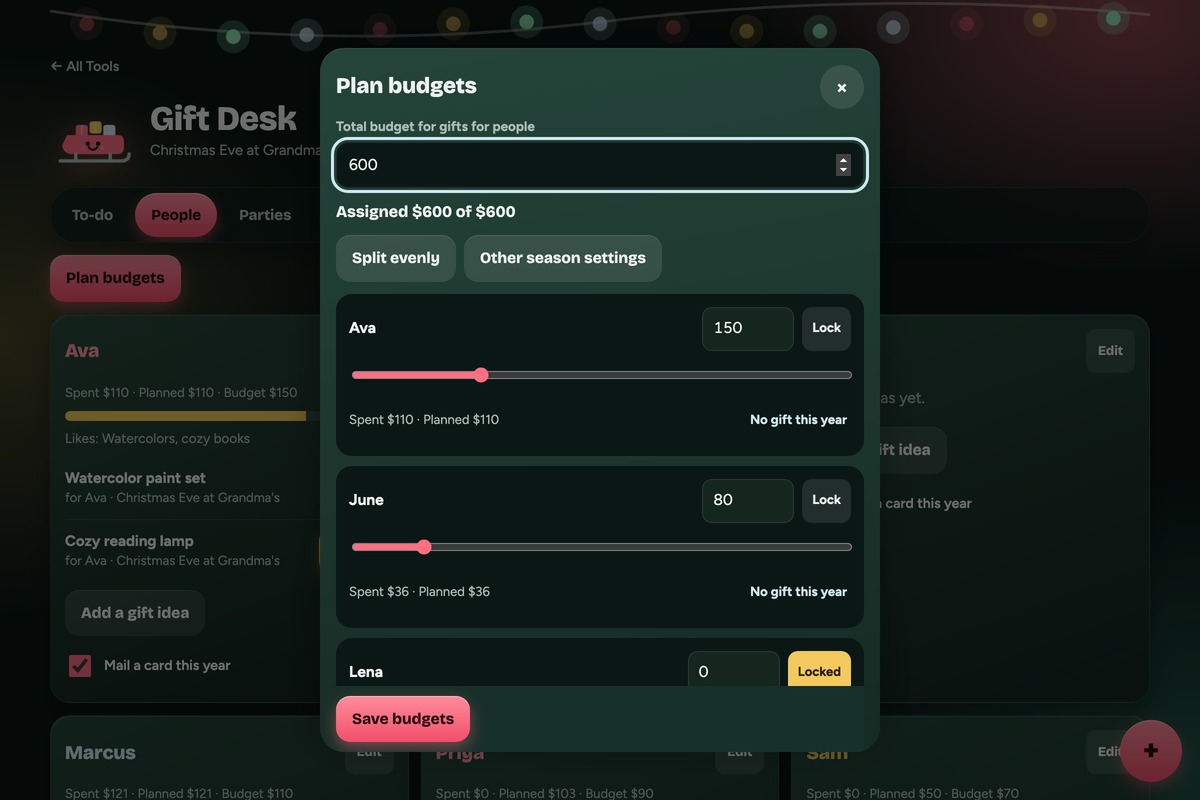
That’s my real Gift Desk page filled with made-up people and parties, since my own list has my family’s names on it. The little guy in the corner is Skid, a sleigh with a smile.
The best part, for me, is the budget. I set one total, then split it with sliders instead of dividing it evenly. It’s so easy to go overboard on my sister, so someone else might get something a little smaller. What you spend depends on your relationship with each person, and the planner lets the budget follow that. If someone isn’t getting a gift this year, I mark them No gift and they drop to $0. And since we still have time, I can change the total itself whenever I want.
The page tracks money two ways. Planned counts every gift on the list. Spent only counts gifts bought or further along. If what I’ve spent on someone passes their budget, they show up as Over budget. If I haven’t spent it yet but my plans add up to more, they show up as Heading over, which is the warning I need before it’s too late.
Who is a Christmas gift tracker for?
This one is for you if you buy for enough people to lose track, you shop both online and in stores, and you want a nudge before the shipping deadlines sneak up. It’s also for anyone who hosts or helps with party games, since that part tends to live on a sticky note somewhere.
Skip building one if any of these sounds like you:
- You buy for five people. A note on your phone is plenty.
- You want it done in five minutes. The free holiday gift planner on Admin Arcade runs in your browser with no login. Nothing to build.
- You won’t open it. The email helps, but the list only works if you update it when you buy something.
There are three ways to do this, depending on how much setup you want:
| No-login planner | Google Sheets tracker | Airtable + n8n (mine) | |
|---|---|---|---|
| What you set up | Nothing | One spreadsheet | A base, a workflow and a page |
| Order-by dates | Yes | Yes, with a formula | Yes, per gift |
| Budget split between people | Yes | Yes | Yes, with sliders on my dashboard |
| Party games, supplies and prizes | A stash list | Its own tab | Linked to each game |
| Weekly reminder email | No | With n8n or a calendar reminder | Yes, every Sunday |
| Works on your phone | Yes | Yes | Yes, through my dashboard |
What do you need to build a Christmas gift tracker?
You need somewhere to keep the list. Everything past that is optional.
- Airtable or Google Sheets. Airtable is what mine runs on. Airtable says its free plan is built for individual users and very small teams. Google Sheets works fine too, and the generator below writes setup steps for either one.
- n8n, if you want the Sunday email. Mine is self-hosted on a Hostinger VPS. No n8n? A recurring calendar reminder does the same job with less polish.
- Claude Code or any AI chat. I built mine with Claude Code. The generator’s prompt works in Claude, ChatGPT or whichever chat you use.
- A dashboard, optional. Mine is a page on a Cloudflare Worker I already run for my other personal dashboards, like the ones in my Pilates progress tracker. You can skip it and use Airtable’s own app or the Sheets app.
There’s no AI call in the tracker itself. The email and the dashboard read the base and do the math in plain code.
How does a Christmas gift tracker work?
Every gift links to a party, every order-by date counts back from that party, and a Sunday email tells me what’s coming due.
The base holds everything. Mine has tables for the season, parties, people, gifts, games, supplies, prize groups and cards. A gift links to a person and a party. A game prize links to a game, and the game links to a party. The season row holds the total budget, a separate prize budget and the mail-by date for cards.
Order-by dates come from the party date. Anything bought online gets an order-by date 10 days before its party. I can type my own date on any gift when something ships slow. Gifts I’ll buy in a store get no order-by date, since there’s nothing to wait on. If I leave “where” blank but paste a link, it counts as online.
The Sunday email is the countdown. Every Sunday at 7:30am, n8n reads the base and sends me a check-in. It leads with the next party and how many days away it is. Then it lists what to order soon, what’s bought but not wrapped for a party this week, who’s over budget or heading over, game supplies to get and game prizes still to get. On any other day, it only emails if something hits its order-by date that day.
Right now the subject line says Mom’s House is 67 days away. Sixty-seven days doesn’t move me. When it says 7 days, I’ll need to get my butt in gear, and that’s the kick I built it for. The email also sends nothing at all when nothing is due, so it never turns into noise I learn to ignore.
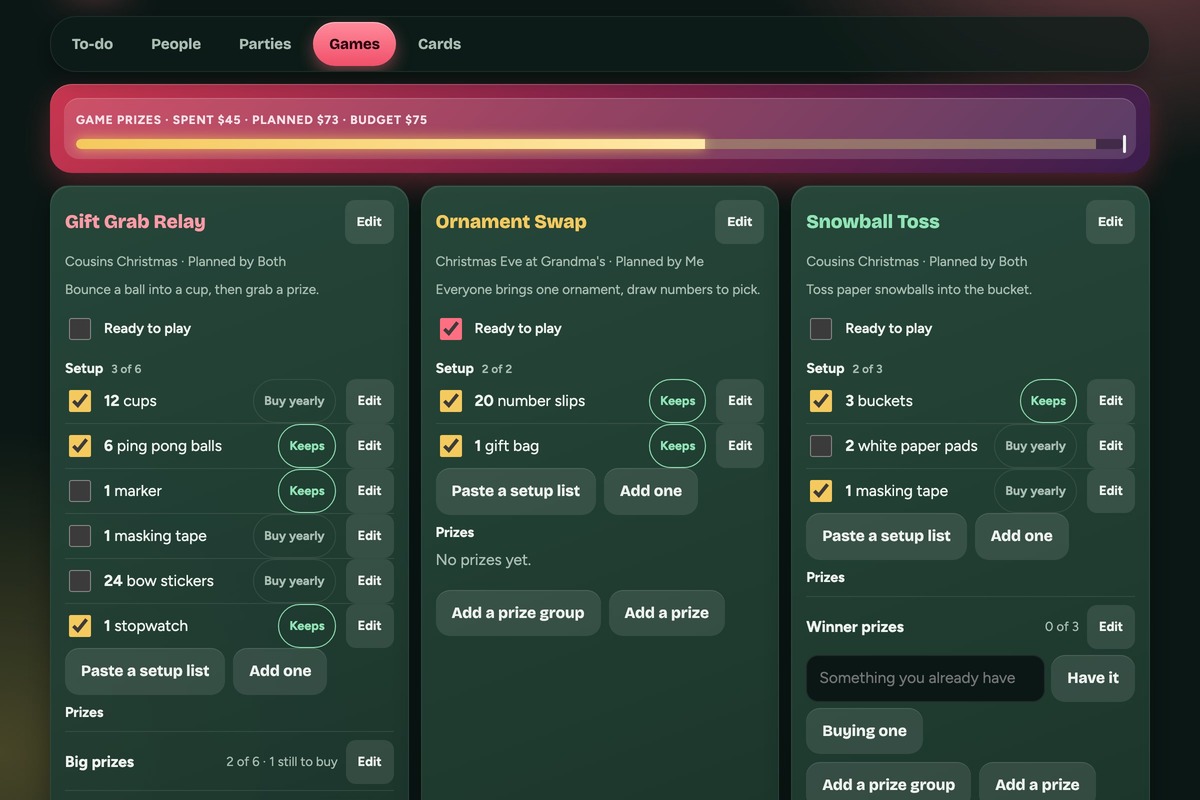
Games get their own tab. Each game has a setup list and prize groups. I can paste a whole setup list at once, like “12 cups, ping pong balls, marker,” and it splits into separate items with quantities. Each supply is marked Keeps (we reuse it every year) or Buy yearly. Prize groups have counts. For the Saran Wrap Ball game, I need 8 prizes too big for the ball and 100 little ones. The email says how many I’ve got and how many are left to go, so we’re counting from the start this time instead of guessing in December. A lot of our prizes are products I reviewed, and I wrote about what I do with Amazon Influencer products after I film them over on Seeding Serendipity.
A game with no party this year stays in a game library, so next year I can just pick it to play again.
Cards have a mail-by date. Each person can get a gift, a mailed card or both. Cards go from To write to Written to Mailed, and the email starts listing unmailed cards 14 days before the mail-by date. I set mine to December 17, from the USPS 2026 holiday shipping dates, which list First-Class Mail by December 17 for arrival by December 25 in the contiguous US. If you still need cards, I reviewed a box of pink Christmas cards over on Jen Tried It.
Get the generator
My tracker is built around my family, my two parties and our games, so a copy of it would be mostly my stuff. The generator asks about your holidays instead: who you buy for, your gatherings and dates, your budget and how you want it split, how you shop, whether you host games, whether you mail cards, and which extras you want. You also pick Airtable or Google Sheets, and how you want reminders.
Then it writes you a skill for Claude Code, a prompt you can paste into any chat, or both. The rules from above come built in, like order-by dates only for online gifts and Spent only counting what’s bought.
The skill file goes in a .claude/skills folder. The prompt gets pasted into Claude, ChatGPT or whichever chat you use, and it walks you through setting up your base or sheet one step at a time.
What it doesn’t do
It doesn’t plan the food. Holiday food prep came up when I started, and I left it out. Gifts and games were enough for version one.
It’s only for me, for now. My sister and I plan the games together, but she doesn’t log in. That’s fine this year.
It doesn’t know shipping times. Ten days is my default, not a promise from any carrier. If something ships from far away, I type my own order-by date.
It can’t help until the plans exist. Right now my parties have no confirmed dates, and an order-by date needs a party date to count back from.
I don’t love how it looks yet. The dashboard got a brighter redesign in October, and there’s still something about it I can’t put my finger on. Since it’s only for me, it doesn’t matter much. I’ll figure out what’s bugging me once I’m in it every day.
Frequently asked questions
Can I make a Christmas gift tracker in Google Sheets?
Yes. Make one row per gift with columns for person, item, price, where you’re buying it, step and order-by date, then a second tab for each person’s budget. The generator in this post writes Google Sheets setup steps if you pick Sheets.
How far ahead should I order Christmas gifts online?
I set mine to 10 days before each party, and I change it per gift when something ships slow. Carriers publish their own holiday cutoffs every fall, so check the one your store uses. USPS lists December 17 for First-Class Mail to arrive by December 25 in 2026.
How do I split a Christmas gift budget between people?
Start with one total, then give each person a share based on your relationship with them, not an even split. My tracker uses sliders, so raising one person’s budget pulls from the others and the total stays the same. People you’re skipping this year get $0.
Should party game prizes count toward my gift budget?
I keep them separate. My prize budget sits on top of the gift total, so a pile of little prizes doesn’t make it look like I overspent on people. The email shows gifts for people and game prizes as two lines.
Do I need n8n for a Christmas gift tracker?
No. n8n sends my Sunday email and order-today alerts, but the tracker works without it. A weekly calendar reminder to open your list does the same basic job.
What should a Christmas gift tracker include?
At minimum: each person, the gift, the price, where you’re buying it and what step it’s at. Order-by dates, a hiding spot, receipt photos and past years’ gifts are the extras I use most.
Try it yourself
A Christmas gift tracker is a list of people and gifts with a budget, a step for each gift and a date to order by. Start with the generator above, add everyone you’re buying for and one party date, and let the order-by dates fill in from there. It’s late October, so there’s still time to start before the mess does.
A book I made
Your Aunt, No Filter
A guided journal of real questions from her nieces and nephews, made for the aunt who’d rather skip the small talk. She writes the answers, then hands it back to you.
Ask her the real stuff →I run an affiliate program on the tools I build. Approved affiliates earn 20% on what their referrals pay, for up to a year. US only for now. See the program →
Related reading
- My Pilates Progress Tracker: 79 Classes, 24 Moves, One Base
- Build Your Own Reading Tracker With Airtable and n8n
- My Irregular Income Tracker Counts Money Before It’s Paid
- What to Watch on My Streaming Services: 2 Dashboards
Subscribe if you haven’t yet, and go get your list started before December gets here.