My n8n monitoring dashboard is one page with a pulse line for every active workflow. Each hour a workflow runs, its line gets a beat. A failed run turns the beat red, and a workflow that stops running goes flat. It also shows roughly what each run costs. I open it every morning, and I don’t have to wonder if something failed or never fired.

I took the reply literally
A while back I wrote about an n8n schedule trigger that never ran for seven weeks. Nothing was in the error log, because nothing had errored. The workflow just never fired, and I had no idea.
I tweeted that post out, and somebody replied saying I needed a heartbeat log. I’ve looked for the reply since and I can’t find it. I took him literally and built an actual heartbeat for my n8n workflows.
Now every single day I look at the Heartbeat page in the morning, just to see how everything is doing. It’s all right there on one page. And since the cost column went in, if I all of a sudden see my API charges go up, I can get an idea of which workflow it’s coming from.
What does an n8n monitoring dashboard do?
It answers one question per workflow: is this thing still running the way it’s supposed to? Mine sorts every active workflow into one of six states:
- Steady. It ran when it was supposed to.
- Skipped a beat. It’s late. More than 1.25 times its normal gap has passed since the last run.
- Flatlined. More than twice its normal gap has passed. Something stopped.
- Last run failed. It ran, and the run errored.
- Waiting. A monthly job the page hasn’t seen run yet.
- On call. It starts from a webhook, a form or an email, so there’s no schedule to be late for.
As I write this, the page is tracking 147 active workflows: 95 steady, 51 on call and 1 waiting. They ran 3,683 times in the last 48 hours.
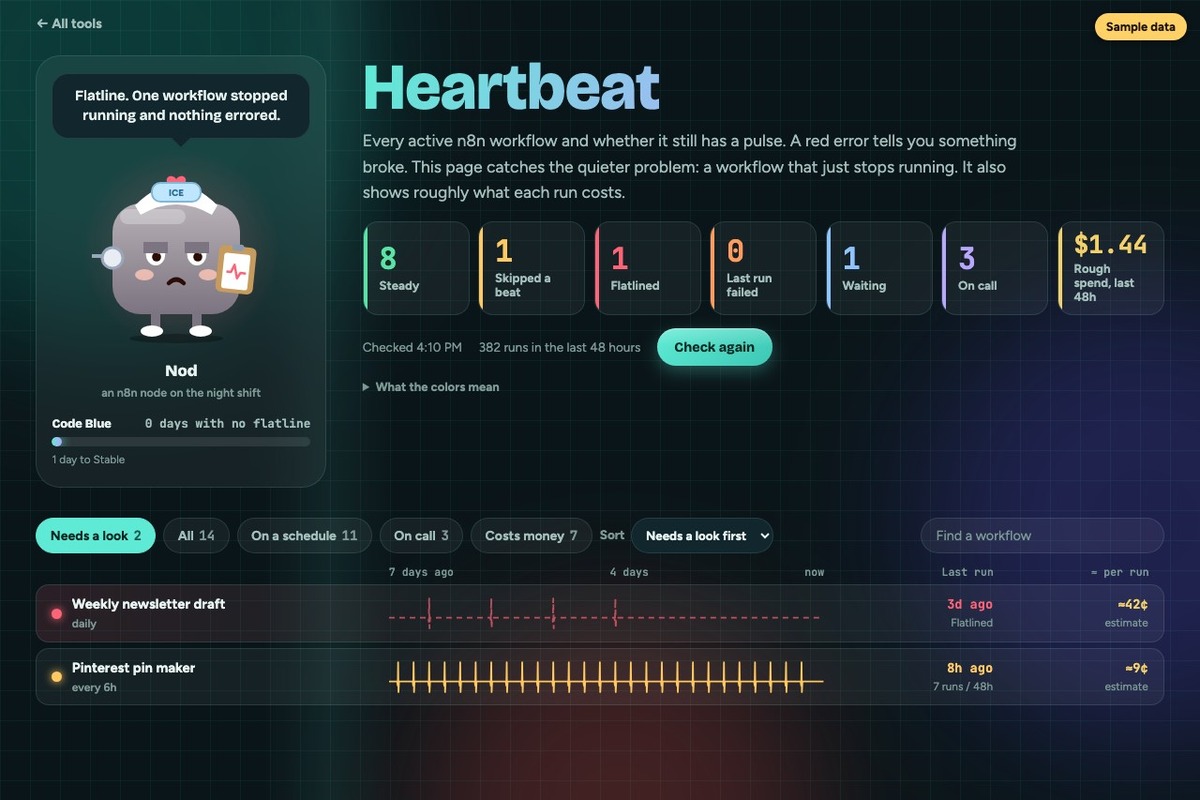
That screenshot is my real page fed made-up workflows, so you can see what a flatline looks like without me breaking something on purpose. The little guy is Nod, an n8n node on the night shift. When something flatlines he gets an ice pack and a frown. There’s also a streak counter for days in a row with no flatline, with ranks from Just Admitted up to Marathon Heart at 90 days. A monitoring page doesn’t need ranks. I asked for them anyway.
Who is an n8n monitoring dashboard for?
It’s for you if you have enough workflows to lose track of them, and at least a few run on a schedule. Scheduled workflows are the ones that go missing without an error.
Skip it if any of these sounds like you:
- You have five workflows. Open n8n and look at the executions list. A dashboard for five things is a hobby project (no judgment).
- Everything you run starts from a webhook. The page can’t tell a broken webhook from a slow day. Both look like nothing happening.
- You want to be told, and never want to go look. This is a page I open. The emails come from two other workflows, and I’d build those first.
The three pieces do different jobs:
| Error workflow | Schedule watchdog | Heartbeat page | |
|---|---|---|---|
| Catches | A run that errored | A schedule that never fired | Both, plus how often and what it costs |
| How I find out | It emails me | It emails me | I open the page |
| Shows every workflow at once | No | No | Yes |
| Shows runs per workflow | No | No | Yes |
| Build it first? | Yes | Second | Third |
I wrote up the n8n error workflow and the schedule watchdog already. The Heartbeat page sits on top of both.
What do you need to build an n8n monitoring dashboard?
- n8n with its API turned on. The page reads workflows and executions through it. Mine is self-hosted on a Hostinger VPS.
- One small n8n workflow to build the feed. It boils everything down to a short summary the page can read.
- Somewhere to put a web page. Mine is a page on a Cloudflare Worker I already had, behind my own login.
- A list of how often each scheduled workflow should run. Mine comes from the table my schedule watchdog already keeps in Airtable.
- A small place to store history. n8n forgets old runs, so the week of history lives outside it. I’ll get to why.
There’s no AI call anywhere in it. Looking at the page costs nothing per view.
How does an n8n monitoring dashboard work?
n8n builds a feed. The page doesn’t ask n8n for the list of active workflows directly. The list for my setup is about 5.8 MB, because it includes every node of every workflow. So a small n8n workflow does the reading and hands back a few fields per workflow: its name, how it starts, how often it’s supposed to run, when it last ran, whether that run worked, and one beat for each hour it ran.
The page only draws. It fetches the feed through my Worker, which adds a secret header so nobody else can call it. The n8n API key never gets near the browser. The Worker also holds on to each answer for 60 seconds, so hitting refresh ten times doesn’t run the feed ten times.
The feed doesn’t save its own runs. The feed workflow is set to not save successful executions. Otherwise every look at the page would use up a slot in n8n’s execution history, which is the exact history the page is trying to read.
The week lives outside n8n. n8n prunes old executions, and at my volume it holds about two and a half days. So once an hour, my Worker saves that hour’s beats to its own small store and keeps 168 hours. The first version of the page showed 48 hours. Now each line runs a full week.
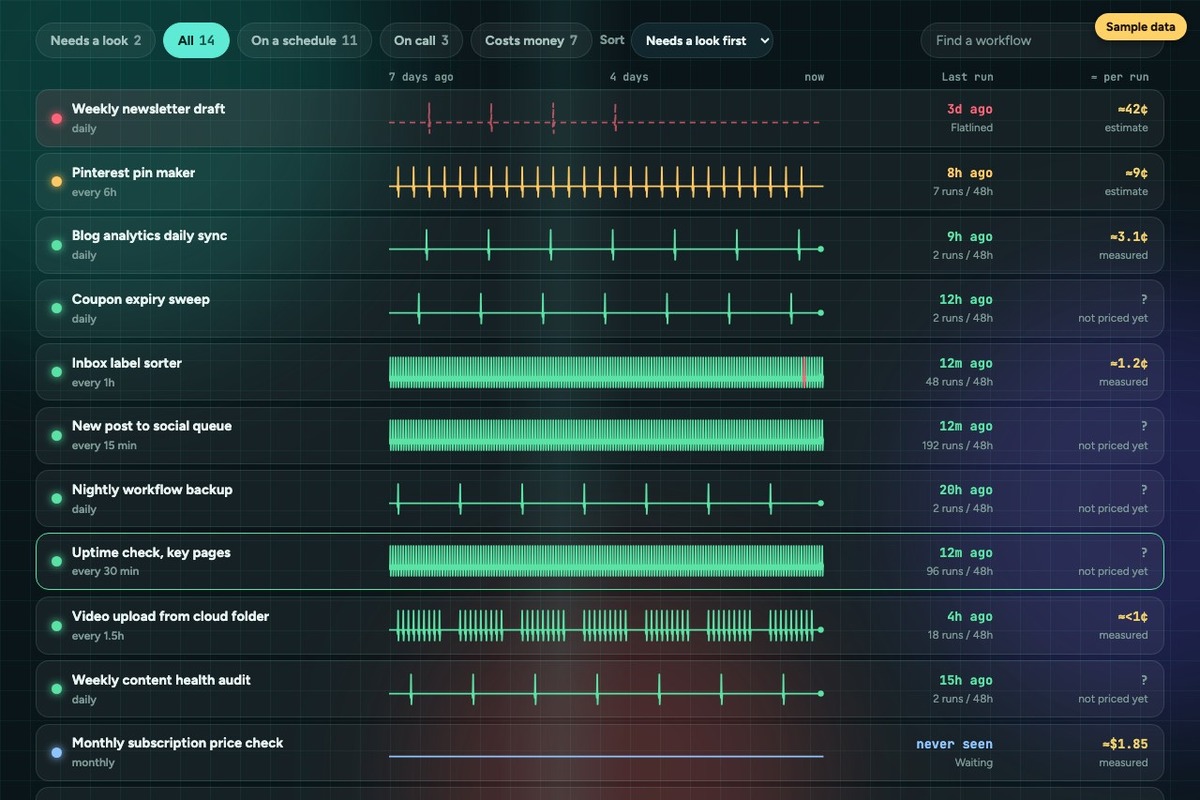
Costs come from each run’s own numbers. For workflows calling an AI model, the cost per run is worked out from the tokens the run reports, at the provider’s listed price. Some are measured and some are estimates, and the page labels which is which. When the column went in on October 4, 116 of my workflows cost nothing to run and 32 made paid calls.
Building the page turned up a bug in something else. My schedule watchdog was reading a schedule like “every 15 minutes between 5am and 10pm” as a once-a-day job. The pulse line made it obvious, because a workflow with dozens of beats a day was being held to a 24-hour standard. That’s fixed now, and the watchdog is better for it.
It also showed me something I haven’t dealt with. Some of my workflows run a lot more often than they should. I prefer to have things fire by a webhook, so they only run as much as they need to. The ones polling on a timer are the problem. Right now 14 workflows on a schedule of 30 minutes or less account for 81% of all my runs, and two of them run every 5 minutes, 576 times each in 48 hours. It’s something I saw and just haven’t acted on yet.
Get the generator
My page is built around my workflows, my watchdog table and a mascot with an ice pack, so a copy of it would be mostly things you’d throw out. The generator asks about your setup instead: where your n8n runs, a few of your workflows and how often each should run, how strict you want “late” and “flatline” to be, and whether you want cost per run, a week of history and a streak.
You’ll see a sample monitor build while you type. Then it writes you a skill for Claude Code, a prompt you can paste into any chat, or both. The lessons from the section above are already in there, including the one about schedules with an hours window.
The skill file goes in a .claude/skills folder. The prompt gets pasted into Claude, ChatGPT or whichever chat you use, and it walks you through the build one step at a time.
What it doesn’t do
It doesn’t tell me anything. If I don’t open the page, I don’t see the flatline. The error workflow and the watchdog are still what email me.
It can’t judge anything on call. A webhook with no calls yet and a webhook that’s broken draw the same empty line.
It doesn’t fix what it shows. The polling workflows above are still polling.
Some costs are estimates. When a service doesn’t report usage on the run, the number is worked out from a typical run, and it’s marked as an estimate on the page.
New scheduled workflows start as Waiting. The expected schedules come from the watchdog’s table, and the watchdog updates it once a morning. A workflow I create at noon shows Waiting until the next day.
It’s private. The page is behind my login, and it lists every workflow I run by name. The screenshots here use made-up names for the same reason.
Frequently asked questions
Does n8n have a built-in monitoring dashboard?
n8n has an executions list of recent runs, and its docs describe an Insights banner with seven days of totals, failures and failure rate, plus a fuller Insights dashboard on some plans. Those count runs that happened. A workflow that should have run and didn’t leaves nothing to count, and that gap is why I built a separate page.
How do I know if an n8n workflow stopped running?
Compare the time since its last run to how often it’s supposed to run. My page calls a workflow late at more than 1.25 times its normal gap and flatlined at more than twice. A workflow on a daily schedule flatlines after 48 hours with no run.
How long does n8n keep execution history?
It depends on your pruning settings and how much you run. At my volume, about 3,700 runs every two days, mine holds roughly two and a half days. To show a full week, my page saves its own hourly record outside n8n.
Can I see what each n8n workflow costs to run?
Yes, for workflows calling a paid service. Mine works out cost per run from the usage the run reports, at the provider’s listed price, and labels anything it had to estimate. Workflows with no paid calls show as costing nothing.
Will a monitoring dashboard slow down n8n?
Mine adds one small workflow that runs when the page asks for it, at most once a minute because the answer is cached for 60 seconds. It’s set to not save its successful runs, so it doesn’t fill the execution history either.
Does this replace an n8n error workflow?
No. An error workflow emails you the moment a run fails. The dashboard is a page you choose to look at. I’d set up the error workflow first and add the dashboard once you have more workflows than you can keep in your head.
Try it yourself
An n8n monitoring dashboard is a small feed workflow, a page to draw it and a rule for how late is too late. Start with the generator above and three of your scheduled workflows. To test it, pause one harmless workflow, watch it go late and then flat, and turn it back on.
A tool I built
Emergency Fund Aquarium
Log what you save at your own bank and watch your tank fill with creatures. Your money never moves through the app.
Start your tank →I run an affiliate program on the tools I build. Approved affiliates earn 20% on what their referrals pay, for up to a year. US only for now. See the program →
Related reading
- n8n Schedule Trigger Not Working? Mine Never Ran for 7 Weeks
- n8n Error Workflow: How I Stop Finding Out Days Later
- My Software Bill Is $583 a Month. The Blog Is $328.
- Does Automation Save Time? I Automated My Way Into Overwhelm
Subscribe if you haven’t already, and go check on your workflows. One of them might be taking a very long nap.