
To repurpose PLR, change it so much it becomes yours. I built a tool that reads each PLR pack on two levels: what it’s about and what it does. A moving planner is really a countdown checklist. It keeps the structure, moves it to a topic my readers care about, and suggests a new format, like a micro app or a printable. In about two weeks, spreadsheets I’d ignored for ages turned into two published posts.

This post contains affiliate links. If you sign up through one, I earn a commission at no extra cost to you. I only point to tools I actually use or would recommend.
The spreadsheets I paid for and never touched
I was paying for a Spreadsheetables membership. They make super cool Google Sheets templates that you’re allowed to rebrand and sell as your own, and a new one shows up every month. So every month I got another cool spreadsheet, and every month I did nothing with it.
Of course I overwhelmed myself. A lot of the members over there build sheets to sell on Etsy and sites like that. I never got into Google Sheets that way like I planned to. I took a different turn, into building small apps and tools. I canceled the membership because I was just hoarding the spreadsheets. They’re still an amazing membership. I just wasn’t using them.
That left me with around 230 packs in an Airtable table, nearly all spreadsheets plus some Canva templates. Every one was marked “Never Processed.” I’d already built an n8n workflow that scores old PLR to tell me which packs were worth reviving. Scoring told me what to keep. It didn’t tell me what to make, so I built the PLR Repurpose Studio for that part.
It wasn’t only spreadsheets, either. I had a whole backlog of other PLR too, like articles and ebooks. Hoarding PLR used to be a nice way for me to feel productive while procrastinating.
What does a PLR repurposing tool do?
A PLR repurposing tool takes a pack you own and suggests what NEW thing you could make from it, so you’re not reposting the original. Mine reads one pack at a time and comes back with 8 ideas, 2 for each of my four blogs. Each idea names a format, like a micro app, a printable, a generator or a post.
The page has seven parts:
- Today’s pick. One fresh pack I haven’t made anything from yet, chosen at random. It changes at midnight, and there’s a button for “give me a different one.”
- Ideas per pack. One click and Claude reads the pack and writes the 8 ideas, with a fit call for each blog: Strong, Maybe or Skip.
- Save to my list. Any idea I like goes into my content ideas table with one click, tagged with where it came from, and there’s an Undo.
- Bundle mode. Check 2 or 3 related packs and it suggests one bigger product that combines them.
- Build prompt. For an idea I want to make, it writes a prompt I can paste into a fresh Claude Code session to build it.
- “I made something.” Marks the pack as done and saves the link. The page ranks me from Collector up to Alchemist by how many packs I’ve turned into something, which is a little ridiculous and I love it.
- Describe it. 118 of my packs had no description at all, so there’s a box to add one. That gives Claude more to work with than a file name.
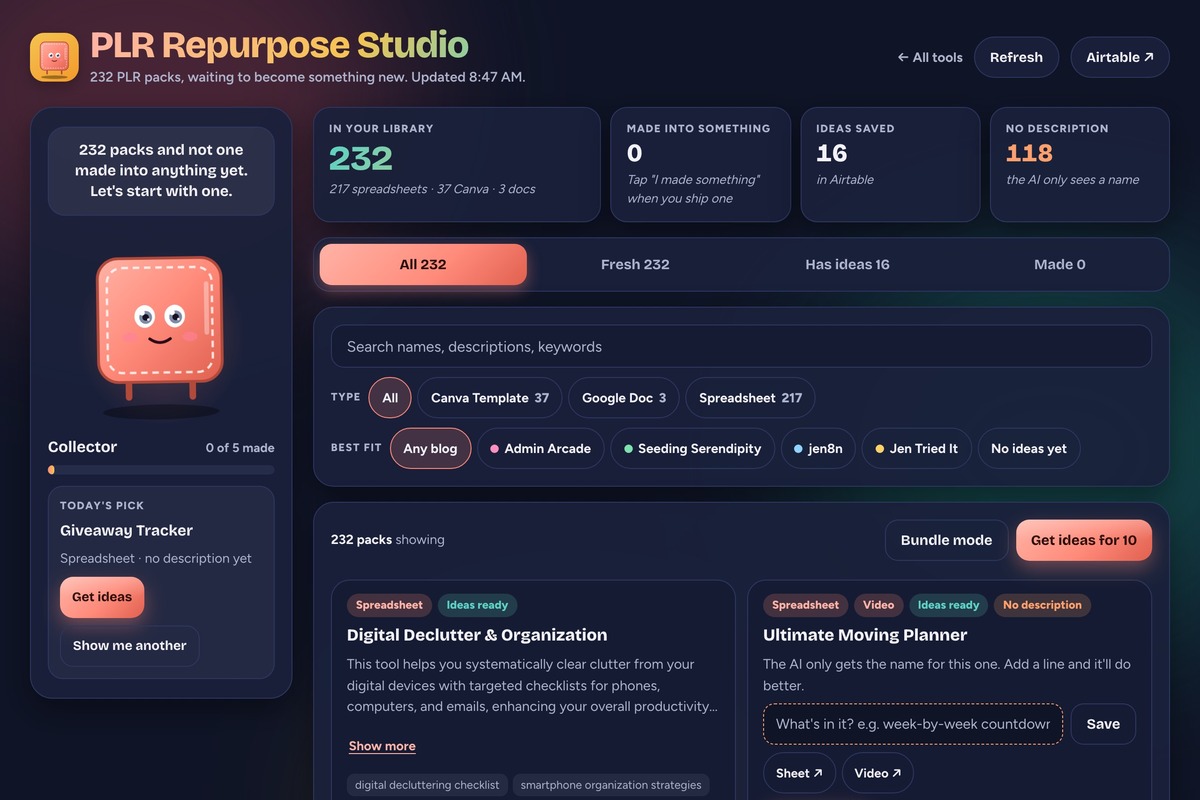
I mostly just go in and generate ideas. That’s how both of the posts so far happened. I was clicking around, an idea jumped out, I liked it, and I hit the button to add it to my list.
Who is a PLR repurposing tool for?
A PLR repurposing tool is for anyone who bought PLR in bulk, back when it felt like such a deal, and never got the most out of it. If you have folders of ebooks, planners, templates or spreadsheets you swore you’d use someday, this is for you.
It’s a good fit if:
- You own a pile of PLR and feel guilty every time you see the folder
- You make things in a different format than the PLR came in (I buy spreadsheets and make micro apps)
- You run more than one blog, shop or newsletter and want ideas sorted by where they belong
- You want ideas to pick from, not a finished product
Skip it if:
- You’re happy selling the PLR close to how it came, like rebranded sheets on Etsy. Spreadsheetables is great for that, and you don’t need this.
- You don’t own any PLR yet. Buying more to feed the tool is how I got here in the first place.
- You want the tool to make the thing for you. It hands you ideas. You still build them.
What do you need to build a PLR repurposing tool?
To build your own PLR repurposing tool you need somewhere to list your packs and an AI model to read them. The rest is up to you. Mine has five pieces:
| Piece | What it does in my build | Free or paid |
|---|---|---|
| Airtable | Holds every pack (name, type, description, keywords) and saves the ideas | Has a free plan. I’m on the Team plan |
| Claude (Sonnet 5.5) | Reads each pack and writes the 8 ideas | Paid, billed per use |
| A second Airtable table | My running list of post ideas, where saved ideas land | Same Airtable account |
| Cloudflare Workers | Hosts the page and talks to Airtable and Claude for it | Free plan covers 100,000 requests a day |
| Claude Code | How I built the whole thing | Needs a paid Claude plan or API credits |
You don’t need any of that to try the idea, though. The generator further down writes you a version that runs in any AI chat. Paste in a pack’s name and what’s in it, and you get the same kind of ideas back.
How does a PLR repurposing tool work?
A PLR repurposing tool works by separating what a pack is ABOUT from what it DOES, then moving the “does” part somewhere new. My prompt calls staying stuck on the pack’s subject the number one failure, because a Halloween trivia pack that only turns into Halloween ideas doesn’t help a blog that isn’t about Halloween. So the prompt tells Claude to read every pack twice:
- The topic. What it’s about: moving, passwords, chores, podcast planning.
- The structure. What it does: a countdown checklist, a self-checking quiz with a reveal, a tracker with a column for each detail, a scorecard, a weekly log.
Then every idea uses one of three moves:
| Move | What changes | Example from my packs |
|---|---|---|
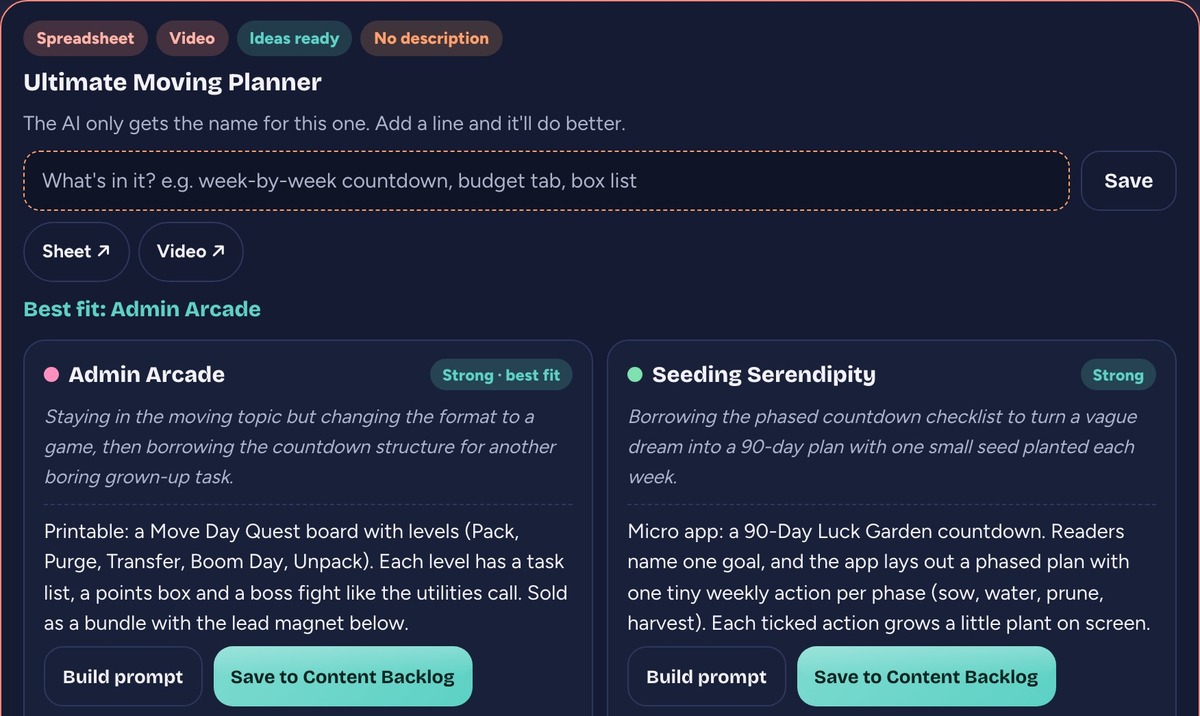
| Same structure, new topic | The subject | My Ultimate Moving Planner’s countdown checklist turned into an idea for a Tax Season Boss Fight printable that runs January to April |
| Same topic, new format | The format | The same planner turned into an idea for a Move Day Quest board with levels like Pack, Purge and Unpack |
| Inspiration only | Both | The pack gives you a first idea, and the thing you make from it is original |
At least 4 of the 8 ideas have to be the first kind, because that’s where the good ones come from. The prompt also spells out what never counts as an idea: reviewing the PLR, sharing it as-is, or leaving it basically untouched. Rewriting it in my voice and making it look like my brand is assumed. Ideas have to go past that.
Both table examples are real ideas from the moving planner. Here’s the top of its card, with a fit call and an angle for each blog:
My two posts so far both came from spreadsheets and both ended up on my mindset blog, Seeding Serendipity. A report card spreadsheet with rated categories became a weekly check-in for weeks you feel like you did nothing, with a printable report card for your own week. Another idea became the Gratitude Roster printable in how to show gratitude to the people who help you, a list of who helped you, how you thanked them and when to check in next.
So far I’ve run 16 packs through it, and 122 ideas have gone into my list across all four blogs. That’s a lot of ideas from packs I’d written off.
Get the generator
My tool is wired into my four blogs and my Airtable, so a copy of it would hand you my blogs’ voices and my ideas list. Not useful to you. The generator asks about your PLR and what you make instead. It takes four steps: what kinds of packs you own, what you make and sell now, where your work goes (up to four places, each with who it’s for and its voice), and your rules, like how far from the original every idea has to get and anything it should never suggest. It writes you a Claude Code skill, a prompt you can paste into any AI chat, or both.
The skill version goes in ~/.claude/skills/plr-remix/SKILL.md. Restart Claude Code and say “remix this PLR” with a pack’s details. The prompt version works in any chat: paste it, then paste the pack’s name and what’s in it underneath. If skills are new to you, I wrote up what a Claude Code skill is and how to make one.
What it doesn’t do
It doesn’t make anything. The tool hands me ideas and a build prompt, and I still build the thing. I’ve got 122 ideas on my list and two finished posts, which tells you how that ratio goes. Got a long idea list like mine? I made a free tool on my other blog that sorts a pile of ideas into seeds to plant, so you can pick what to build next.
It also doesn’t change the PLR for you. Whatever you make, change it a lot, until it’s yours. Don’t copy the pack or keep it the way it came. The ideas push hard in that direction on purpose, but the final call is still yours.
It doesn’t check your license either. PLR rights vary by seller. Spreadsheetables, for example, lets members rebrand and sell what they make but not resell the sheets as PLR. Read the terms for each pack before you sell anything built from it.
A few rough edges in mine:
- The ideas are only as good as the description. A pack with just a file name gets vaguer ideas, which is why I added the describe box.
- I haven’t marked a single pack as made yet, even with two posts out. The rank still says Collector. That’s on me, not the tool.
- Bundle ideas and build prompts only save in the browser I made them in, so they don’t follow me to another computer.
Frequently asked questions
Can you repurpose PLR content?
Yes, if your license allows it. Rights vary by seller, so read the terms for each pack. Some let you rebrand and sell what you make, and some are personal use only. I had a few personal-use packs in my own pile, and I hid them from the tool.
How much do you need to change PLR?
Change it until it’s yours. Rewriting it in your voice and putting your branding on it is only the first step. The best results come from keeping the pack’s structure and giving it a whole new topic or format.
What can you make from PLR spreadsheets?
PLR spreadsheets turn into printables, trackers, small web tools, quizzes and blog posts. A spreadsheet’s columns and tabs are a structure you can reuse. Two of mine became printables for blog posts on topics that had nothing to do with the original sheets.
Do I need Claude Code to repurpose PLR with AI?
No. The generator on this page writes a prompt that works in any AI chat. Claude Code is only needed if you want the skill version, which saves the rules so you don’t paste them every time.
Should I buy more PLR?
Only if you’ll use it. I canceled my spreadsheet membership because I was hoarding, not using. Work through what you already own first, then decide whether you need more.
Try it yourself
To repurpose PLR, read each pack for what it does, not just what it’s about, then move that structure to a topic and format your readers want. Start with one pack you’ve ignored the longest and run it through the generator above.
A tool I built
Side Hustle Garden
Log every side hustle payment and watch it knock out your monthly bills, smallest first.
Plant your first dollar →I run an affiliate program on the tools I build. Approved affiliates earn 20% on what their referrals pay, for up to a year. US only for now. See the program →
Related reading
- Score Old PLR Assets Automatically with n8n
- What a Claude Code Skill Is, and How to Make One
- How I Stopped Rebuilding Things I’d Already Built
Subscribe if you haven’t yet. More builds are on the way, and in the meantime, go dig out that PLR folder.