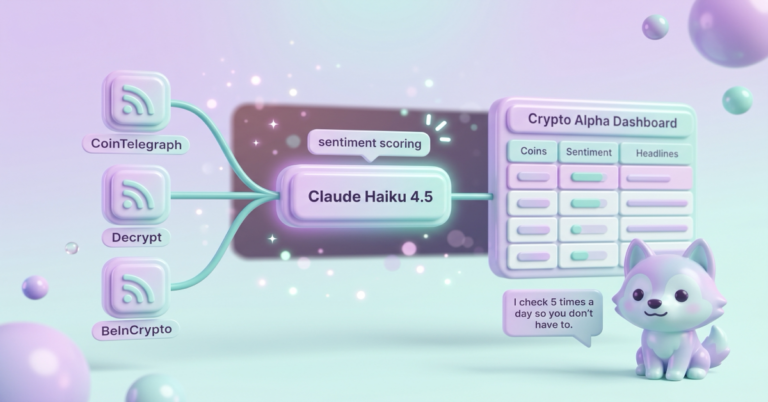

The Levanta API lets a creator do in code what the Levanta dashboard does by hand: pull deals, create affiliate links, read link reports and check which brands they still have access to. I use it with n8n to run 11 small workflows that post daily deals for my approval, drop coupon codes into my posts, swap links when a brand leaves and email me my earnings once a month. Now I only open Levanta to answer brand messages.
Some links in this post are my affiliate or referral links, including Levanta, Airtable, Hostinger and GeniusLink. If you sign up through one, I can earn a commission, credit or bonus. It doesn’t cost you anything extra.

A $40 payout I didn’t see coming
A $40 bonus showed up as a payout a little while ago, and I couldn’t tell you which dashboard explains it. Levanta has a lot of dashboards and a lot of possible bonuses, and I still don’t understand all of them. It was a nice surprise anyway, and it made me want to make sure I’m using as many Levanta links as I can.
I barely look at those dashboards anymore, because the API does the looking for me. Everything runs in the background, which is exactly how I like it. These days I go into Levanta to check messages and that’s about it.
Levanta has also turned into my favorite way to request samples and talk to brands. Most recently a brand pitched me a titanium pan. I didn’t even know titanium pans were a thing, and now I like cooking with it a lot. So I got to try something new and learn about cooking on a pan with no nonstick coating, all from one message.
What does a Levanta API workflow do?
A Levanta API workflow does one Levanta job on a schedule so you don’t have to log in and do it by hand. Mine pull deals, create links, add and remove coupon codes, check whether I still have access to each product, and add up what my links earned. Each one is small and does one thing.
Levanta is an affiliate platform that connects creators with brands selling on Amazon (and a few other stores). Brands set their own commission, and you get a unique link for each product. The API is the side door into all of that. Here’s what each piece of my setup does:
| Job | How often | What it handles |
|---|---|---|
| Daily deal posts | Every morning at 8am | Pulls deals, writes Facebook and X posts, waits for my approval |
| Stale deal guard | Every 15 minutes | Skips any post scheduled after its deal ends |
| Coupon sync | Every morning at 7:30am | Adds new brand codes to my posts, pulls ended ones |
| Coverage audit | Mondays at 7am | Sorts products I’ve reviewed into “link it now” and “apply to brand” |
| Link swaps | Mondays to queue, daily to swap | Moves links to Levanta, or back to my GeniusLink when a brand leaves |
| Earnings sync and email | Daily sync, email on the 3rd | One email a month with clicks, sales and commission |
Who is a Levanta API workflow for?
A Levanta API workflow is for creators who already use Levanta, have more than a handful of links out in the world, and would rather set rules once than check a dashboard every day. If you post deals, review products on YouTube or a blog, or juggle a pile of brand partnerships, this is for you.
It’s a good fit when:
- You have links in lots of places (old blog posts, YouTube descriptions, social posts) and can’t keep track of them by hand
- Brands come and go from your list, and you want old links fixed when they leave
- You like an approval step, where the work is done for you and you just say yes or no
It’s not for you yet if you have five links and post once a week. The dashboard is fine for that. It’s also not a fit if you don’t want any automation posting under your name. Even with an approval step, you’re trusting a workflow to pull the right price.
What do you need to build a Levanta API workflow?
You need a Levanta creator account with API access, somewhere to run the jobs, somewhere to keep the queue and an AI to help you build it. Here’s my list:
- A Levanta creator account (free to join). This is where the brands, links and payouts live.
- API access. You ask for it through the chat bubble inside Levanta. Their help docs say it can take up to a week. After that, the key shows up in your settings under API when you’re signed in as an admin.
- n8n (paid if they host it, or self-hosted on your own server). This is what runs each job on a timer. Mine is self-hosted on Hostinger, and I wrote up how I set that up with the one-click template.
- Airtable (free plan to start, I pay for mine). This holds the deal queue, the coupon list and the link swap list.
- Claude Code (paid Claude plan). This is how I build the workflows now. I describe the job and it writes the workflow.
- A fallback link for products when a brand leaves. I use GeniusLink. An Amazon Associates link works too.
How does a Levanta API workflow work?
A Levanta API workflow calls Levanta’s API on a schedule, filters what comes back by your rules, then writes the results somewhere you can review them. The daily deal posts are the best example, so here’s that one start to finish. It’s three workflows passing work to each other.

The deal puller. Every morning at 8am, n8n picks 10 of my brands, shuffled differently each day so the same brands don’t hog the list. It asks Levanta for their deals and keeps the ones at 20% off or more that haven’t ended. It skips anything already in my seen log, allows no more than 2 products per brand, keeps the top 10 and creates a Levanta link for each. Then Claude writes a Facebook post and an X post for every deal and drops them in an Airtable queue.
The approval bridge. I look at the queue and check the ones I like. Every 15 minutes, a second workflow picks up anything I checked and hands it to my social scheduler, which spaces the posts out so they don’t all go out at once. I wrote about that scheduler in how I keep promos from posting back to back.
The stale deal guard. Every 15 minutes, a third workflow compares each scheduled post to its deal’s end date. If a post would go out after the deal ends, it gets skipped. Since May, 147 deal posts have gone out through this setup.
The other jobs work the same way, just on different timers:
- Coupon sync checks every product I’ve linked for live codes each morning. A new code goes into the posts and YouTube descriptions where I already talk about that product, and an ended code comes back out. Codes I added myself never get touched. The rest of that system is in my coupon code automation post.
- Coverage audit runs Mondays at 7am. It takes every product I’ve reviewed and sorts it: link it now, apply to the brand, partnership ended or not on Levanta. Applying happens in the dashboard, so it just hands me the list.
- Link swaps handle my biggest frustration. When a brand leaves Levanta, I’m never sure what happens to those links, so the queue filler finds them and lines them up to go back to my GeniusLink. The runner swaps 5 products a day, changes only the link and saves the original text first.
- Earnings pulls Levanta’s reports every morning and emails me a summary on the 3rd of the month.
One rule runs through all of it. Nothing ever clicks an affiliate link to test it. The workflows read link details straight from the Levanta API, so I’m never sending fake clicks.
Get the skill
The generator below builds you a Claude skill, a chat prompt, or both, for your own Levanta setup. Pick the jobs you want handled, where your links go and your rules. You’ll get the API basics, a separate link source for each place you post and the steps for each job, ready to hand to Claude Code.
What it doesn’t do
It doesn’t tell me which place earned the money. When I built the deal puller, every deal link got the same source tag. A source tag is what tells Levanta’s reports where a click came from. Because they all match, my reports lump the deal posts in with everything else. One supplement from my deal queue had clicks in August, September and October, and the report can’t say whether those came from a deal post or somewhere else. That’s why the generator gives every place its own source from day one. I’m fixing mine going forward, but old links keep their old tag.
It doesn’t explain bonuses either. The earnings email reads commission from Levanta’s reports, and that $40 bonus wasn’t in them. If a payout surprises you, Levanta’s payment settings are where to look.
It doesn’t pick deals I’d stand behind. It picks deals that are at least 20% off. That’s why nothing posts without my approval, and why I delete a few from the queue most days.
Some deals also can’t be linked. Levanta can list a deal, then answer “product not found” when the workflow asks for its link, so that deal just drops out. In my first test, only 2 of 6 deals made it through, which was a little deflating.

Frequently asked questions
Is the Levanta API free?
As far as I can tell, yes. Levanta’s help docs describe API access as something you request from your creator account, which is free to join, and they don’t mention a fee. You ask through Levanta’s in-app chat, and approval can take up to a week.
How do I get a Levanta API key?
You ask for one through the chat bubble in the bottom right corner of Levanta while you’re signed in. Once it’s approved, the key shows up in your settings under API, but only when you’re signed in as an admin of your creator team.
Do I need n8n to use the Levanta API?
No. Any tool that can make web requests works, including Make, Zapier, a script or Claude Code on its own. I use n8n because it runs on a timer and I already had it for everything else.
What happens to my Levanta links when a brand leaves?
The link keeps pointing to the product, but it most likely stops paying you. Levanta’s API tells you which products you no longer have access to, which is how my weekly check finds them and swaps them back to my GeniusLink.
Can I see which posts my Levanta sales came from?
Yes, if you give each place its own source when you create the link. Levanta’s reports break clicks and sales down by link and source. If every link shares one source, like mine did, the reports can’t tell your places apart.
Try it yourself
The Levanta API turns the dashboard into a set of rules: pull these deals, add these codes, fix these links and tell me what earned. Start with one job, like the daily deal posts, test it on a few deals with an approval step, then add the next one. Use the generator above to get the skill, and if you’re not on Levanta yet, it’s free to join.
A tool I built
Porch Pile
Track your whole Amazon Influencer operation, every product, video, and brand deal, so one glance tells you what to film next.
Start your pile →I run an affiliate program on the tools I build. Approved affiliates earn 20% on what their referrals pay, for up to a year. US only for now. See the program →
Related reading
- Coupon Code Automation: My Blog and YouTube Add and Remove Brand Codes on Their Own
- n8n Social Media Scheduler: No More Back-to-Back Promos
- What a Claude Code Skill Is, and How to Make One
Subscribe if you haven’t yet. Next time you’re staring at one more dashboard, maybe that’s the job to hand off.