A Pilates progress tracker logs every class and keeps a list of specific moves with how well you can do each one. Mine is an Airtable base with a Sessions table for energy and soreness after class, a Moves table of 24 movements on a five-rung ladder from Can’t Yet to Solid, and a dashboard built with Claude Code. Here’s how it works and what I’d build differently now.

This post contains affiliate links. If you sign up through one, I earn a commission at no extra cost to you. I only point to tools I actually use or would recommend.
Seventy-nine classes and no idea what changed
I started reformer Pilates at the end of January. By May I’d been to about forty classes, and if you’d asked me what was different, I would have said “I’m stronger, I think?” Nothing I had written down could tell me about the roll up I still can’t do, or the side plank I couldn’t hold in February and now hold without thinking about it.
Classes blur together. You show up, you do the thing, you drive home, and the only record is the date. I wanted to see progress in actual moves, so I built a tracker in Airtable and a dashboard to read it. Then I did the part I’m least proud of and typed 40 past classes in from the booking history, which is when I found out I had no memory of most of them.
The tracker has 79 sessions in it now, and it counts them the way you’d expect: by month, by week, by instructor. The part I open it for is a list of 24 moves and which rung each one is on.
What does a Pilates progress tracker do?
A Pilates progress tracker logs every session and records the moves you’re working on with the status of each one. Mine counts classes like any log would, then answers two questions on top of the count: which moves have I gotten better at, and what does a class do to my energy and soreness? Everything else on the dashboard exists to support those two.
The move list is the core of it. Each movement sits on one of five rungs: Can’t Yet, Working On It, First Time!, Consistent, Solid. When a move reaches First Time!, the date gets stamped, and that date is the win. As of this week the 24 moves split like this:
| Rung | Moves | What it means |
|---|---|---|
| Can’t Yet | 1 | Roll up. Still fighting it. Starting to think I am missing abs |
| Working On It | 0 | Attempted, not landed |
| First Time! | 4 | Landed at least once, date stamped |
| Consistent | 12 | Happens most classes |
| Solid | 7 | Don’t think about it anymore |
Each move also carries two text fields I use more than I expected: a form note, which is the cue that makes it work, and an anti-cue, which is what’s wrong when it falls apart. “Ribs down” lives in one, “hips hiked” lives in the other.
The Sessions table is the second piece. One row per class: date, time of day, whether I ate first, energy right after, energy later that day, soreness the same day, soreness the next day, which body areas the class hit, and which instructor taught it. Ratings are 1 to 5 stars and take about two minutes to fill in from the parking lot.

Who is a Pilates progress tracker for?
A Pilates progress tracker is for anyone who wants to see specific moves improve and doesn’t mind two minutes of logging after class. It isn’t for you if all you want is a calendar of classes. That’s the easy half, and any booking app already has it without a form.
It’s for you if:
- You have moves you can’t do yet and you’d like to know the day that changes
- You suspect certain classes wreck you the next day and want proof
- You’d log a five-star rating from the car, but not fill out a page of notes
It’s not for you if:
- A calendar of classes is all you want
- You won’t log within a day. Ratings entered later are guesses, and guesses poison the pattern charts.
- You don’t already use Airtable and don’t want to. A notes app with a list of moves gets you most of the way for zero setup.
What do you need to build a Pilates progress tracker?
You need a database with linked tables, something to build the base with, and optionally a place to host a dashboard. Here’s what each piece does in my setup and what it costs me.
| Tool | What it does here | Paid or free |
|---|---|---|
| Airtable | Holds the three tables, the views, and the one automation | Paid. I pay for it and it runs most of my life. |
| Claude Code | Designed the base, wrote the dashboard page, and logs sessions from chat when I’m lazy | Paid subscription |
| Cloudflare Workers | Serves the dashboard behind a password so my Airtable key never touches the page | Runs on my existing account |
| Your studio’s booking history | The dates of every class you’ve already taken, for the backfill | Free, and painful |
The base has three tables: Moves, Sessions, and Instructors. Airtable’s linked records do the rest. A session links to any move that changed rung during it, and to the instructor who taught it. A move gets a rollup of when it was last practiced. Instructors get rollups of average energy and average next-day soreness, which is how a leaderboard happens without any code.
How does a Pilates progress tracker work?
It works in three layers: the Moves table you build first, the Sessions table you fill in after every class, and a dashboard that reads both and shows the patterns. The first layer is the one to copy. The other two are optional, and I say that as the person who built a 2,000-line dashboard.
Layer one, the move list. Every movement goes in on its honest rung, including Can’t Yet. This felt bad for about a day. Then it became the baseline everything else is measured from. One Airtable automation watches the date field, and the moment I type a first-achieved date on a move that’s Working On It, the status flips itself to First Time!. That’s the only automation in the whole base.
Layer two, the session log. The trick that saved the data was a checkbox called Retroactive. The 40 backfilled classes have it ticked and no ratings. Totals and the calendar include them. Every pattern chart filters them out. Without that flag I would have had to either invent ratings for classes I couldn’t remember or lose four months of dates. I’ve since seen the same problem on every tracker I build, and the answer is always a checkbox, not a guess.
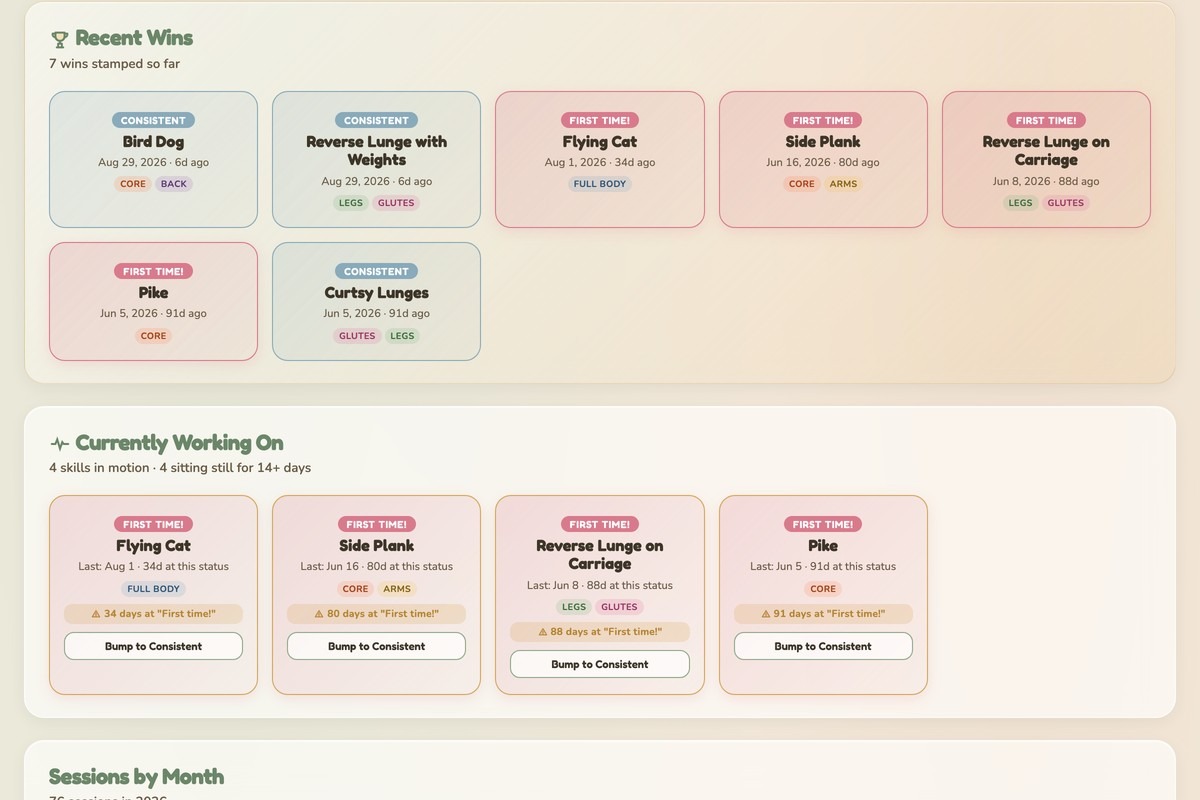
Layer three, the dashboard. It’s one HTML page served by a Cloudflare Worker, and it reads the base at load time through my own Worker route so the API key stays on the server. Cards, in the order I look at them:
- The year so far: sessions, this week, days since the last one
- A wins wall: every move with a first-achieved date, newest first
- Currently working on: the moves not yet Consistent, as a board
- Energy that holds, by instructor and by time of day, from the later-that-day rating
- Soreness by body area
- Body area focus as a donut, with a callout for whatever I’ve been neglecting
- An instructor leaderboard, ranked on energy delta
- A logging status card, so I can see which classes are missing ratings
There’s also a small reformer drawn in the header. The carriage glides on its own, and it has a speech bubble that gets less polite the longer it’s been since a class. That is the entire gamification layer and it’s enough.
Get the skill
The generator below builds your version, not mine. Name your activity, list the moves you’re working on, edit the status ladder if my wording doesn’t fit, pick what you want the log to tell you, and decide whether you want a character on the page. It writes a skill file for Claude Code, a prompt you can paste into any AI chat, or both.
Two things to make it yours. First, the moves list is the whole tracker, so put the ones you can’t do yet at the top and don’t be shy about the first rung. Second, the plan includes an Energy Before field I don’t have, on purpose. Fill it in on the way into class. It’s the number I’m missing, and I’ll get to why below.
If you take the skill route, paste the output into Claude Code and tell it to save the skill. It writes the file for you. I do the same with every skill I run, and I wrote up why in I don’t install Claude Code skills, I customize them.
What it doesn’t do
It doesn’t tell me whether class woke me up or drained me, because I never recorded energy before class. I have energy right after and energy later in the day, so I can see whether a class holds, but I can’t see the direction of the change. That’s the field I’d add first, and it’s why the generator includes it by default.
It doesn’t answer the question I thought would be the sneaky insight. I built a fed-versus-fasted card expecting to learn something. I ate before class 76 times out of 79. The card has nothing to compare and sits there looking hopeful.
And it doesn’t know about the classes that mattered most. I started tracking in May, four months after my first class. Those four months are the ones where the biggest changes happened, and all I have for them is dates. I wish I would have started it when I started Pilates. There’s a lot of missing data from starting late, and no amount of dashboard fixes that.
Frequently asked questions
How do I track Pilates progress without an app?
A list of moves with a status next to each one is enough to start. Write down five things you can’t do yet, put “can’t yet” beside each, and update the word when it changes. A notebook works. Airtable works better once you want dates and patterns, but the list is the part doing the work.
What should I log after a Pilates class?
Log four things at most: energy right after, energy later that day, soreness the next day, and any move that changed status. Keep it to ratings you can enter from the car in two minutes. A longer form gets skipped, and a skipped form tells you nothing.
How many moves should be on the list?
Five is a good start and 24 is where mine sits after seven months. Start with the moves you can’t do yet, since those are the ones with somewhere to go. Add moves as instructors introduce them, and don’t remove the ones that reach Solid. Seeing the bottom of the list fill up is the point.
Can I backfill old classes into a progress tracker?
Yes, but flag them and leave the ratings blank. I added 40 past classes from my studio’s booking history with a Retroactive checkbox ticked and no energy or soreness scores. Totals and the calendar count them. Every pattern chart ignores them, so nothing is built on numbers I made up.
Does a Pilates progress tracker need a dashboard?
No. The Moves table with a wins view answers the main question on its own, and Airtable’s kanban view shows what’s in progress. I built the dashboard because I like building dashboards, and because seeing patterns by instructor and time of day took an afternoon, and I’d spend it again. Start with the table.
Should I track energy before class or after?
Both, and I only track after. Energy after class tells you whether the session holds through the day. Energy before is what turns it into a direction: did class add or subtract? I skipped the before rating and it’s the first thing I’d add.
Try it yourself
The tracker that shows progress is a list of moves with a rung next to each one. Everything else, the session log, the ratings, the dashboard, is optional and can come later. So start there today. Write down five moves you can’t do yet, put them on the first rung, and run the generator above when you want the full base built around them. Then keep logging until one of them moves.
A tool I built
Energy Battery
Log your energy through the day and watch your battery fill, so you can see what actually charges you and what drains you.
Find your spark →I run an affiliate program on the tools I build. Approved affiliates earn 20% on what their referrals pay, for up to a year. US only for now. See the program →
Related reading
- Build your own reading tracker with Airtable and n8n
- How I track what I actually got done without logging it
- I don’t install Claude Code skills, I customize them
- Why my gamified cleaning app didn’t stick
Subscribe if you haven’t already, and in the meantime, go forth and move something up a rung.